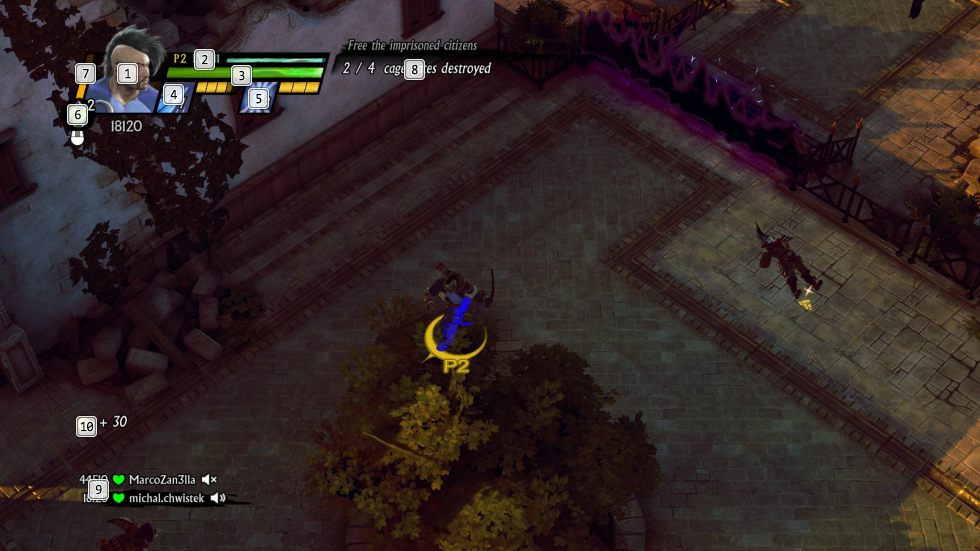
Sacred 3: Interface Controls
The interface in Sacred 3 is very simple and all of the necessary information can be found in the upper-left corner. The most important ones, which you definitely need to keep an eye on, are health bar [3] and the information on the selected combat arts, and the available attacks [4],[5]. What is also important is the currently selected item [6], which is available to be used immediately, information on the current quest [7]. Additionally, while playing in the co-op mode, you also should pay attention to the amount of energy that you need tor the battle prayer [7] and, for a change, the bottom-right corner of the screen, where you can learn about players present in the game, their health and the points that you have obtained in the game [9].



You are not permitted to copy any image, text or info from this page. This site is not associated with and/or endorsed by the developers and the publishers. All logos and images are copyrighted by their respective owners.
Copyright © 2000 - 2026 Webedia Polska SA for gamepressure.com, unofficial game guides, walkthroughs, secrets, game tips, maps & strategies for top games.