Timberborn: Keybinds - keyboard shortcuts, list
On this page of the guide we present a list of keyboard shortcuts and a description of the controls in the game Timberborn.
Last update:
Timberborn has many useful keyboard shortcuts. On this page of the guide, you will find a summary of the controls with an explanation of their action.
General
 | Pause |
 | 1 speed |
 | 2 speed |
 | 3 speed |
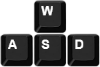 | Moving the camera |
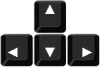 | Moving the camera |
 | Zoom the camera in/out |
| Faster camera movement |
| Hide/show the interface |
| Change the maximum visibility level |
 | Turn on/off water visibility |

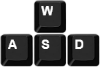


Build mode
 | Rotate an object |
 | Remove |
 | Stop work |


You are not permitted to copy any image, text or info from this page. This site is not associated with and/or endorsed by the developers and the publishers. All logos and images are copyrighted by their respective owners.
Copyright © 2000 - 2026 Webedia Polska SA for gamepressure.com, unofficial game guides, walkthroughs, secrets, game tips, maps & strategies for top games.