EVE Online: Market - how to sell?
This page of the guide to EVE Online explains how to sell items on the Market.
On this guide page to EVE Online, you will learn how to sell items on the Market in New Eden.
Item Hangar
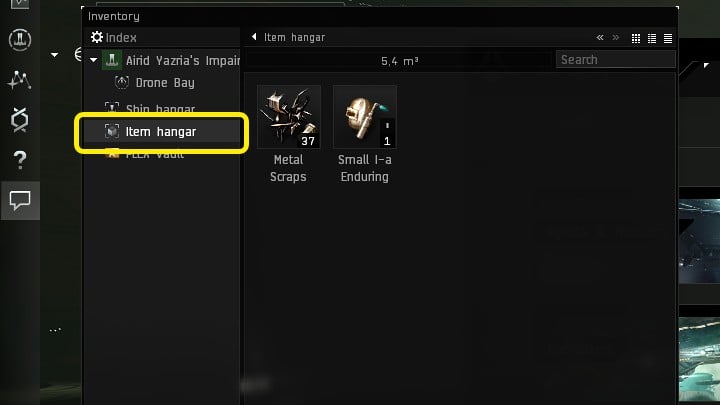
Before being able to sell items on the Market in EVE Online, first, you will need to move them to the Item Hangar. After entering the inventory screen, simply drag the selected items to the appropriate tab - marked in the above image.
Selling items
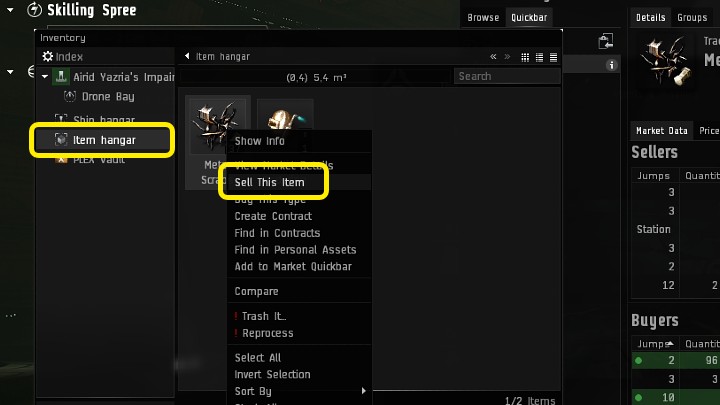
Once the items are in the Hangar, click RMB on the selected item and select Sell This Item.
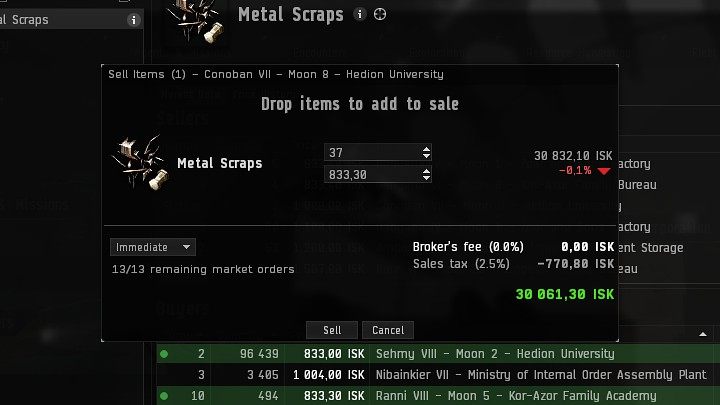
You will be automatically transferred to the item sales window, where you will be able to choose the number of items you want to sell immediately (if there is a good buyer) or put them on the market for a certain amount of ISK.

- EVE Online Guide
- EVE Online: Game Guide
- EVE Online: FAQ
- EVE Online: Active players - how many people are playing in 2021?
- EVE Online: Omega subscription - what does it offer?
- EVE Online: Market - how to sell?
- EVE Online: Playing on the controller - is it possible?
- EVE Online: Free-to-play - can I play for free?
- EVE Online: Corporation - how to join?
- EVE Online: Drones - do they attack automatically?
- EVE Online: Friends - how to find?
- EVE Online: Missions - how to start?
- EVE Online: Security System - how it works?
- EVE Online: FAQ
- EVE Online: Game Guide
You are not permitted to copy any image, text or info from this page. This site is not associated with and/or endorsed by the developers and the publishers. All logos and images are copyrighted by their respective owners.
Copyright © 2000 - 2026 Webedia Polska SA for gamepressure.com, unofficial game guides, walkthroughs, secrets, game tips, maps & strategies for top games.