Legend of Grimrock 2: Interface
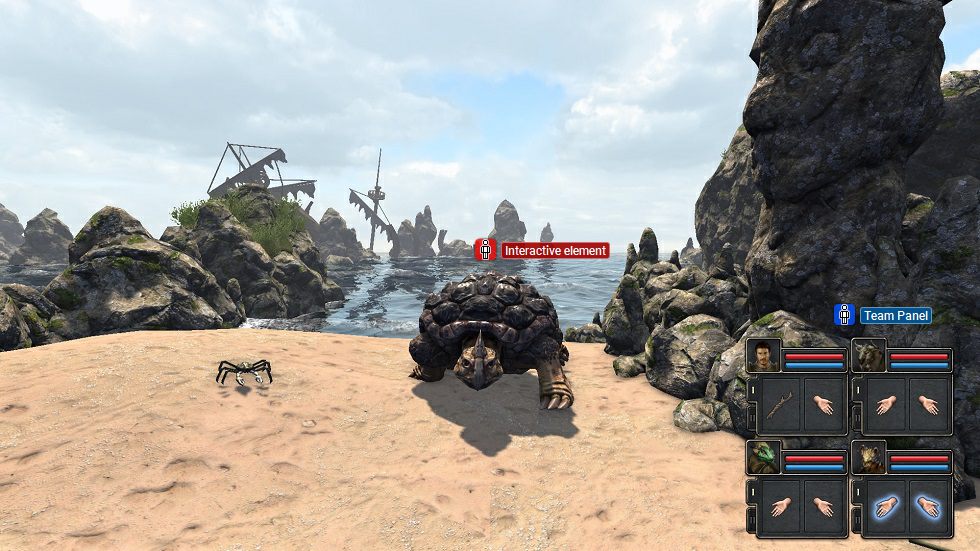
In this chapter, we will be looking at the interface in Legend of Grimrock II. Every element of the interface has been marked with an appropriate icon and described in a way that every beginner player will have no problems starting the game.
Strictly speaking, the interface is not very complex and generally, it consists of two major elements, which should be described in detail. The first elements is the multifunctional panel in the bottom right corner of the screen, which shows our team, its current condition and equipment set, as well as serves as combat panel. The second elements would be all the interactive elements of the gameplay - that is various objects, enemies or items - that we can directly interact with.


- Legend of Grimrock II Game Guide
- Legend of Grimrock 2: Game Guide
- Legend of Grimrock 2: Basics
- Legend of Grimrock 2: Interface
- Legend of Grimrock 2: 10 golden rules
- Legend of Grimrock 2: Game modes
- Legend of Grimrock 2: Character creation and development
- Legend of Grimrock 2: Races
- Legend of Grimrock 2: Classes
- Legend of Grimrock 2: Statistics, primary abilities and resistances
- Legend of Grimrock 2: Secondary abilities and traits
- Legend of Grimrock 2: Skills
- Legend of Grimrock 2: Assembling your team
- Legend of Grimrock 2: Enemies
- Legend of Grimrock 2: Controls
- Legend of Grimrock 2: System requirements
- Legend of Grimrock 2: Basics
- Legend of Grimrock 2: Game Guide
You are not permitted to copy any image, text or info from this page. This site is not associated with and/or endorsed by the developers and the publishers. All logos and images are copyrighted by their respective owners.
Copyright © 2000 - 2026 Webedia Polska SA for gamepressure.com, unofficial game guides, walkthroughs, secrets, game tips, maps & strategies for top games.