Lost Ark: Can you repair remotely?
On this page you will find out if you can repair tools and weapons in Lost Ark remotely.
Last update:
Equipment and tools in Lost Ark are subject to wear and tear. This page of the tutorial explains how you can repair ranged weapons using the Pet function.
If you have a Crystalline Aura, you can use the additional functions of your pet, such as additional equipment, access to mail, but also repairing equipment. It will be useful during resource gathering expeditions, but also for simple repairs of weapons and armor, which lose their efficacy with the level of wear. You may especially notice this when retrying Abyssal Dungeons.
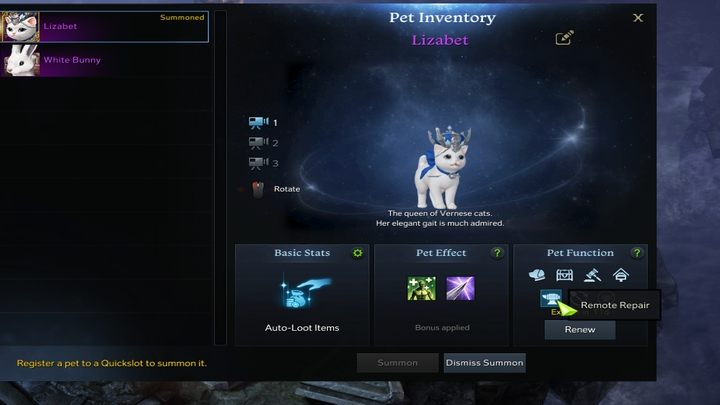
To use the repair function through Peta, open the pet window (Alt + P) and select the anvil icon next to the pet. Of course, you still have to pay silver for such a repair. However, an interesting and very useful feature is the ability to repair equipment in some dungeons and closed locations during activities.


- Lost Ark Guide
- Lost Ark: Game guide
- Lost Ark: FAQ
- Lost Ark: Game mechanics and information
- Lost Ark: Playing offline - is it possible?
- Lost Ark: Controller - is it supported?
- Lost Ark: Channels - what are they?
- Lost Ark: Skills - how to change the hotkeys?
- Lost Ark: Changing subclasses during the game - is it possible?
- Lost Ark: Powerpass - what is it?
- Lost Ark: Character appearance and name - how to change?
- Lost Ark: Changing servers - is it possible?
- Lost Ark: Can you repair remotely?
- Lost Ark: Card Catalog is Full - how to fix?
- Lost Ark: Playing solo - is it possible?
- Lost Ark: Game mechanics and information
- Lost Ark: FAQ
- Lost Ark: Game guide
You are not permitted to copy any image, text or info from this page. This site is not associated with and/or endorsed by the developers and the publishers. All logos and images are copyrighted by their respective owners.
Copyright © 2000 - 2026 Webedia Polska SA for gamepressure.com, unofficial game guides, walkthroughs, secrets, game tips, maps & strategies for top games.