Lost Ark: Skills - how to change the hotkeys?
On this page you will learn how to manage your hero's abilities and change their assigned keys in Lost Ark.
Last update:
The following page explains how to change skills and their order in Lost Ark, as well as their corresponding hotkeys.
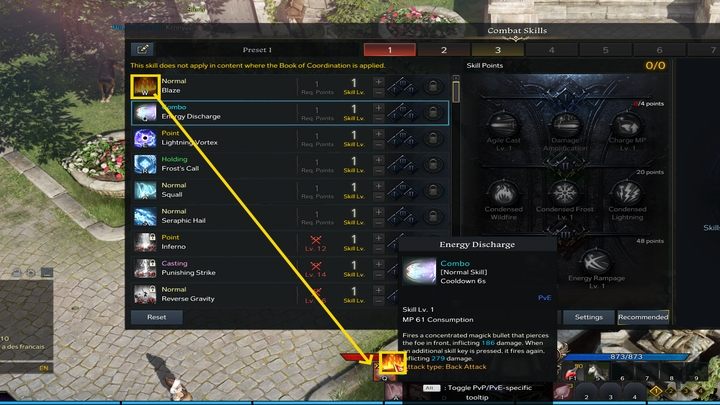
Each skill has a hotkey attributed to it by default. What if you want to swap their places? To do so, open the skill panel (K) and drag the skill icons to the bottom panel to replace the skills already assigned there. This can make it easier for you to use skills with cumulative effects, similar cooldowns or exchange old skills with new ones. You can manage items, such as potions, during battle in a simillar way - by dragging their icons from the inventory panel (I)


- Lost Ark Guide
- Lost Ark: Game guide
- Lost Ark: FAQ
- Lost Ark: Game mechanics and information
- Lost Ark: Playing offline - is it possible?
- Lost Ark: Controller - is it supported?
- Lost Ark: Channels - what are they?
- Lost Ark: Skills - how to change the hotkeys?
- Lost Ark: Changing subclasses during the game - is it possible?
- Lost Ark: Powerpass - what is it?
- Lost Ark: Character appearance and name - how to change?
- Lost Ark: Changing servers - is it possible?
- Lost Ark: Can you repair remotely?
- Lost Ark: Card Catalog is Full - how to fix?
- Lost Ark: Playing solo - is it possible?
- Lost Ark: Game mechanics and information
- Lost Ark: FAQ
- Lost Ark: Game guide
You are not permitted to copy any image, text or info from this page. This site is not associated with and/or endorsed by the developers and the publishers. All logos and images are copyrighted by their respective owners.
Copyright © 2000 - 2026 Webedia Polska SA for gamepressure.com, unofficial game guides, walkthroughs, secrets, game tips, maps & strategies for top games.