Minecraft Earth: How does the interface look like?
Last update:
Knowing the interface is very important in Minecraft Earth. This will make the game easier and help you switch between the game modes. This page contains information about this aspect of the game.
When you start the game, you are moved to the map resembling your surroundings. You will see a circle informing you about your range within which you can collect items and find adventures.
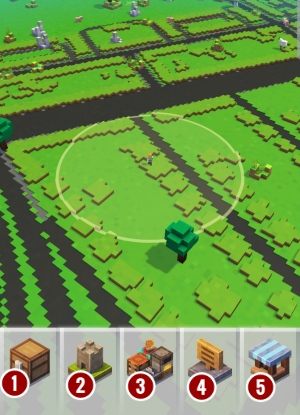
The bar with shortcuts to the game's various functions is at the bottom of the screen. These icons represent:
- Inventory [1] - it contains all items you have found during exploration;
- Building plates [2] - all available plates on which you can build structures;
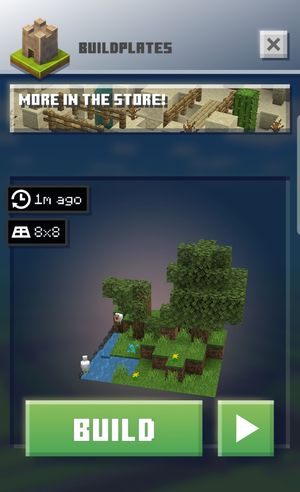
- Crafting panel [3] - here you can choose more advanced objects that can be crafted from resources found during exploration;
- Miscellaneous [4] - a scroll-down menu in which you can find challenges, game settings or the option to invite friends to play;
- Shop [5] - you can buy new building plates or Rubies (for real money).

- Minecraft Earth Guide
- Minecraft Earth: Game guide
- Minecraft Earth: FAQ
- Minecraft Earth: What is the gameplay about?
- Minecraft Earth: How secure is the game?
- Minecraft Earth: What does the combat look like?
- Minecraft Earth: How does the interface look like?
- Minecraft Earth: How should I start the game?
- Minecraft Earth: How does the crafting system work?
- Minecraft Earth: How to get more Rubies?
- Minecraft Earth: How does the challenge system work?
- Minecraft Earth: How do I advance to a higher level?
- Minecraft Earth: FAQ
- Minecraft Earth: Game guide
You are not permitted to copy any image, text or info from this page. This site is not associated with and/or endorsed by the developers and the publishers. All logos and images are copyrighted by their respective owners.
Copyright © 2000 - 2026 Webedia Polska SA for gamepressure.com, unofficial game guides, walkthroughs, secrets, game tips, maps & strategies for top games.