NiOh 2: How to set the item shortcuts in NiOh 2?
Last update:
In NiOh 2, you have access to item shortcuts. This page has information on how to assign them.
You can assign item shortcuts in two ways. The first is to enter the inventory menu. There you can select the item you want to assign. Confirm and click on the "Set as shortcut" option and select the button that will correspond to this item.
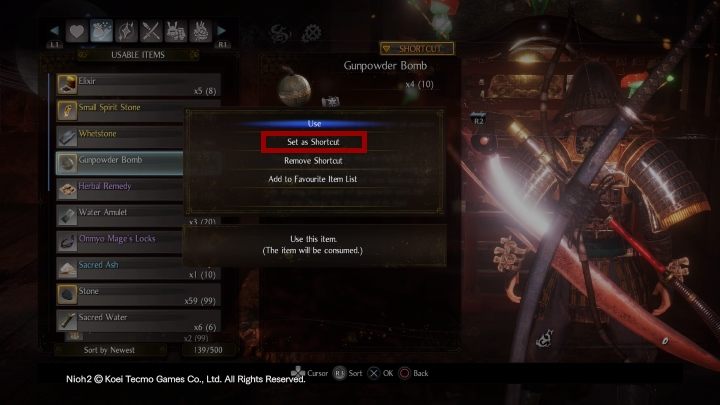
The second option is to go to the inventory menu. There you can enter the shortcuts menu, where you can choose which item you want to assign to a specific button.
By default, shortcuts are assigned to the d-pad, so you can have four of them active at any given time. However, you can create yourself several different sets that you can switch between (you can have a minimum of two and a maximum of four). You can make changes in the settings menu.


- NiOh 2 Guide
- NiOh 2: Game Guide
- NiOh 2: FAQ
- NiOh 2: How to save the game in NiOh 2?
- NiOh 2: How to set the item shortcuts in NiOh 2?
- NiOh 2: How to get healing items in NiOh 2?
- NiOh 2: What is the Kodama Bazaar in NiOh 2?
- NiOh 2: What are these spots on the mini-map in NiOh 2?
- NiOh 2: What is a Sudama in NiOh 2?
- NiOh 2: How to get gold in NiOh 2?
- NiOh 2: How to deal with Nurikabe and Mimic in NiOh 2?
- NiOh 2: What are Kodama's blessings in NiOh 2?
- NioH 2: Game's length - how long does it take to complete?
- NiOh 2: FAQ
- NiOh 2: Game Guide
You are not permitted to copy any image, text or info from this page. This site is not associated with and/or endorsed by the developers and the publishers. All logos and images are copyrighted by their respective owners.
Copyright © 2000 - 2026 Webedia Polska SA for gamepressure.com, unofficial game guides, walkthroughs, secrets, game tips, maps & strategies for top games.