Does Ring of Elysium have a voice chat?
Table of Contents
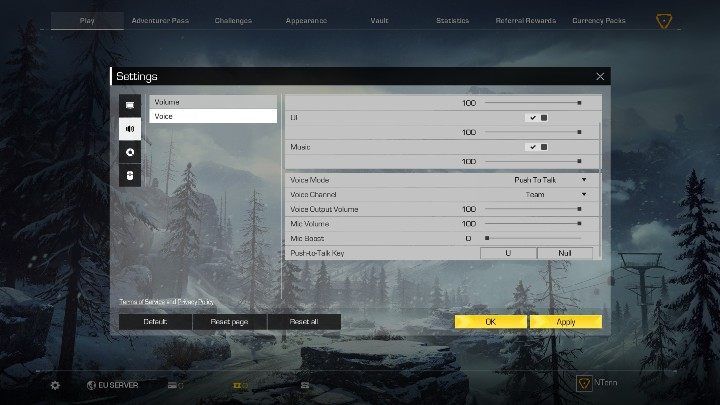
Ring of Elysium does feature an in-game voice chat. You can decide whether you want to be heard only by your teammates or by all players in a match. Open the Settings and click on the Sound icon.
- Voice Mode - select how you want to activate your microphone (automatic, always on, push-to-talk).
- Voice Channel - decide who will be able to hear you.
- Voice Output Volume - the volume of the voice chat.
- Mic Volume
- Mic Boost - decide how much you want to boost your mic.
- Push-to-Talk Key - select which key will activate your mic.
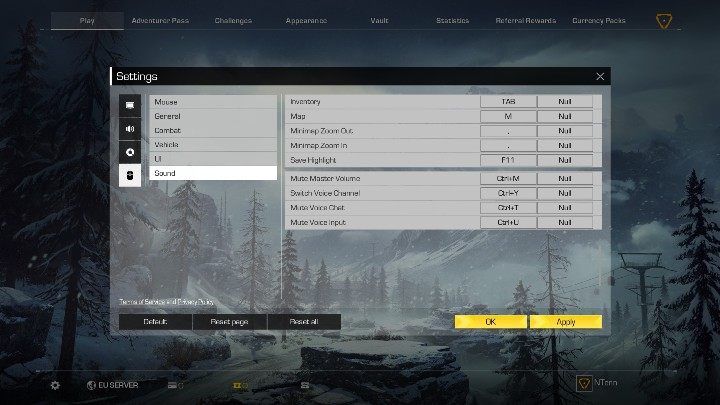
- Mute Master Volume - Ctrl +M.
- Switch Voice Channel - Ctrl + Y.
- Mute Voice Chat - Ctrl + T.
- Master Volume Input - Ctrl +U.
Reset the game if voice chat isn't working. You should also check out if you didn't mute yourself.

- Ring of Elysium Guide and Tips
- Ring of Elysium: Game Guide
- Ring of Elysium: FAQ
- Will Ring of Elysium always be free?
- Ring of Elysium: How to trigger an avalanche?
- Ring of Elysium: How to change language?
- Ring of Elysium: Can you play in two-person teams?
- Does Ring of Elysium have a voice chat?
- Ring of Elysium: How does a referral code work?
- Ring of Elysium: Where can I find Sheriff's Shelter?
- Ring of Elysium: FAQ
- Ring of Elysium: Game Guide
You are not permitted to copy any image, text or info from this page. This site is not associated with and/or endorsed by the developers and the publishers. All logos and images are copyrighted by their respective owners.
Copyright © 2000 - 2026 Webedia Polska SA for gamepressure.com, unofficial game guides, walkthroughs, secrets, game tips, maps & strategies for top games.