Ring of Elysium: How to change language?
Currently, Ring of Elysium supports only two languages - Chinese and English. The game starts automatically in English. This page contains information on how to change the language in the game.

Open the Settings - the icon is marked in the picture above.
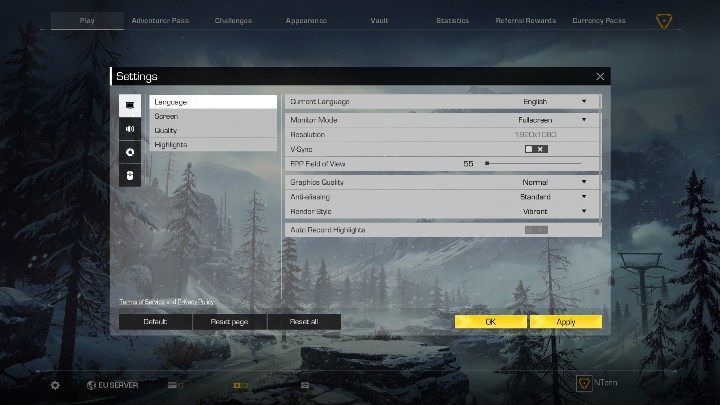
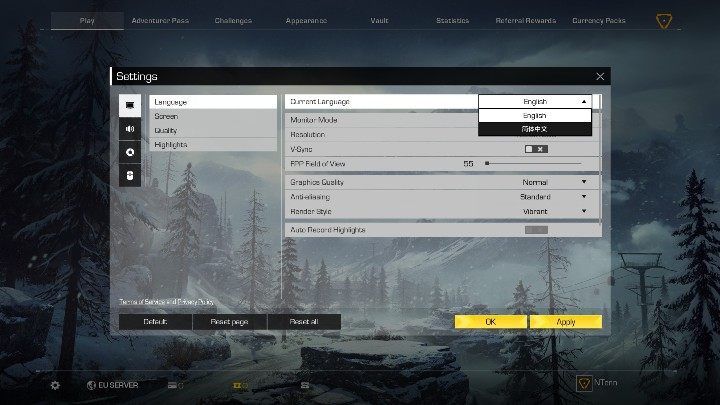
Find Current Language at the top of the screen. This is where you can change your language.
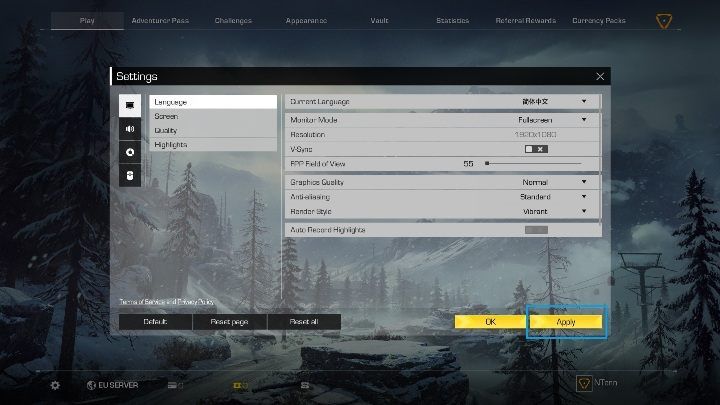
Click on Apply to confirm your choice. Clicking on OK will close the settings - your changes won't be applied.

- Ring of Elysium Guide and Tips
- Ring of Elysium: Game Guide
- Ring of Elysium: FAQ
- Will Ring of Elysium always be free?
- Ring of Elysium: How to trigger an avalanche?
- Ring of Elysium: How to change language?
- Ring of Elysium: Can you play in two-person teams?
- Does Ring of Elysium have a voice chat?
- Ring of Elysium: How does a referral code work?
- Ring of Elysium: Where can I find Sheriff's Shelter?
- Ring of Elysium: FAQ
- Ring of Elysium: Game Guide
You are not permitted to copy any image, text or info from this page. This site is not associated with and/or endorsed by the developers and the publishers. All logos and images are copyrighted by their respective owners.
Copyright © 2000 - 2026 Webedia Polska SA for gamepressure.com, unofficial game guides, walkthroughs, secrets, game tips, maps & strategies for top games.