The Division 2: Disassemble, sell, or donate items
Last update:
During the game, you'll pick up hundreds of items, armors, and weapons. Some of these items you can use, the remaining ones will take up inventory space and you'll need to get rid of them. There are three ways of doing that, and were described in this chapter.
Selling items
A basic way of getting rid of unneeded equipment is selling it. You can sell the items at merchants found in almost any friendly outpost, or at terminals in safe houses. Selling items yield credits which can be spent on new items, crafting, or recalibration.
Disassembling
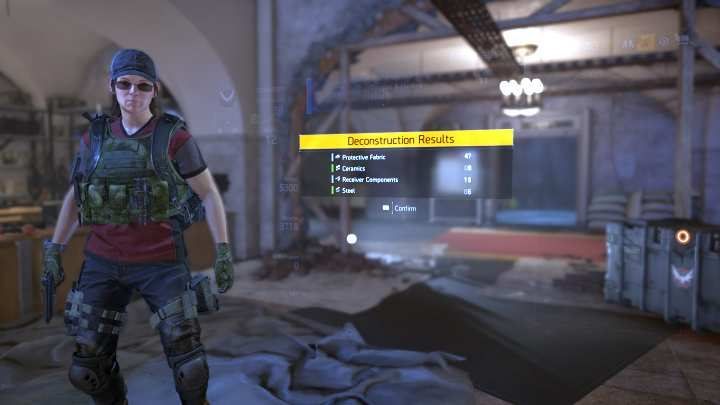
You can also disassemble items to retrieve valuable crafting resources. Disassembly is the most efficient way of gaining these resources - in a short period of time, you can gain hundreds of materials that will be used to craft valuable equipment or weapons. The quantity and quality of materials depends on the item's level - higher the level, better the materials.
Donating items
The items can be donated to Projects to unlock additional, side missions deputed by friendly outposts. Following the fact that you can give items of any quality, it is recommended to donate less valuable items, and leave the more valuable ones for disassembly or selling.
Note - items in your Stash can be donated to Projects, even if they are not currently in your backpack.
Disassemble, sell, or donate?
Finally, we come back to the question from the preamble - what to do with items? This all depends on the current situation, as well as the state of your valet. Follow the following rules:
- When it comes to Projects, donate items of the worst quality, just so they are accepted.
- Disassemble the items of the highest quality to receive the best components. Remember that even those of the worst kind are also needed.
- If you are in need of cash, sell items, instead of disassembling them. Without credits, you won't be able to create anything.


- The Division 2 Guide
- The Division 2: Game guide
- The Division 2: FAQ
- The Division 2: Faction keys
- The Division 2: How to install mods?
- The Division 2: Special ammo - what weapons can use it?
- The Division 2: Where to find photos from the photo mode?
- The Division 2: Where can I look through my collectibles?
- The Division 2: How to zoom with my scope?
- The Division 2: How to personalize my clan?
- The Division 2: How to activate challenges?
- The Division 2: Specializations - what are they and how to unlock them?
- The Division 2: How to deal with enemies?
- Does The Division 2 offer crossplay option?
- Does The Division 2 require PS+ or Xbox Live Gold?
- Does The Division 2 have a season pass?
- The Division 2: How to gain experience quickly?
- The Division 2: How to unlock Bounties?
- The Division 2: How to quickly get crafting materials?
- The Division 2: How to unlock the Dark Zones?
- The Division 2: How to unlock a Clan?
- The Division 2: How to change the hairstyle?
- The Division 2: Can you play in single player mode?
- The Division 2: How to reset a mission?
- The Division 2: Disassemble, sell, or donate items
- The Division 2: How to unlock abilities?
- The Division 2: How to level-up solo?
- Does The Division 2 have matchmaking options?
- Does The Division 2 have PvP modes?
- The Division 2: Which skills to choose at the beginning?
- The Division 2: How does the co-op mode work?
- The Division 2: FAQ
- The Division 2: Game guide
You are not permitted to copy any image, text or info from this page. This site is not associated with and/or endorsed by the developers and the publishers. All logos and images are copyrighted by their respective owners.
Copyright © 2000 - 2026 Webedia Polska SA for gamepressure.com, unofficial game guides, walkthroughs, secrets, game tips, maps & strategies for top games.