Tower of Fantasy: Game settings - what to change?
Sometimes it happens that the default settings in the game are not very well set. In the case of Tower of Fantasy, we advise what you can change to slightly improve your gaming experience.
The default settings may annoy some players in the long run. But what can you change about them to improve your gaming experience? On this page of the guide to ToF, we suggest what to change in them.
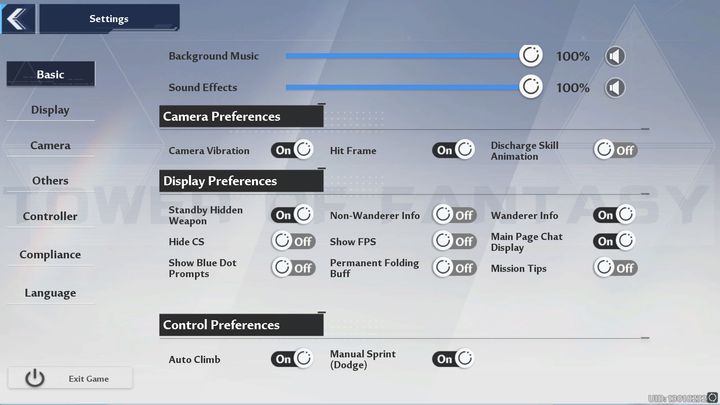
Going into the settings, the first Basic tab contains several features that can make gameplay more difficult later on. First of all, it is worth turning off the Camera Vibration and Discharge Skill Animation options. Vibration, especially on inferior hardware, can only hinder the readability of animations during combat, while Discharge Skill Animation will disable special attack animations when switching to a new weapon with a charged skill.
In Display Preferences, you can turn off Mission Tips Once you are familiar with all the mechanics.
On the other hand, in Control Preferences it is worth disabling the Auto Climb option so that when fighting at an edge or wall, you don't climb over them unnecessarily.
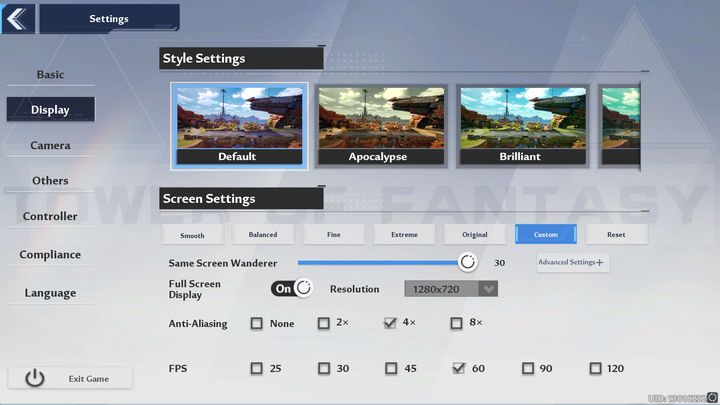
In the Display tab, most of the options affect the graphics and capabilities of the hardware on which you play. However, it is worth considering changing the option Same Screen Wanderer. You can use the slider to determine how many other players you will see at a certain distance from you. This can flow significantly on FPS, so if you have FPS drops, it is worth reducing this number.

On the other hand, in the Camera tab, it is worth increasing the value of one option, namely. Camera Distance in Combat, to the highest value. As a result, you will be able to see a lot more during the fight, which means you will react faster to threats.



- Tower of Fantasy Guide
- Tower of Fantasy: Game Guide
- Tower of Fantasy: FAQ
- Tower of Fantasy: Crossplay - is it available?
- Tower of Fantasy: Food and Satiety - what does it do?
- Tower of Fantasy: New recipes - how to unlock?
- Tower of Fantasy: Server selection - does it matter?
- Tower of Fantasy: Server channel - how to change?
- Tower of Fantasy: Shop and Commissary - what can you buy?
- Tower of Fantasy: Controller - does it work?
- Tower of Fantasy: CS - what is it?
- Tower of Fantasy: ToF vs Genshin Impact - which is better?
- Tower of Fantasy: Entire map - how to unlock?
- Tower of Fantasy: Fast travel - is it available?
- Tower of Fantasy: Deciphers - what are they for?
- Tower of Fantasy: Game settings - what to change?
- Tower of Fantasy: Vitality - what is it?
- Tower of Fantasy: Black / Gold Nucleus - how to get it fast?
- Tower of Fantasy: Dark crystals - what to spend it on?
- Tower of Fantasy: FAQ
- Tower of Fantasy: Game Guide
You are not permitted to copy any image, text or info from this page. This site is not associated with and/or endorsed by the developers and the publishers. All logos and images are copyrighted by their respective owners.
Copyright © 2000 - 2026 Webedia Polska SA for gamepressure.com, unofficial game guides, walkthroughs, secrets, game tips, maps & strategies for top games.