Farming Simulator 19: New fields - how to buy?
In Farming Simulator 19 you do not buy single fields. You purchase the entire plot of land on which the field is located. You can modify the size of the field (or even create it in an empty space). This time the game makes it a little easier for you when it comes to choosing a field for cultivation. Many of them have irregular shapes and small or "too square" sizes - this is not what you want.
- The field should be selected in such a way that it is longer than wider: the pace of work is then much faster, because each of the vehicles (especially the clumsy combine harvester) have much less turning back. Then the vehicles are much more maneuverable (tracks), which makes this argument less relevant.
- If you want to plant a lot of things and you don't have much money to buy a lot of fields, it's worth choosing fields that are located at short distances from each other as the next ones to buy. This makes it easier to work on fields with the same machines without having to transport them. Later on, you can also combine fields that are adjacent to each other.
- Also pay attention to the distance from warehouses / silos or points of sale of crops and the distance from the shop - you do not have the possibility of teleportation, so you have to transport everything on your own.
- Pay attention to a few factors when buying land: how much wooded it is (if you want to enlarge the area under cultivation, you will have to clear the forest) and whether it has no other obstacles in the area (e.g. stones so that machines can turn around freely), whether it is flat- machines going uphill become slower if they do not have much power (and going downhill during work they do not have to be faster!), and if you buy your first field -whether you have a place to build infrastructure: silos, sheds, etc.).
- You can buy one large field and divide it into smaller ones.
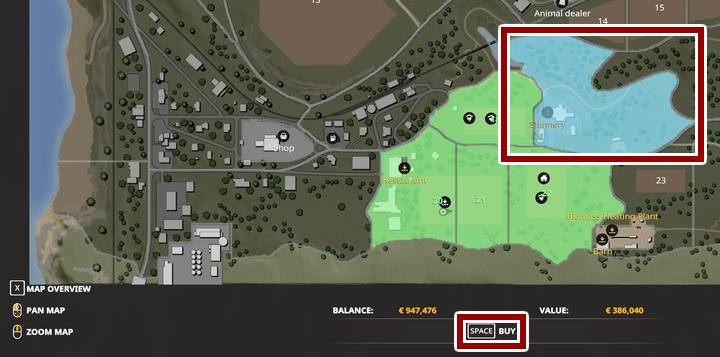
To purchase the correct plot of land, go to the map view. Switch to the land view (X / left knob) and select one of them. At the bottom of the screen you will see the price information.
Hint: It is worth going personally to the field before buying it - check what the field looks like, optionally: how much work is required (some are already carried out, ploughed or even sown), and how much additional free space you have.
Also you can check our top 10 best tips & tricks for Farming Simulator 19:


- Farming Simulator 19 Guide and Tips
- Farming Simulator 19: Game Guide
- Farming Simulator 19: FAQ
- Farming Simulator 19: Plants - what to cultivate first?
- Farming Simulator 19: Belt system - how does it work?
- Farming Simulator 19: Biogas Plant - why can't I use it?
- Farming Simulator 19: Vehicle's tank - how to fill?
- Farming Simulator 19: Saving the game - how to?
- Farming Simulator 19: New fields - how to buy?
- Farming Simulator 19: Fields - how to enlarge, merge?
- Farming Simulator 19: Tractor - which should I get first?
- Farming Simulator 19: Workers - how to hire?
- Farming Simulator 19: Tree stumps, bushes - how to remove?
- Farming Simulator 19: New tractor - what to pay attention to while buying?
- Farming Simulator 19: Combine harvester capacity - how to increase?
- Farming Simulator 19: Vehicles, machinery - how to repair?
- Farming Simulator 19: Vehicles - how to sell?
- Farming Simulator 19: Semi-trailers - can I combine them?
- Farming Simulator 19: Leasing - how does it work?
- Farming Simulator 19: FAQ
- Farming Simulator 19: Game Guide
You are not permitted to copy any image, text or info from this page. This site is not associated with and/or endorsed by the developers and the publishers. All logos and images are copyrighted by their respective owners.
Copyright © 2000 - 2026 Webedia Polska SA for gamepressure.com, unofficial game guides, walkthroughs, secrets, game tips, maps & strategies for top games.