Farming Simulator 19: Workers - how to hire?
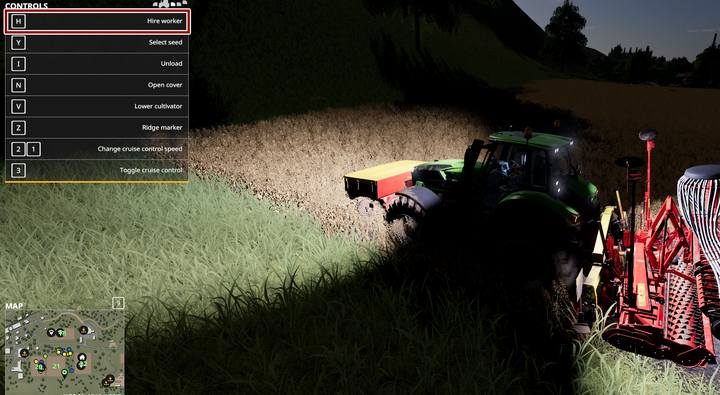
To hire an employee in Farming Simulator 19 to do the work for you, all you have to do is press the key/button (B on XONE / circle on PS4). When you are sitting in a machine (complete one: e.g. the tractor must have the appropriate bits fitted), position yourself by the field where you want to start the working process and press the employment key. Optionally, start the work yourself and then select the option of hiring a worker.
- If at the end of the game you had employees working in the fields, remember to reallocate them to work, after loading the game - they are automatically dismissed;
- Employees have an average of $50-100 per hour of work; this depends on the machine they use and whether they work day or night;
- If an employee is blocked by an object (or e.g. if a combine harvester is overcrowded) and is unable to continue working, he still gets his salary.
- When an employee does not want to do the work assigned to him, it sometimes helps when he starts the work on his own - only then try to assign some adds for him.
- If the adjacent plot (which belongs to you) is only separated by a narrow strip, there is a good chance that the employee will go to work on it as well. Make sure that the worker does not destroy your work!
- You can employ several workers in the same field at the same time - just make sure that they do not get blocked.
- The speed of the employees is as fast as the machine allows - if the machine is attached to the tractor and the tractor is too weak, the speed will be lower. The speed is also slightly decreased if the equipment is in bad condition.
- The cruise control setting determines the speed of your workers. So if you want to hire two workers in the field who move at different speeds, limit the speed of one of them. Remember, however, if you use sprayers/spreaders, you will lose a large part of the substance.



- Farming Simulator 19 Guide and Tips
- Farming Simulator 19: Game Guide
- Farming Simulator 19: FAQ
- Farming Simulator 19: Plants - what to cultivate first?
- Farming Simulator 19: Belt system - how does it work?
- Farming Simulator 19: Biogas Plant - why can't I use it?
- Farming Simulator 19: Vehicle's tank - how to fill?
- Farming Simulator 19: Saving the game - how to?
- Farming Simulator 19: New fields - how to buy?
- Farming Simulator 19: Fields - how to enlarge, merge?
- Farming Simulator 19: Tractor - which should I get first?
- Farming Simulator 19: Workers - how to hire?
- Farming Simulator 19: Tree stumps, bushes - how to remove?
- Farming Simulator 19: New tractor - what to pay attention to while buying?
- Farming Simulator 19: Combine harvester capacity - how to increase?
- Farming Simulator 19: Vehicles, machinery - how to repair?
- Farming Simulator 19: Vehicles - how to sell?
- Farming Simulator 19: Semi-trailers - can I combine them?
- Farming Simulator 19: Leasing - how does it work?
- Farming Simulator 19: FAQ
- Farming Simulator 19: Game Guide
You are not permitted to copy any image, text or info from this page. This site is not associated with and/or endorsed by the developers and the publishers. All logos and images are copyrighted by their respective owners.
Copyright © 2000 - 2026 Webedia Polska SA for gamepressure.com, unofficial game guides, walkthroughs, secrets, game tips, maps & strategies for top games.