Horizon Forbidden West: System requirements
On this page of the Horizon Forbidden West guide you will find information about system requirements, resolution modes and performance.
On this page of the Horizon Forbidden West guide you'll learn about the Favor Resolution and Favor Performance graphical modes. We also provide PC system requirements - minimum, recommended, high and very high.
The PS4 version unfortunately doesn't let you choose which mode to play Horizon Forbidden West in, as the resolution adjusts automatically depending on your console: regular PS4 (1080p 30 FPS), PS4 Pro (1800p 30 FPS). PS5 owners will be able to choose between Resolution mode and Performance mode.
- Minimum PC system requirements
- Recommended PC system requirements
- High PC system requirements
- Very high PC system requirements
- Resolution and Performance mode differences
- How to switch between resolution and performance modes?
Minimum PC system requirements
- Average performance: 720p, 30 fps,
- Graphics card: NVIDIA GeForce GTX 1650 4GB or AMD Radeon RX 5500XT 4GB,
- Processor: Intel Core i3-8100 or AMD Ryzen 3 1300X,
- RAM: 16GB,
- Operating system: Windows 10 64-bit (version 1909 or later),
- Disk space: 150 GB on SSD.
Recommended PC system requirements
- Average performance: 1080p, 60 fps,
- Graphics card: NVIDIA GeForce RTX 3060 or AMD Radeon RX 5700
- Processor: Intel Core i5-8600 or AMD Ryzen 5 3600,
- RAM: 16GB,
- Operating system: Windows 10 64-bit (version 1909 or later),
- Disk space: 150 GB on SSD.
High PC system requirements
- Average performance: 1440p at 60fps / 4K at 30 fps,
- Graphics card: NVIDIA GeForce RTX 3070 or AMD Radeon RX 6800,
- Processor: Intel Core i7-9700 or AMD Ryzen 7 3700X,
- RAM: 16GB,
- Operating system: Windows 10 64-bit (version 1909 or later),
- Disk space: 150 GB on SSD.
Very high PC system requirements
- Average performance: 4K, 60 fps,
- Graphics card: NVIDIA GeForce RTX 4080 or AMD Radeon RX 7900XT,
- Processor: Intel Core i7-11700 or AMD Ryzen 7 5700X,
- RAM: 16GB,
- Operating system: Windows 10 64-bit (version 1909 or later),
- Disk space: 150 GB on SSD.
Resolution and Performance mode differences
- Favor Resolution: better image quality at the expense of lower frames per second (FPS) - 4k and 30 FPS;
- Favor Performance: higher FPS at the expense of lower resolution - 1080p and 60 FPS.
How to switch between resolution and performance modes?
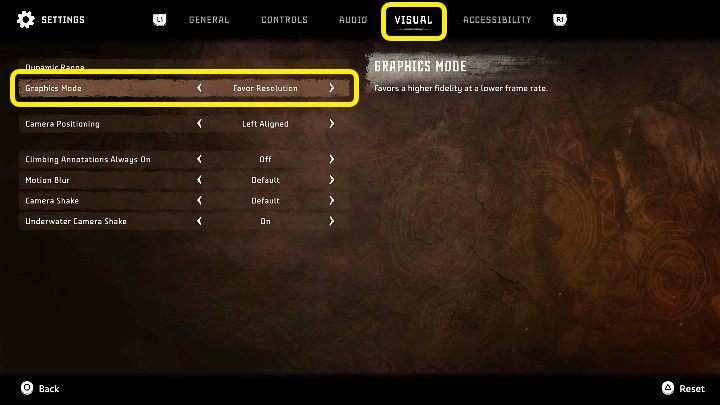
The appropriate option can be found in Horizon Forbidden West's settings, in the Visual tab, as pictured above.


- Horizon Forbidden West Guide
- Horizon Forbidden West: Game Guide
- Horizon Forbidden West: Appendix
- Horizon Forbidden West: Game's length
- Horizon Forbidden West: Disk space
- Horizon Forbidden West: Release date
- Horizon Forbidden West: PS5 upgrade
- Horizon Forbidden West: Language versions
- Horizon Forbidden West: Game editions
- Horizon Forbidden West: PS4 and PS5 controls
- Horizon Forbidden West: Photo Mode - how to activate?
- Horizon Forbidden West: HUD (user interface) - can it be turned off?
- Horizon Forbidden West: Trophies - list, trophy guide
- Horizon Forbidden West: System requirements
- Horizon Forbidden West: Accessibility
- Horizon Forbidden West: Multiplayer / Co-op - is it in the game?
- Horizon Forbidden West: Appendix
- Horizon Forbidden West: Game Guide
You are not permitted to copy any image, text or info from this page. This site is not associated with and/or endorsed by the developers and the publishers. All logos and images are copyrighted by their respective owners.
Copyright © 2000 - 2026 Webedia Polska SA for gamepressure.com, unofficial game guides, walkthroughs, secrets, game tips, maps & strategies for top games.