Controller Support in Once Human Explained - Setup Guide
Frustrated about Once Human not working with your gamepad? This guide will explain the current state of controller support and show you how to set up your controller for the Once Human through Steam Input.

Once Human just launched yesterday, and the game is already attracting a wide group of players. With some problems with downloading the game and key bindings issue, fans have also discovered that controller support is currently not fully implemented. Here’s a quick explanation why it’s tricky and how to set up a controller to play the game.
Does Once Human Have a Controller Support at Launch?
Controller support for the demo version of Once Human was a bit of a mixed bag. Officially, the game didn’t have built-in controller support. Although the full game was supposed to have this feature at launch, it’s not quite there yet. Here’s a statement from the developers posted on the Once Human Official Release FAQ:
Due to ongoing technical adjustments, Once Human does not support controllers and Steam Deck at launch. Our development team is actively working on changes to bring controller support as soon as possible. We expect to complete this by August.
While official support is still under development, you can still set up a gamepad yourself. It's a quick and easy process.
How to Set Up a Gamepad to Play Once Human
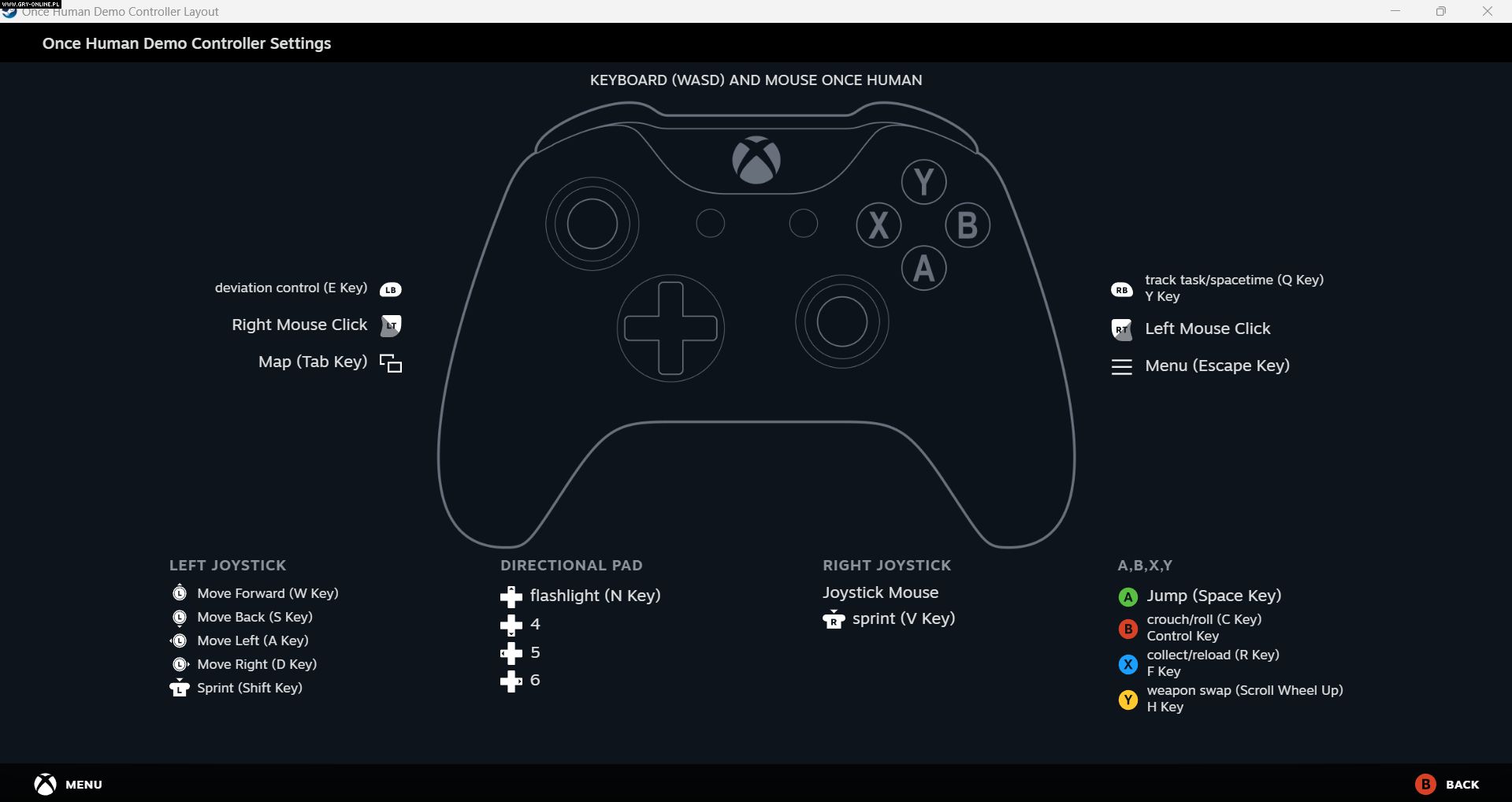
Custom controller layout for Once Human demoSteam app
Luckily, there’s a way to set up a controller to enjoy Once Human with a gamepad before the full support. Here’s a quick guide on how to do it on Steam:
- Run the app as administrator and go to Steam Settings.
- Click on Controller tab and ensure that Enable Steam Input is checked for your controller type (PlayStation, Xbox, or anything else).
- Connect your gamepad to the PC. Go to Steam Library, select Once Human and click on a controller icon (on the right from the Play button). Here you can edit the layout to configure your own button mapping.
- If you want to try a pre-made community layouts, click on the Current Button Layout and choose one from the community tab.
While this method allows you to use a controller, the in-game button prompts will still reflect keyboard and mouse controls.



0

Author: Olga Racinowska
Been with gamepressure.com since 2019, mostly writing game guides but you can also find me geeking out about LEGO (huge collection, btw). Love RPGs and classic RTSs, also adore quirky indie games. Even with a ton of games, sometimes I just gotta fire up Harvest Moon, Stardew Valley, KOTOR, or Baldur's Gate 2 (Shadows of Amn, the OG, not that Throne of Bhaal stuff). When I'm not gaming, I'm probably painting miniatures or admiring my collection of retro consoles.

Latest News
- A fan has enhanced and fixed the classic Ultimate Spider-Man for PC
- Because of the final boss, I never gave up on entire genre, but the wonderful Rayman 2: The Great Escape hasn't aged a bit
- The free version of the cult classic shmup Tyrian has been updated after 4 years
- A new Nod campaign has been added to The Dawn of the Tiberium Age, a freeware Command & Conquer RTS
- Fans have removed the time limit from The Blood of Dawnwalker