Doom The Dark Ages not Working with only black screen and audio? We have a fix
Having waited for Doom The Dark Ages and being welcomed by only a black screen and audio is not the greatest experience. Fear not, as here you will find a couple of fixes that will allow you to happily rip through demons of hell.

After going on a hiatus for more than a decade, main branch of Doom franchise has made a glorious comeback in 2016. After that, the developers from id Software kept it in upswing with Doom Eternal, and now everything shows that Doom The Dark Ages will be a great game, too, also according to our review. It is more and more common recently to release games a tad bit faster for an extra price (which is already through the roof) in programs like Early or Advanced Access. Thanks to it, some of the fans had a chance to experience the dark ages quite literally, as all they are able to see is a black screen and music playing in the background.
Black screen fix for Doom The Dark Ages
Doom keeps experimenting with its pacing, and it’s fantastic. Every game after 2016 offered a slightly different experience while still being “Doom” in the core. While the first Doom reboot (without a subtitle) was the most faithful to the original, Eternal was very fast and platform oriented, The Dark Ages appears to be slower and technical with boots to the ground philosophy. No wonder that a lot of people want to check out this fresh take, yet some are unfortunate enough that they are unable to launch the production, as it only shows black screen and plays music in the background. At least there is a roster of fixes that can be implemented, so let’s get started.
It appears that this problem affects mostly players with Nvidia GPUs, and no wonder, since the situation with this manufacturer’s video drivers is far from ideal recently. Don’t fret, though, as there are a couple of potential fixes and none of them are particularly hard to try. Without further ado:
- If you still use Nvidia Control Panel instead of the revamped Nvidia App, navigate to “3D settings”, select “Manage 3D settings” and click on “Restore” button in the main window.
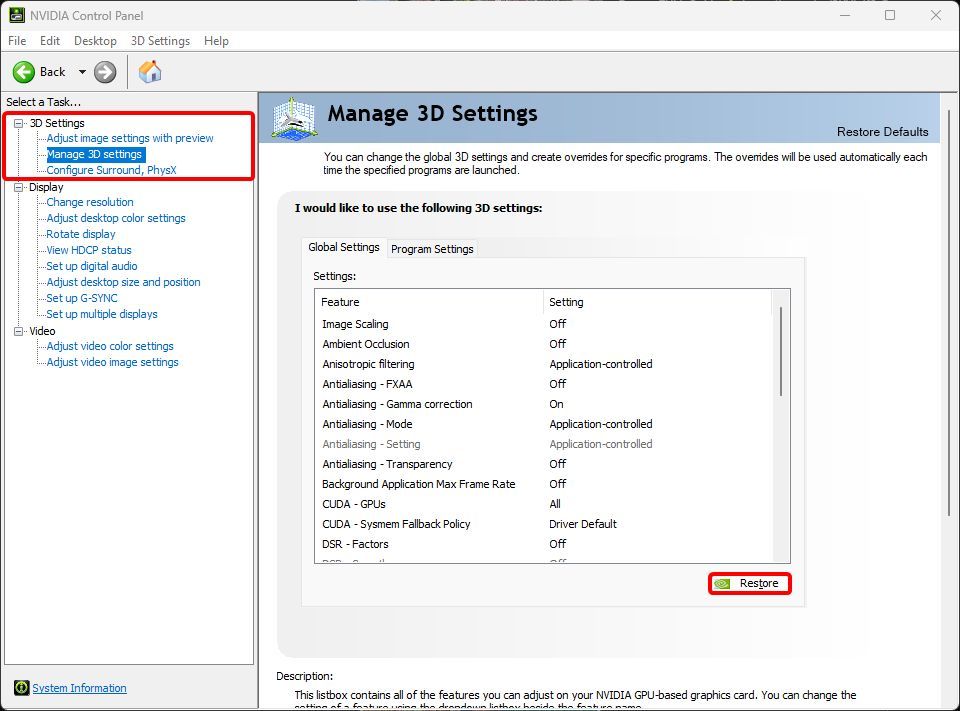
Location of the "Restore" button in Nvidia Control Panel.Personal collection
- In your Steam library, right click on Doom The Dark Ages, choose “Properties…” and in “General” tab, in “Launch Options” section add the line as below:
+com_skipIntroVideo 1 +r_mode -1 +r_customWidth 1280 +r_customHeight 720 +r_fullscreen 0

- Disable all overlay apps that you may have, including Steam, MSI Afterburner, SteelSeries GG, Nvidia Ansel and similar.
- In case you use 2 or more monitors, try launching the game while only one is plugged in. However, do not attempt disconnecting them while Doom is already running as it will cause it to stop responding.
- While starting the production, do not Alt-Tab. This is a known issue acknowledged by id Software in their official FAQ and they are working to have it resolved, yet if that happens to you, it can be fixed by restarting your computer.
We are not affiliated with the developer of DDU, nor we take any liability for this program to work. Operations regarding drivers can render your system or computer unusable. If you decide to implement the step below, be kindly informed that you are doing it at your own risk.
- As a last resort, you can try clean reinstallation of GPU drivers by using software like DDU. After removing them from your PC, make sure to install the latest one using “Perform Clean Installation” option that is available after choosing “Advanced” install path.
We cannot blame id Software entirely for this state of release, as Nvidia is to blame here, at least in some part due to their recent problematic drivers’ releases. While both companies work on solving their own issues, hopefully the fixes presented here will let you enjoy slaying demons.
If you would like to learn more about the game, make sure to check our guide and resort to interactive maps if you would like to hunt down all the secrets. Have fun!


0

Author: Aleksander Kartasinski
Just a random from the depths of the internet who happens to be interested in video games like millions of other people on this planet. By sheer luck he was given a chance to write about them. Worked in IT department and supported users for way too long, but also given a chance to do some IT magic on a large scale in his free time. Interested in technology, games with intriguing mechanics, etymology, and linguistics.

Latest News
- The free version of the cult classic shmup Tyrian has been updated after 4 years
- A new Nod campaign has been added to The Dawn of the Tiberium Age, a freeware Command & Conquer RTS
- Fans have removed the time limit from The Blood of Dawnwalker
- Empire II: Total War now with two extra historical campaigns
- Someone has remastered Medieval 2: Total War and Rome: Total War so well that the AI's moves are now calculated in a matter of seconds [Updated]