Everything about Player Profile in DBD
Patch 7.4.0 to DBD introduced Player Profile. From our guide you will learn more about this new feature.

Dead by Daylight is popular asymmetrical horror game which is regularly updated. Two days ago 7.4.0 patch was released, which introduced, among other things, the Trickster rework and Player Profile. From this guide you will learn more about the latter feature.
Player Profile in DBD
To open Player Profile you have to click on the badge next to your profile name and the amount of Bloodpoints. By default, it will be just a blank square - once you've unlock your first badge, you can change its appearance.
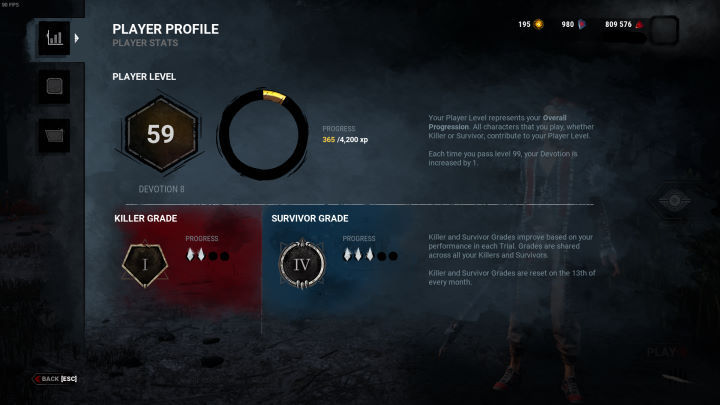
Player Profile has two uses. The first is to summarize our progress in the game. You will find your current account level and the survivor and killer ranks. It looks like the screenshot below.
The second option, however, is to personalize your profile. There, you can choose the banner and badge that will be displayed in the main menu and the match summary.
- At this moment there is only one banner and badge. You will get them if you purchase any cosmetic item for Chucky.
- Leaks suggest that more banners and badges will be added to the game with winter event.
If you would like to read the details of the banners and badges, you can read our previous guide.
If you are interested in Dead by Daylight then I recommend you read our other news.
- Stranger Things Back in DbD; Fans Fought for Return of Show-inspired Content
- DBD - Best Knight Builds
- Aliens Coming to One of Steam's Biggest Hits; Fans Seem Overjoyed [Update]



0

Author: Agnes Adamus
Associated with gamepressure.com since 2017. She started with guides and now mainly creates for the newsroom, encyclopedia, and marketing. Self-proclaimed free-to-play games expert. Loves strategy games, simulators, RPGs, and horrors. She also has a weakness for online games. Spent an indecent number of hours in Dead by Daylight and Rainbow Six: Siege. Besides that, she likes horror movies (the worse, the better) and listen to music. Her greatest passion, however, is for trains. On paper, a medical physicist. In fact, a humanist who has loved games since childhood.
Latest News
- Because of the final boss, I never gave up on entire genre, but the wonderful Rayman 2: The Great Escape hasn't aged a bit
- The free version of the cult classic shmup Tyrian has been updated after 4 years
- A new Nod campaign has been added to The Dawn of the Tiberium Age, a freeware Command & Conquer RTS
- Fans have removed the time limit from The Blood of Dawnwalker
- Empire II: Total War now with two extra historical campaigns