Outriders: Items - how to transfer them between characters?
Last update:
This page of the Outriders guide is dedicated to moving items between characters using a stash. Once you pick up an item, the game allows you to transfer it to the alternate character.
A stash, like the one pictured below, allows you to store items as well as transfer equipment between characters.
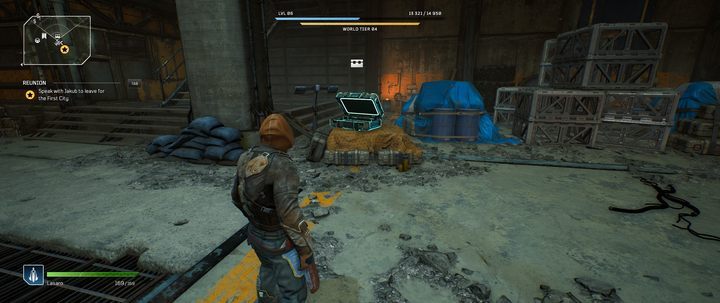
In Outriders, it is possible to create more than one hero on a single account, so transferring items to another character may prove useful. To move an item, open the stash and move the item you are wearing to the stash. Now you can switch to another character and you can pick up that item from the stash. Remember that every item has requirements - most of the time, it concerns the level of the item. When you transfer an item, all restrictions are retained.



- Outriders Guide
- Outriders: Game Guide
- Outriders: FAQ
- Outriders: Minerals - how to collect?
- Outriders: New NPCs - how to unlock?
- Outriders: Healing - how to restore health?
- Outriders: Enemy skill - how to interrupt?
- Outriders: Another location - how do move there?
- Outriders: Notes - what they do?
- Outriders: Friends - how to invite?
- Outriders: Ally down - how to revive?
- Outriders: Experience - how to gain it quickly?
- Outriders: Items - how to transfer them between characters?
- Outriders: Mods - how to change?
- Outriders: Best mods - which ones?
- Outriders: FAQ
- Outriders: Game Guide
You are not permitted to copy any image, text or info from this page. This site is not associated with and/or endorsed by the developers and the publishers. All logos and images are copyrighted by their respective owners.
Copyright © 2000 - 2026 Webedia Polska SA for gamepressure.com, unofficial game guides, walkthroughs, secrets, game tips, maps & strategies for top games.