Outriders: Mods - how to change?
Last update:
This section of the Outriders guide explains how to change gear mods. You'll learn how to do this quickly.
The ability to change gear mods can be unlocked by completing the Dedication quest. You will then unlock Zahedi, who will help you insert mods you have already discovered by disassembling weapons and armor (for a small fee).
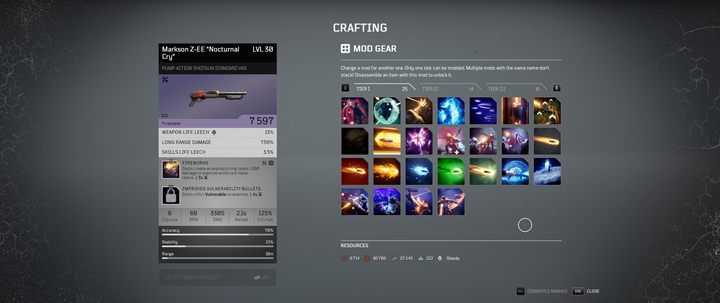
To change mods, go to Zahedi, select the item you are interested in, and then select Mod Gear. You will see a mod library, like the one pictured above, where you can exchange an armor or weapon mod for another for a small fee (usually 150 Scrap), provided you have already discovered the mod. This way, you can customize mods to make them suit your play style.



- Outriders Guide
- Outriders: Game Guide
- Outriders: FAQ
- Outriders: Minerals - how to collect?
- Outriders: New NPCs - how to unlock?
- Outriders: Healing - how to restore health?
- Outriders: Enemy skill - how to interrupt?
- Outriders: Another location - how do move there?
- Outriders: Notes - what they do?
- Outriders: Friends - how to invite?
- Outriders: Ally down - how to revive?
- Outriders: Experience - how to gain it quickly?
- Outriders: Items - how to transfer them between characters?
- Outriders: Mods - how to change?
- Outriders: Best mods - which ones?
- Outriders: FAQ
- Outriders: Game Guide
You are not permitted to copy any image, text or info from this page. This site is not associated with and/or endorsed by the developers and the publishers. All logos and images are copyrighted by their respective owners.
Copyright © 2000 - 2026 Webedia Polska SA for gamepressure.com, unofficial game guides, walkthroughs, secrets, game tips, maps & strategies for top games.