Xenoblade 3: Saving the game - how to do it?
From this page you will learn how to do manual saving in Xenoblade Chronicles 3 - Quick Save, Auto Save.
There are several ways to save the game in Xenoblade 3. On this page, you will learn how to manually save the game, how to make a Quick Save and whether there are autosaves in the game.
Manual saves
You can manually save the game at any time, except when you're in the middle of a fight.
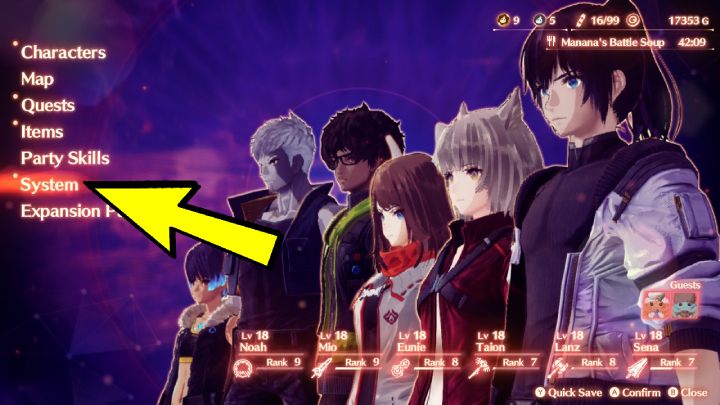
You can save the game:
- by entering the game menu, pressing X and selecting the System - Save tab;
- at any Rest Spot.
Quick saves
You can quick save the game:
- by entering the game menu (X) and pressing Y.
Auto saves
The game has the option to create automatic save files, which occur after each story event or when completing side quests.


- Xenoblade Chronicles 3 Guide
- Xenoblade Chronicles 3: Game Guide
- Xenoblade Chronicles 3: FAQ
- Xenoblade 3: Character's death - what will happen?
- Xenoblade 3: Fast travel - how to use it?
- Xenoblade 3: Combat - how to run away?
- Xenoblade 3: Character - how to change?
- Xenoblade 3: Saving the game - how to do it?
- Xenoblade 3: Canceling attacks - how to do it?
- Xenoblade 3: Flame Clock - what is it?
- Xenoblade 3: Affinity Meter - how to Fill?
- Xenoblade 3: Combos - how to use?
- Xenoblade 3: Food - how to cook?
- Xenoblade 3: Art Follow-Up - what is it? Juniper, Stalker
- Xenoblade 3: Character - how to revive?
- Xenoblade 3: Nopon Coins - how to farm?
- Xenoblade 3: Class Points - how to farm?
- Xenoblade 3: Finishing the story - can you keep playing? (New Game Plus)
- Xenoblade Chronicles 3: FAQ
- Xenoblade Chronicles 3: Game Guide
You are not permitted to copy any image, text or info from this page. This site is not associated with and/or endorsed by the developers and the publishers. All logos and images are copyrighted by their respective owners.
Copyright © 2000 - 2026 Webedia Polska SA for gamepressure.com, unofficial game guides, walkthroughs, secrets, game tips, maps & strategies for top games.