Control Dev Menu is a mod for Control, created by reg2k.
Descriptions:
Provides access to developer menus to control render options, lighting, tweakables, etc.
Dev Menus
Ambience System: Control ambient lighting filters.
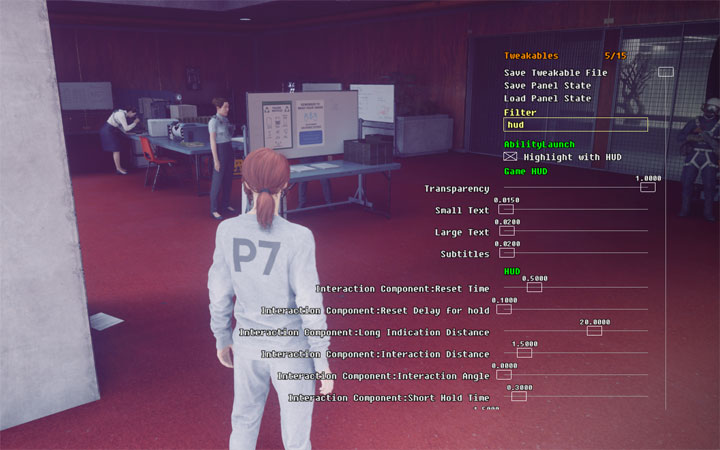
Tweakables: Control various game settings in realtime. See the Tweakables? mod for more information.
Render Options: Enable wireframe rendering, toggle various lighting types, etc.
Inventory: Display player inventory and unlocks.
Content Memory Tracking: Display memory usage of various game entities.
Parameters: Adjust graphics parameters like brightness, color balance, saturation, film grain levels, etc.
Unlocks: Display unlocked items.
Trials: Control active, available and potential Board Countermeasures.
Requires the Control Plugin Loader.
Installation
1. Install the prerequisite: Control Plugin Loader.
2. Extract DevMenu.dll and DevMenu.ini into the following folder: <Control Installation Directory>\plugins. Create the plugins folder if it does not exist.
3. Launch the game.
Usage
When in-game, press F11 to toggle the dev menu.
Press [Page Up] to move to the next menu.
Press [Page Down] to move to the previous menu.
Navigating the Dev Menu
Use the arrow keys to move between options in the dev menu.
Press [Spacebar] to select an option.
You can also navigate the dev menu with the mouse while the game is paused, or in Photo Mode.
Right-clicking on numerical sliders will allow you to input a value using the keyboard.
Configuration
Open DevMenu.ini to configure settings. The following settings are available:
Activation Hotkey
The hotkey to toggle the developer menus. Default: F11
Menu Set
The set of developer menus to enable.
Possible options:
0: Enable all menus, even non-working menus.
1: Enable only working menus. [Default]
2: Enable only graphics-related menus (excludes all gameplay-related menus).
Other Notes
Back up your savegame before using the dev menu, especially before modifying any gameplay parameters!
Some options in the dev menu may have no effect on the game. Options containing the word "Debug" or "Visualize/Show" are more likely to be unused.
If you want to modify your inventory, I highly recommend using the Control Save Editor mod (also made by me) instead of the Inventory dev menu for better control over values and an ability to revert to your original values without committing it to your savegame.
- Last update: Wednesday, February 3, 2021
- Genre: Action
- File size: 735.1 KB