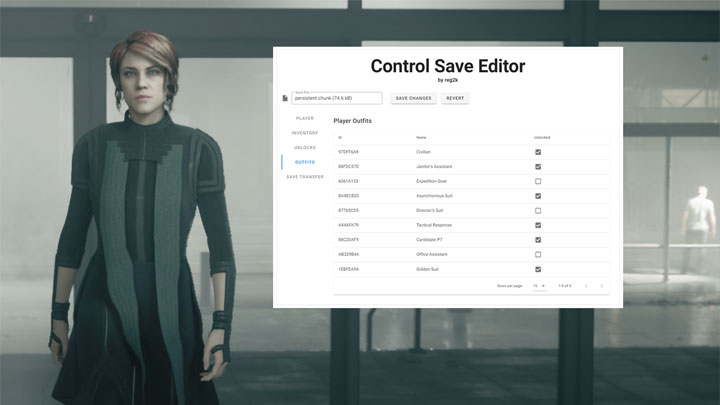
Control Save Editor is a tool for Control, created by reg2k
Description:
A save editor and transfer tool for Control.
The save transfer feature allows you to carry over outfits, mods and other stats to new or existing savegames to start your own New Game Plus.
Features
Stats: Edit Source (game currency) and ability points. View player stats such as number of collectibles found, player level, completed missions count and total ability points spent.
Inventory: Edit modifier values on personal and weapon mods and change resource/material/jukebox token quantities. Modify inventory item IDs (advanced feature).
Unlocks: View your unlocked abilities and items.
Outfits: View and change the unlock state of outfits.
Save Transfer Tool
The Save Transfer Tool allows you to transfer your progression between savegames, allowing you to play a New Game Plus or replay missions with your latest loadout.
Supported Transfer Options:
Outfits
Inventory (personal/weapon mods and all resources)
Ability points
Source
Warning: If you are starting a New Game Plus, carrying over all your endgame gear will likely imbalance game difficulty! If you are looking for a more balanced NG+ experience, I recommend only transferring outfits and leftover ability points.
I welcome suggestions to make the inventory transfer process more balanced! Feel free to leave a comment with your ideas.
In this initial first release, I am not placing any restrictions on inventory transfer, but one potential solution would be to limit the transfer of items to only 3 or 4 mods of your choice.
Locating and backing up your saves
It is important that you back up your saves before using this tool! Please read this section carefully.
Epic Game Store version:
Your save games are located in the following directory: %LOCALAPPDATA%\Remedy\Control\Default-Epic-User\
(You can copy and paste the above address to Windows Explorer's address bar)
Inside the savegame directory are save slot folders, numbering from savegame-slot-00 up to savegame-slot-10.
savegame-slot-00 is your active savegame and is the slot that is loaded when you select "Continue" from the game's main menu.
All other slots are fixed snapshots of your game progress at each major main mission in the game and are used for the "Mission Select" menu. Once created, these other slots are never updated again.
Backing up your entire game profile
To backup your entire game profile, make a copy of your Default-Epic-User folder and keep it somewhere safe.
Backing up your active savegame slot
To backup your current active savegame, make a copy of the savegame-slot-00 folder and keep it somewhere safe.
If you are starting a new game, it is best to backup your entire game profile.
If you are editing your current savegame, it is sufficient to just backup the active savegame slot. Make sure you backup the entire slot folder, not just individual files within it!
Steam version:
Your save games are located at: <Steam Install Folder>\userdata\<Your Steam ID>\870780\remote\.
The savegame-slot-00_* files are your active savegame and are the savegame files that are loaded when you select "Continue" from the game's main menu.
All other slots are fixed snapshots of your game progress at each major main mission in the game and are used for the "Mission Select" menu. Once created, these other slots are never updated again.
Usage
Important: Please backup your saves before using this tool!
The web app is available here: https://reg2k.github.io/control-save-editor-beta/
You can also download an offline copy to your computer from the Files section of this mod page. Open index.html to launch the app.
Please note: If you would like to endorse the mod on the Nexus, you can only do so if you've downloaded the file.
Usage Instructions:
0. Locate and back up your savegame as described in the above section.
STEAM / GOG version:
1a. Load the savegame-slot-00_persistent file into the save editor.
EGS version:
1b. Load the persistent.chunk file inside your savegame-slot-00 folder into the save editor.
2. Make your desired changes.
3. Click Save Changes - this will download an edited persistent.chunk file to your computer.
4. Replace your existing persistent savefile with the downloaded copy. If you are on Steam/GOG, rename the file back to savegame-slot-00_persistent.
How to start a New Game Plus
Instructions:
1. Backup your old savegame.
2. Start a New Game from the main menu.
3. Once the initial cutscene has played and the game has been saved, exit the game.
4. Go to your savegame folder and load the freshly created persistent savefile into the save editor.
5. Select the "Save Transfer" tab, then upload your old persistent save that you have backed up in the "Source Save" section.
6. Select the options you would like to transfer from your existing save to your new game save.
7. Click the Transfer button, then replace your persistent save with the version that the Save Editor has modified.
Load your savegame and you will start the game with the attributes that you've selected to bring over to your new game.
Requirements
Requires a modern browser!
Supported browsers: Chrome, Firefox, MS Edge (>=79)
Not supported: Old Edge, Internet Explorer, Safari
- Last update: Monday, February 8, 2021
- Genre: Action
- File size: 251 KB