Far Cry 6: Health indicators - how to turn them off?
This page of the Far Cry 6 game guide explains what the health indicators above enemies' heads are and how to turn them off.
This page of the guide to Far Cry 6 explains what are the so-called Health Indicators that appear above the enemies' heads. You will also learn whether you can turn the Health Indicators off so that they don't spoil the immersion during gameplay.
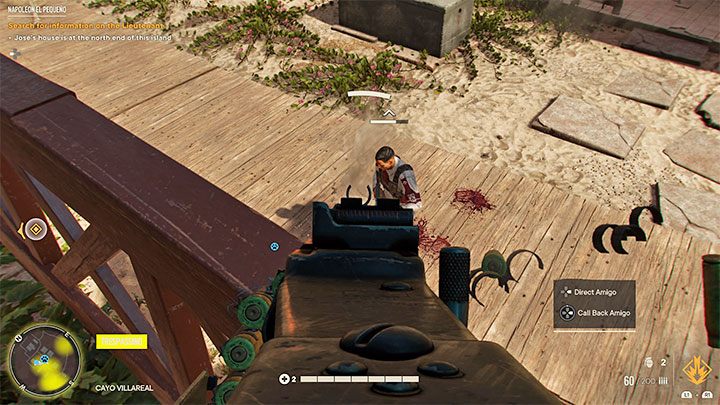
In Far Cry 6 , every enemy you attack by default has a health indicator that appears above their head. This indicator can take different forms and be, e.g. single or double.
The health indicators are not just symbolic, as Far Cry 6 includes RPG-style health bars that first appeared in Far Cry New Dawn. In a nutshell, this means that the opponents have become a sort of bullet sponges. It's a mechanic you may also be familiar with from games like Tom Clancy's Division or Borderlands. A single headshot and other strong attacks may not be enough to instantly kill an opponent , and you may need to attack them some more before you kill them. Player and enemy levels, as well as the equipment you use, play a much larger role during battles.
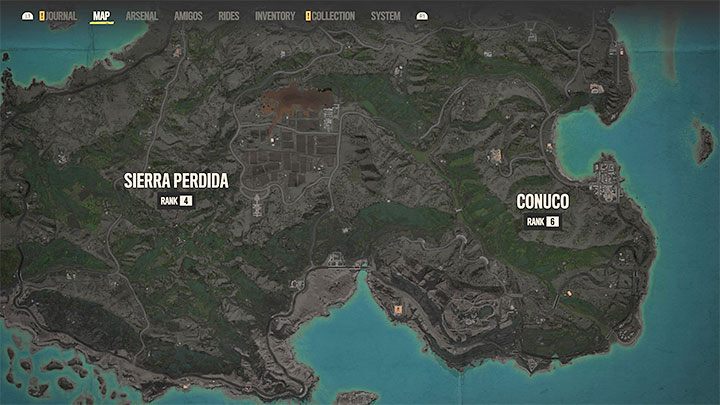
You can find more tips on how to eliminate enemies effectively on the Combat and Stealth page. Below, you will find some quick tips on how to make the health indicators less cumbersome and reduce the RPG-ness of the combat system:
- Check the current ranks of the regions on the world map and the recommended mission ranks. Don't choose the ones that are higher than the character's current rank, just save them for later. Otherwise, the enemies you encounter may become even bigger bullet sponges.
- Match the type of ammunition in your weapons to the type of enemies you are attacking. For example, when attacking enemies who use armor, choose bullets with increased penetration power.
- Keep trying to find better weapons from higher ranks, and upgrade your weapons by installing various mods. This is, of course, supposed to enhance their combat capabilities.
If all other methods fail, you can also lower the difficulty by activating Story Mode, although it won't completely revert the enemies from being bullet sponges.
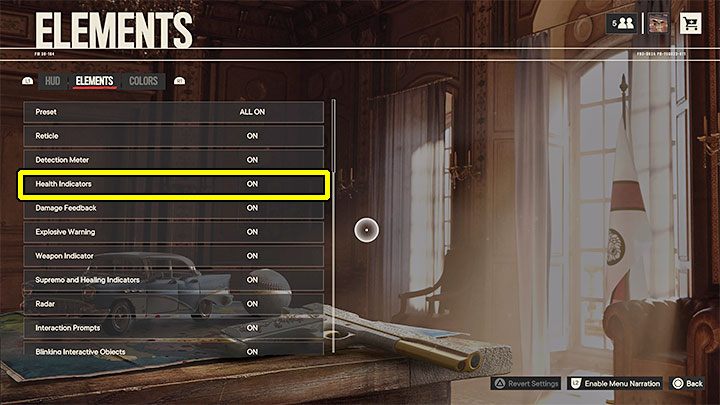
Far Cry 6 allows you to hide health indicators. To do so, you have to select HUD and Elements in the game options and find the appropriate item on the list.
An important note is that hiding health indicators will not turn them off. You will still need to attack the enemies in the same manner as before, so the only advantage of this method is that the unimmersive HUD element will no longer be visible. We don't recommend this method because without seeing the health indicators on screen you won't be able to determine how effective your attacks are and e.g. change the weapon to a more appropriate one or retreat from a location that's too dangerous.



- Far Cry 6 Guide
- Far Cry 6: Game Guide
- Far Cry 6: FAQ
- Far Cry 6: Choosing the protagonist's gender - does it matter?
- Far Cry 6: Wingsuit - how to unlock?
- Far Cry 6: Tank - how to steal?
- Far Cry 6: Locked doors - to open?
- Far Cry 6: Health indicators - how to turn them off?
- Far Cry 6: Rocket Launcher - how to obtain?
- Far Cry 6: Helicopters - how to destroy?
- Far Cry 6: Killing dogs - is it mandatory?
- Far Cry 6: Game world - is it big?
- Far Cry 6: Bow and crossbow - how to get it?
- Far Cry 6: Flashlight - is it available?
- Far Cry 6: Game state - how to save?
- Far Cry 6: Romances - are there any?
- Far Cry 6: Anti-aircraft cannons - how to destroy?
- Far Cry 6: The McKay choice - does it matter?
- Far Cry 6: Fast travel - how to unlock and use?
- Far Cry 6: Esperanza - can you fly over it?
- Far Cry 6: Ranks and XP - how to advance?
- Far Cry 6: Time of day - can you change it?
- Far Cry 6: Inventory capacity - how to increase?
- Far Cry 6: New gear - how to get it?
- Far Cry 6: Money - how to earn it?
- Far Cry 6: FAQ
- Far Cry 6: Game Guide
You are not permitted to copy any image, text or info from this page. This site is not associated with and/or endorsed by the developers and the publishers. All logos and images are copyrighted by their respective owners.
Copyright © 2000 - 2026 Webedia Polska SA for gamepressure.com, unofficial game guides, walkthroughs, secrets, game tips, maps & strategies for top games.