Like a Dragon Ishin: How to save the game manually?
In Like a Dragon Ishin you will find automatic and manual saves of the game state. This guide page explains when it's best to safe the game and how to create your own manual saves of your current progress.
On this page of the Like a Dragon: Ishin guide we have provided information on how to save your game. You will find out when autosaves are created, when you can create manual saves and when saving the game can be most useful (e.g. upon receiving a warning about an upcoming battle).
Autosaves

Like a Dragon: Ishin features an automatic system of saving your game. Autosave is indicated by a specific icon appearing on the screen.
Autosaves happen relatively rarely. This usually happens, for example, after significant story progress or after completing a mini-game or other activity. You may find yourself in a situation where your progress has not been saved for a long time and you should rely on manual saves as a result.
Manual save
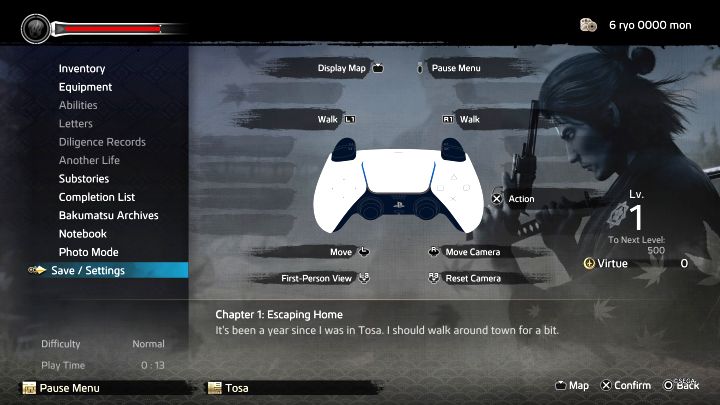
You don't have to go back to your dojo/home or visit any location on the map (e.g. the equivalent of phone booths from selected older instalments of the Yakuza series).
The save option is in the pause menu, but the game may not allow you to create a save if, for example, you are doing a quest that cannot be interrupted.
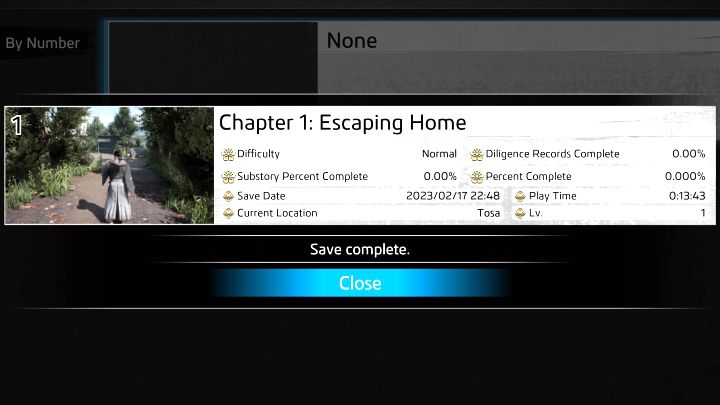
Each created save has a useful description, which can help you determine your progress in the game and locate a specific save on the list. These are:
- a picture showing the location where the game was saved;
- save creation date;
- the name and number of the chapter and the location where the game was saved (e.g. city or district name);
- completion percentage - it is calculated separately for the whole game (Percent Complete), completing side quests (Substory Percent Complete) and completing challenges (Diligence Records Complete);
- Play Time and Lv.;
- current difficulty level.
Saving before major battles
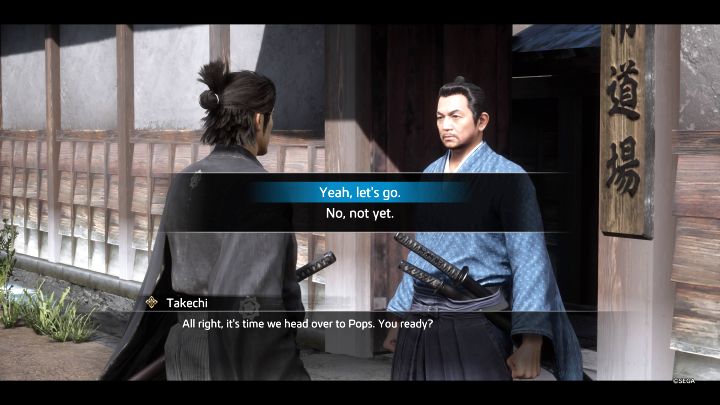
Saving is recommended not only to protect yourself against losing your progress, but also before preparing for bigger battles.
The game signals most of the upcoming difficult clashes (e.g. boss fights or a series of fights in separate locations) through your interlocutors who will ask you if you are ready. It is then recommended to say no; this way, you will be able to save the game before the fight starts. It may turn out that your character is too weak for the particular battle or has not properly prepared for it (e.g. too few meds collected). This will allow you to easily go back to this moment and improve your preparations (or level up your character in other activities).



- Like a Dragon Ishin Guide
- Like a Dragon Ishin: Game Guide
- Like a Dragon Ishin: FAQ
- Like a Dragon Ishin: Campaign
- Like a Dragon Ishin: How to save the game manually?
- Like a Dragon Ishin: How to start Substories?
- Like a Dragon Ishin: How to unlock other districts of Kyo?
- Like a Dragon Ishin: Is Fast Travel available?
- Like a Dragon Ishin: How to count currency (Ryo and Mon)?
- Like a Dragon Ishin: How to change the time of day?
- Like a Dragon Ishin: Do I need to know the Yakuza?
- Like a Dragon Ishin: Is the combat real-time?
- Like a Dragon Ishin: Is there a point of no return?
- Like a Dragon Ishin: Is there endgame (Premium Adventure)?
- Like a Dragon Ishin: Campaign
- Like a Dragon Ishin: FAQ
- Like a Dragon Ishin: Game Guide
You are not permitted to copy any image, text or info from this page. This site is not associated with and/or endorsed by the developers and the publishers. All logos and images are copyrighted by their respective owners.
Copyright © 2000 - 2026 Webedia Polska SA for gamepressure.com, unofficial game guides, walkthroughs, secrets, game tips, maps & strategies for top games.