Manual Loading in Railway Empire 2 Explained
In Railway Empire 2 there is an option for manual loading of trains. In this guide you will learn how it works and how to use it.

Railway Empire 2 is a pleasant economic strategy in which you create your own railroad company from scratch. During the game you must not only build tracks, but also control the flow of cargo between cities. Manual loading can help with this. In this guide you will learn how it works and how to use it.
When you create a new line you can define how loading will take place. The default way is "Automatic", in which the game decides itself what to fill the train with. Of course, in this case you can still set priorities for individual goods. However, you don't quite have control over where something will be unloaded.
For those who want more control, there is the "Manual" mode, which enables you to manually determine what will be unloaded where. The whole thing works on a relatively simple principle
- In the line edit panel, you change the loading method. When you do this you will see that in the list of stations next to each resource you will find an icon saying that it will not be loaded on the train.
- To change this, you have to click on the pen symbol located next to the station name. Then a panel will open, where you can choose what will be loaded and unloaded. You have to repeat the process for each station.
- In case you want to unload something, you have to click on the squares located under "Departing Wagons".
- If, on the other hand, you want to add goods produced by the city or industry to the depot, you must click on its icon under "Offered Goods". This will assign a new wagon to the train.
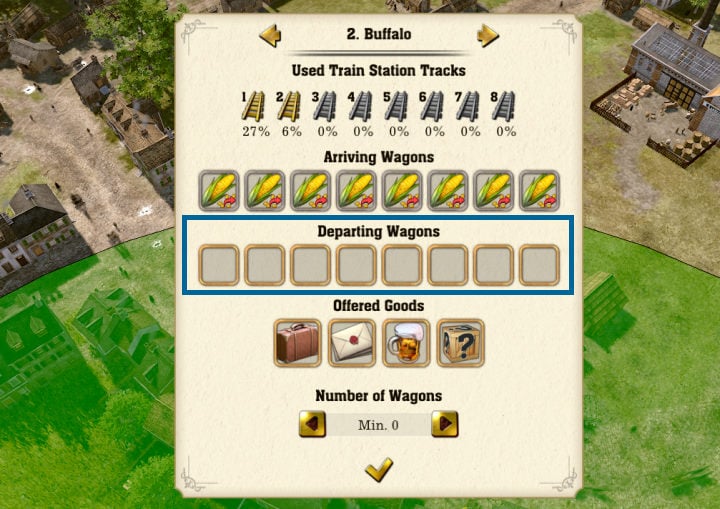
When you have finished editing all stations, it remains for you to confirm your decision. From then on, the trains on the line will move according to what you have ordered.
If you are playing Railway Empire 2 then I recommend you to read our other guides, where you will find a lot of useful information about the game.
- How to Use Warehouse in Railway Empire 2
- Railway Empire 2 Guide - Tips for Beginners
- Maintenance in Railway Empire 2 Explained
- Comma and Decimal Point in Railway Empire 2 Explained


0

Author: Agnes Adamus
Associated with gamepressure.com since 2017. She started with guides and now mainly creates for the newsroom, encyclopedia, and marketing. Self-proclaimed free-to-play games expert. Loves strategy games, simulators, RPGs, and horrors. She also has a weakness for online games. Spent an indecent number of hours in Dead by Daylight and Rainbow Six: Siege. Besides that, she likes horror movies (the worse, the better) and listen to music. Her greatest passion, however, is for trains. On paper, a medical physicist. In fact, a humanist who has loved games since childhood.


Latest News
- A fan has enhanced and fixed the classic Ultimate Spider-Man for PC
- Because of the final boss, I never gave up on entire genre, but the wonderful Rayman 2: The Great Escape hasn't aged a bit
- The free version of the cult classic shmup Tyrian has been updated after 4 years
- A new Nod campaign has been added to The Dawn of the Tiberium Age, a freeware Command & Conquer RTS
- Fans have removed the time limit from The Blood of Dawnwalker