How to turn off camera shake in Indiana Jones and the Great Circle
Turning off the camera shake in Indiana Jones and the Great Circle might be a good idea, considering that this option, in extreme cases, may lead to severe discomfort and nausea.

Your Indiana Jones and the Great Circle playthrough may be a bit ruined by an option that causes the camera to shake while moving the character (when using the first-person view). The option is on by default. Our guide will help you - we explain how to enable FPP camera stabilization and additionally how to get rid of screen shake.
How to disable camera shake?
Indiana Jones and the Great Circle, Machine Games, 2024
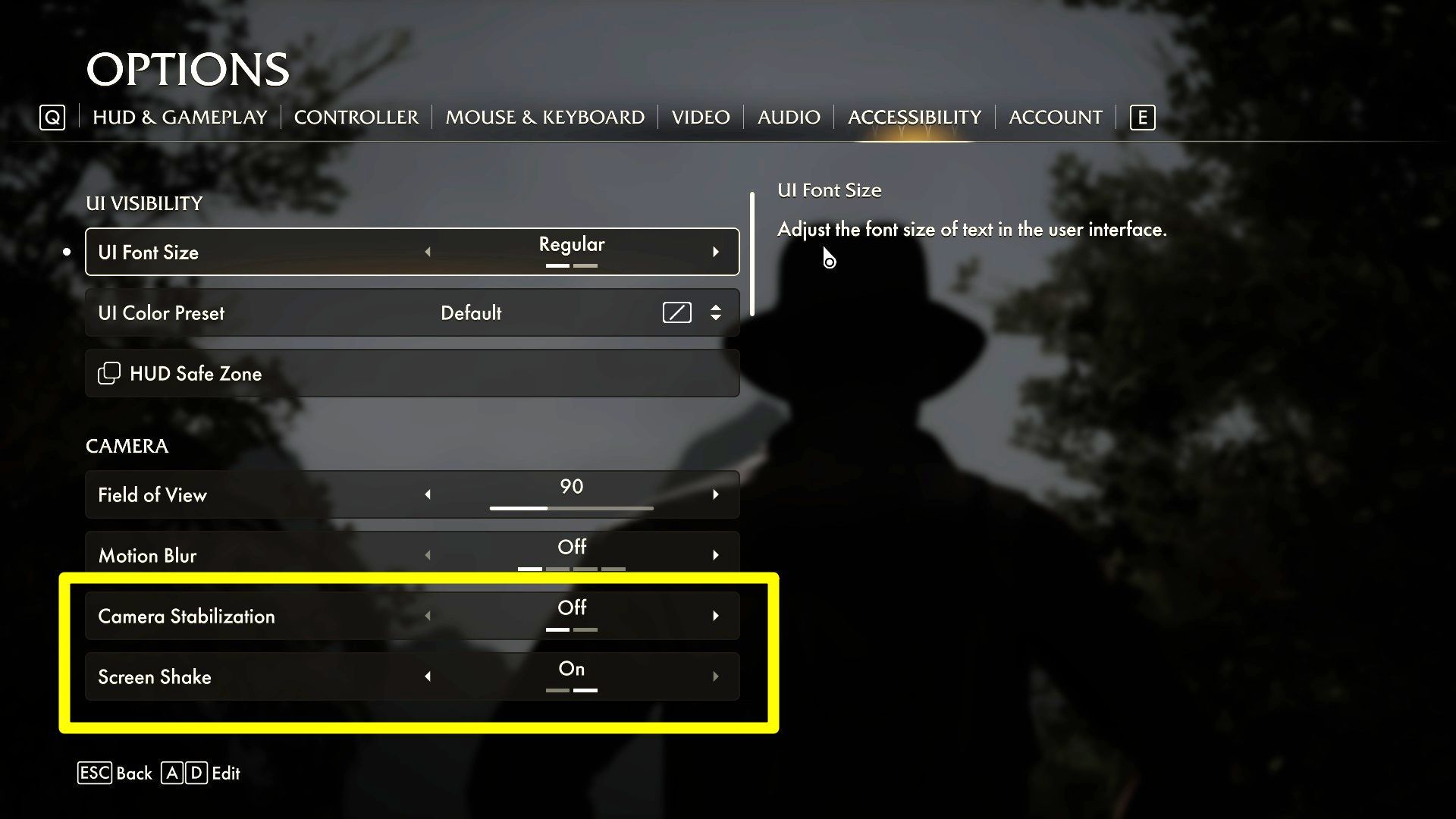
The problem described on this page can, in extreme cases, lead to severe discomfort and nausea, making it impossible to play longer sessions. Fortunately, there is a solution and it comes with built-in accessibility options. In the game options menu, go to the Accessibility tab. Take a look at the following two options in the Camera category:
- Camera stabilization - this option is disabled by default. After activating it, the first-person camera should stop swaying while walking and will instead remain in a fixed position.
- Screen shake- this option is enabled by default. Deactivating it can eliminate additional unwanted screen shake, e.g. in action sequences, when sprinting or in scenes with explosions.
Some puzzles in Indiana Jones and the Great Circle are quite challenging, which is why we recommend checking out our guide, where you’ll find solutions to all the puzzles.



0

Author: Jacek Hałas
Working with Gamepressure.com since the old days, focusing on preparing guides for large and massive games, although occasionally smaller ones too. Besides more than 200 guides, his writing credits include reviews, previews, and editorials. Privately, almost exclusively a console player, most often playing action-adventure games (with a strong emphasis on good plot), racing games, and horrors. Also appreciates stealth games and tactical turn-based games in the style of XCOM. Plays a lot, not only at work but also outside of it, hunting - within the limits of reason and free time - for trophies. Apart from games, likes cycling trips, a good book (especially by Stephen King), and TV series (Stargate, The Sopranos, and Supernatural).

Latest News
- KaM Remake, the fan-made version of the classic strategy game, is practically finished
- A fan has enhanced and fixed the classic Ultimate Spider-Man for PC
- Because of the final boss, I never gave up on entire genre, but the wonderful Rayman 2: The Great Escape hasn't aged a bit
- The free version of the cult classic shmup Tyrian has been updated after 4 years
- A new Nod campaign has been added to The Dawn of the Tiberium Age, a freeware Command & Conquer RTS