Players report crashes in Fantasy Life i. All we know about Fatal Error and more
Is FLi crashing for you? It's a recurring issue for some players. Here you will learn more about it and a possible workaround.

To accompany and balance epic and grand adventures, we need games that can provide a soothing experience of growing crops, for instance. For every Final Fantasy there is Stardew Valley, for Call of Duty, Slime Rancher. But to be fair, most titles are somewhere in between with more focus on one or the other. Fantasy Life that debuted in 2012 is also trying to find its harmony between building a settlement and exploring precarious island. Its sequel, Fantasy Life i The Girl Who Steals Time is following the same principle, that’s why it’s an ideal production for couples, especially that it allows for multiplayer also on a local device. However, some players are experiencing crashes caused by UE Fatal Error that spoils their fun. Let’s find out what might be causing it and if there is anything to be done about it.
Crashes in Fantasy Life i The Girl Who Steals Time explained
Despite fans’ biggest hopes, Fantasy Life i The Girl Who Steals Time is not flawless piece of software. And we are not talking here about gameplay or story, but technicalities. We have already covered an issue where the title was not able to be launched at all, and now we can hear voices of players who experienced multiple crashes, most of them due to UE Fatal Error.
What is happening
Yes, even if you were able to successfully start Fantasy Life i that doesn’t mean that the problems end here. The crashes can happen randomly and with different frequency, yet the most common scenario is that when the production is loading, all that is showing is a black screen for a couple of minutes and then it closes with the Fatal Error message. It can also flat out when one is trying to sell something in the open world area.
How to fix Fatal Error?
Regardless of how it happens, it is frustrating and as of now, there is no known method of fixing it. There are players who claim that reinstalling FLi helps, yet it only works for a short time as the next launch causes it to break again.
However, this is a known Unreal Engine error that has been present in games using this engine for years. Due to that, some players have connected it to Epic Game Services (that the Fantasy Life i uses for online connectivity). We have to remember that this production utilizes a number of Epic technologies that are not only its engine, but also EpicOnlineServices SDK, and kernel-level anti-cheat in the form of Easy Anti-Cheat (EAC) that also belongs to Epic. To attempt working around the crashes, you can try the following (but before that, verify if all your drivers are up to date):
The steps below have been suggested by the community. We do not take any liability for them to work. Also, the workaround relies on modification of system files, so before doing any changes, make sure to create a copy of them if you decide to proceed. Bear in mind that this has a chance to render your system or hardware unusable. You are doing it at your own risk!
- Open Command Prompt as an administrator. You can do so by opening Start Menu and looking for “cmd”, and then clicking “Run as administrator” button on the right panel:
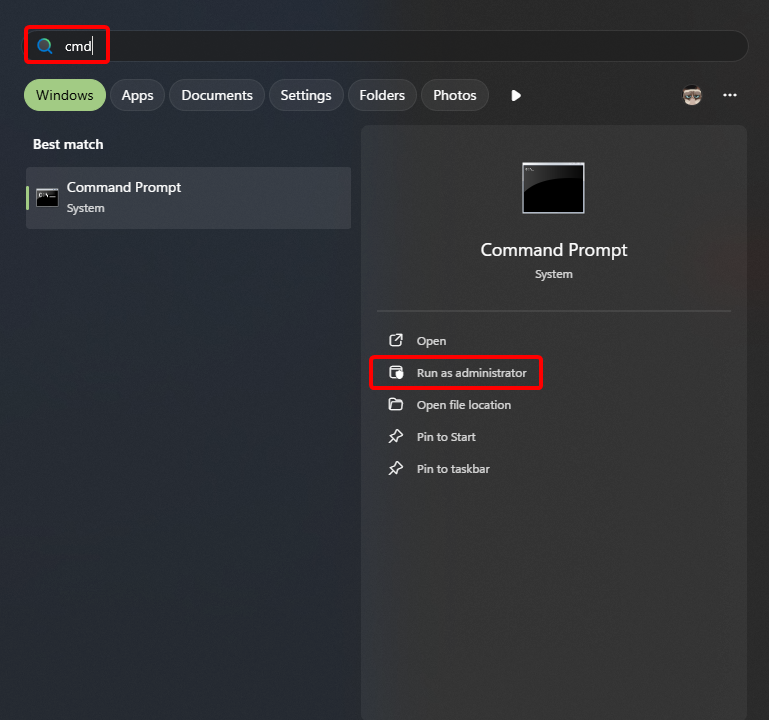
- Next, if a UAC (User Account Control) window appears, accept it by clicking “Yes”.
- In the console itself, paste the following string and press enter:
notepad %windir%\system32\drivers\etc\hosts
- You should now have the hosts file opened in notepad. At the end of the file, add the line as below:
0.0.0.0 datarouter.ol.epicgames.com datarouter-weighted.ol.epicgames.com
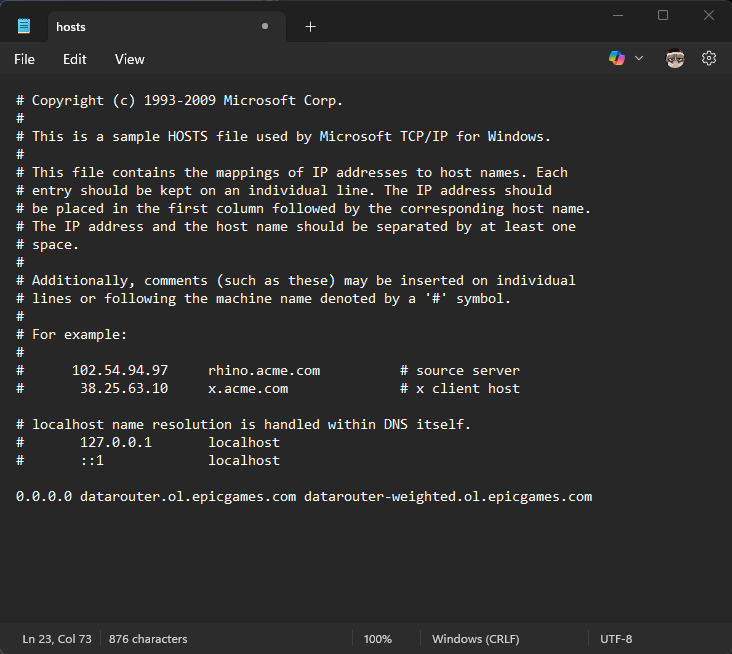
- With that done save the file and close the notepad and the Command Prompt.
After all of those operations, you should be able to run the game, hopefully without crashes this time.
Beware, adding this line can cause issues with other games which use Epic Services! However, reverting it is simple, as all you need to do is to access “hosts” file again following the steps above and deleting the line that you have added. Alternatively, you can bring back the original file that you might have backed up (which is advised).
Since the problem might come from Epic Games services, it is also a good idea to uninstall them and then verify game files integrity before launching the game, just as it was described in the previously mentioned article about fixing issues with launching FLi.
What to do if nothing helps
Of course, the methods mentioned above will not necessarily solve the problem for you as it can stem from different roots. In that case, the best way to proceed is to open a support ticket with Level 5 (game developer) who will be able to help you accordingly.
As this problem most probably originates from Unreal Engine and has a chance to be related to Epic Games services, there is a slim chance that the future patches will solve it, so if that bothers you, do not waste your time and open the ticket with support. Good luck!


0

Author: Aleksander Kartasinski
Just a random from the depths of the internet who happens to be interested in video games like millions of other people on this planet. By sheer luck he was given a chance to write about them. Worked in IT department and supported users for way too long, but also given a chance to do some IT magic on a large scale in his free time. Interested in technology, games with intriguing mechanics, etymology, and linguistics.


Latest News
- A fan has enhanced and fixed the classic Ultimate Spider-Man for PC
- Because of the final boss, I never gave up on entire genre, but the wonderful Rayman 2: The Great Escape hasn't aged a bit
- The free version of the cult classic shmup Tyrian has been updated after 4 years
- A new Nod campaign has been added to The Dawn of the Tiberium Age, a freeware Command & Conquer RTS
- Fans have removed the time limit from The Blood of Dawnwalker