Tower of Fantasy (ToF) - How to Change Game Language?
From this post you will learn how to change the language in Tower of Fantasy.

Tower of Fantasy is an MMORPG that challenges Genshin Impact. In this guide you will find information on how to change the language in the game.
Changing the language settings is relatively easy. Just follow a few steps:
- In the main menu, go to settings;
- Select the language tab;
- Decide which language version you want to play;
In the settings you can decide separately on the subtitles and voiceover language. So you can freely adjust the parameters to your needs. Of course, there are some limitations. After all, not every language has received dubbing.
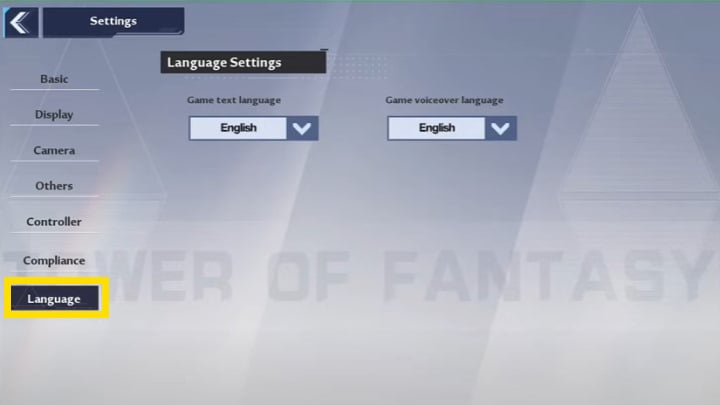
Tower of Fantasy offers seven different language versions. Only two of them are full and offer translated not only subtitles but also voice lines. The entire list presents itself as follows:
- English (dubbing and subtitles)
- French (subtitles)
- German (subtitles)
- Japanese (dubbing and subtitles)
- Thai (subtitles)
- Portuguese Brazilian (subtitles)
- Spanish Latin American (subtitles)
Tower of Fantasy has been released today. The game attracted a huge amount of interest - more than 4 million players signed up for the preloads. Not surprisingly, the servers are overcrowded, and waiting in queues can last up to a dozen hours.
More about Tower of Fantasy:
- Tower of Fantasy (ToF) Red Nucleus - How to Get It?
- Tower of Fantasy Character Tier List
- Tower of Fantasy (ToF) Character List
- Tower of Fantasy (ToF) Registration and Account Creation


0

Author: Agnes Adamus
Associated with gamepressure.com since 2017. She started with guides and now mainly creates for the newsroom, encyclopedia, and marketing. Self-proclaimed free-to-play games expert. Loves strategy games, simulators, RPGs, and horrors. She also has a weakness for online games. Spent an indecent number of hours in Dead by Daylight and Rainbow Six: Siege. Besides that, she likes horror movies (the worse, the better) and listen to music. Her greatest passion, however, is for trains. On paper, a medical physicist. In fact, a humanist who has loved games since childhood.


Latest News
- Because of the final boss, I never gave up on entire genre, but the wonderful Rayman 2: The Great Escape hasn't aged a bit
- The free version of the cult classic shmup Tyrian has been updated after 4 years
- A new Nod campaign has been added to The Dawn of the Tiberium Age, a freeware Command & Conquer RTS
- Fans have removed the time limit from The Blood of Dawnwalker
- Empire II: Total War now with two extra historical campaigns