Aliens Dark Descent: How to rotate Sentry Gun?
The sentry cannon is one of the best pieces of equipment in Aliens Dark Descent, but you must always turn it the right way. From our tutorial you will learn how to turn the cannon and select its field of fire.
Using sentry guns in Aliens Dark Descent can be very helpful in killing Xenomorphs, but these machines must be placed correctly. On this guide page, we explain how to rotate a Sentry Gun and set the desired range of fire for it (e.g. area of the entrance to the defended room).
Choosing Sentry Gun from skill menu
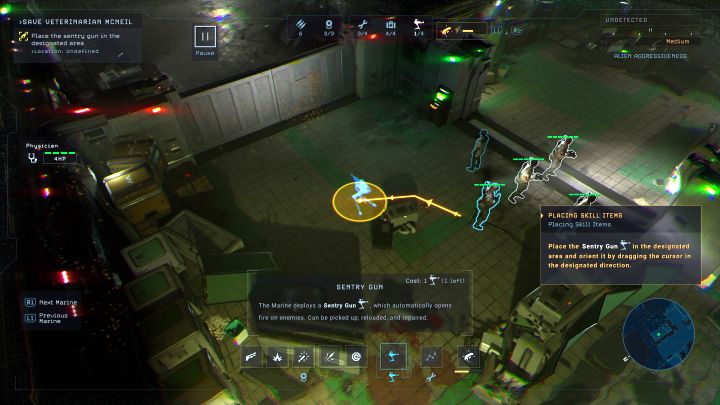
- You can find sentry guns for the first time during the first mission, Dead Hills, and you should use them in every greater battle, as they are excellent for eliminating Xenomorphs without taking additional risks.
- The sentry guns work like active skills. Choose the gun from the skill menu, and 1 Command Point is required to deploy each.
How to set range of fire for Sentry Gun?
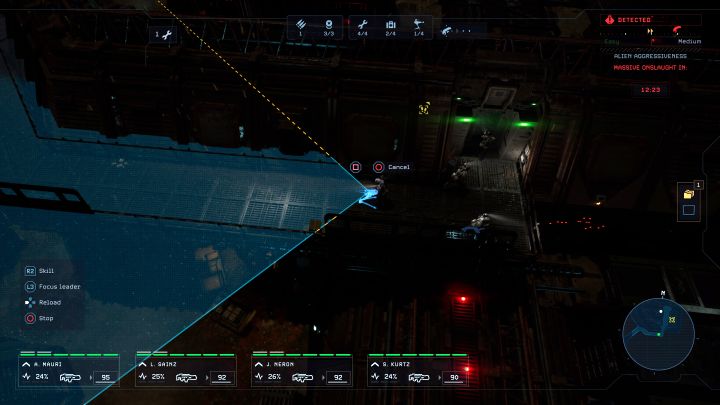
After selecting the Sentry Gun from the skill list, you have to choose the place to set it up, and this is a critical step in ensuring its usefulness in battle. Do not single press an interaction button, as the gun will be set up without the possibility of adjusting its operation. Instead:
- hold the left mouse button on PC;
- hold the X button (PlayStation ) or the A button (Xbox) while playing using a controller.
In both cases, the range will be indicated on the screen - the example is shown in the picture. Do not release the button and adjust the range to the places where you predict the enemy's appearance.
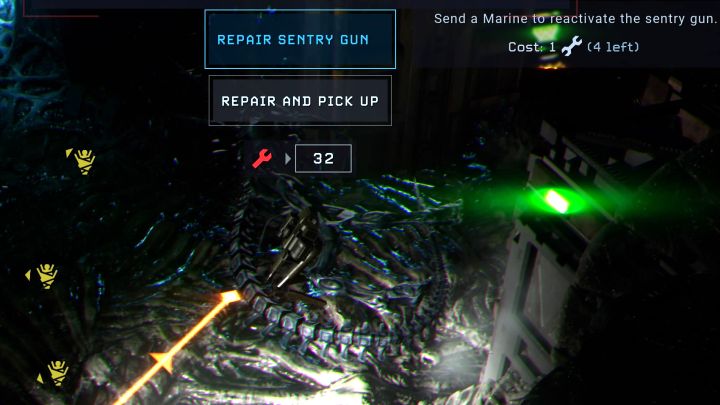
Unfortunately, the game does not allow you quickly rotate the Sentry Gun you placed earlier. If you want to change the range of it, you have to:
- pick up the Sentry Gun (and optionally repair it);
- choose a Sentry Gun from a skill from the list again and spend 1 Command Point;
- hold the skill button and place the gun the desired direction.



- Aliens Dark Descent Guide
- Aliens Dark Descent: Game Guide
- Aliens Dark Descent: FAQ
- Aliens Dark Descent: Is there an active pause?
- Aliens Dark Descent: Can you save the game?
- Aliens Dark Descent: How to get out of the cargo hold in the prologue?
- Aliens Dark Descent: How to escape from the server room and avoid Xenomorph?
- Aliens Dark Descent: How the Motion Tracker works?
- Aliens Dark Descent: How to focus the camera on the squad leader?
- Aliens Dark Descent: How to create a shelter and how to rest?
- Aliens Dark Descent: How to repel a Massive Onslaught?
- Aliens Dark Descent: How to reset aggressiveness level?
- Aliens Dark Descent: How to increase squad size?
- Aliens Dark Descent: Can you play as aliens?
- Aliens Dark Descent: How to rotate Sentry Gun?
- Aliens Dark Descent: How to change the apperance of marines?
- Aliens Dark Descent: How to replenish and where to find more ammunition?
- Aliens Dark Descent: How to unlock the Smart Gun?
- Aliens Dark Descent: How to get rid of trauma?
- Aliens Dark Descent: How to use a sniper rifle for stealth kills?
- Aliens Dark Descent: Should I save Robert, Lisa, and Drake in mission 6?
- Aliens Dark Descent: How to die less often?
- Aliens Dark Descent: How to get to the atmospheric processor generator in mission 6?
- Aliens Dark Descent: What does the command Kill That Bastard mean?
- Aliens Dark Descent: FAQ
- Aliens Dark Descent: Game Guide
You are not permitted to copy any image, text or info from this page. This site is not associated with and/or endorsed by the developers and the publishers. All logos and images are copyrighted by their respective owners.
Copyright © 2000 - 2026 Webedia Polska SA for gamepressure.com, unofficial game guides, walkthroughs, secrets, game tips, maps & strategies for top games.