LEGO Skywalker Saga: Co-op - multiplayer
This page of the LEGO Skywalker Saga guide contains information about multiplayer and co-op modes.
This page of the guide to LEGO Star Wars: The Skywalker Saga explains whether the game features multiplayer or split-screen co-op.
Split screen co-op
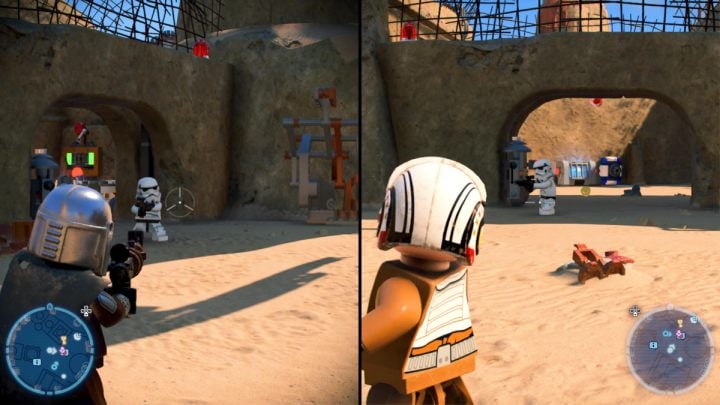
LEGO Star Wars: The Skywalker Saga features split-screen co-op. In order to play together you must connect a second controller and log in to a different account. The game will automatically split the screen and the other player can immediately jump in.
Player two can leave the game at any time by disconnecting their controller. This makes the game go back to singleplayer. Co-op only supports two people at once.
Multiplayer mode
Just like in the previous games in the series, LEGO Star Wars: The Skywalker Saga doesn't contain multiplayer.


- LEGO Skywalker Saga Guide
- LEGO Skywalker Saga: Game guide
- LEGO Skywalker Saga: Basics
- LEGO Skywalker Saga: Beginner's guide
- LEGO Skywalker Saga: Combat - weapons and tips
- LEGO Skywalker Saga: Death - respawn spot and losing studs
- LEGO Skywalker Saga: Vehicles - types and how to use
- LEGO Skywalker Saga: Character progression - points and how to distribute them
- LEGO Skywalker Saga: Jedi powers - actions
- LEGO Skywalker Saga: Fast travel - how it works?
- LEGO Skywalker Saga: Cheat codes (bonus content unlock) - list of all
- LEGO Skywalker Saga: Open locations and levels - how do they differ?
- LEGO Skywalker Saga: Co-op - multiplayer
- LEGO Skywalker Saga: Basics
- LEGO Skywalker Saga: Game guide
You are not permitted to copy any image, text or info from this page. This site is not associated with and/or endorsed by the developers and the publishers. All logos and images are copyrighted by their respective owners.
Copyright © 2000 - 2026 Webedia Polska SA for gamepressure.com, unofficial game guides, walkthroughs, secrets, game tips, maps & strategies for top games.