Ratchet & Clank Rift Apart: Weapons - how to choose it?
This page of Ratchet & Clank Rift Apart game guide explains how to select weapons from your inventory. You will also learn how to quickly switch to another weapon and how to assign your favorite weapons to shortcuts for easy access to your main firearms.
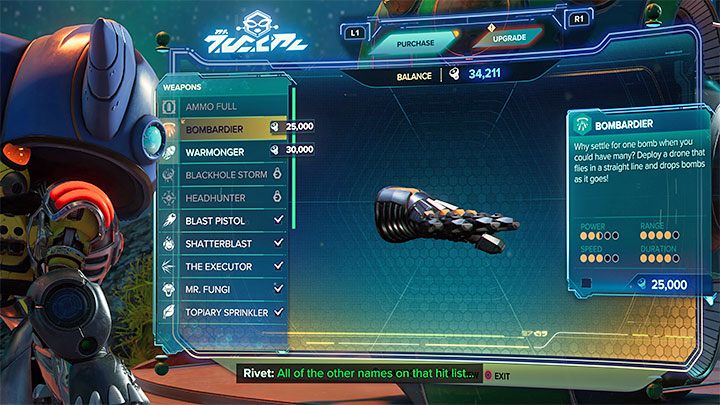
A large number of weapons are available in Ratchet & Clank Rift Apart - you can buy more weapons and gadgets from Mrs. Zurkon. Due to their relatively low prices throughout the game you'll be able to collect lots of powerful firearms.
An important note is the fact that there are no limits of carried weapons, that is, you can carry as many weapons as you wish. You can have all the weapons, that you have purchased from the merchant or gained by progressing through the game, at your disposal at any time during the game.
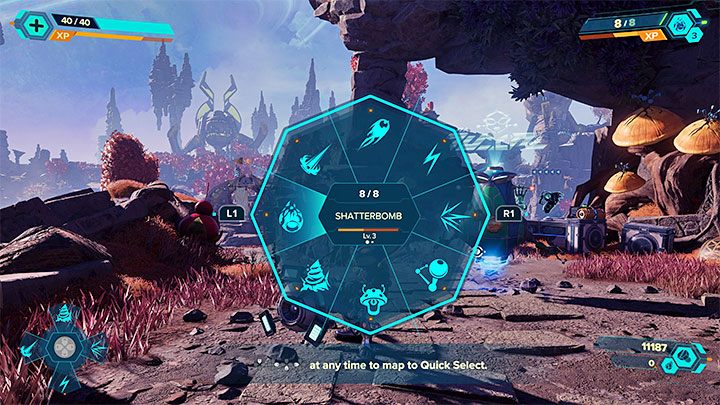
The drop-down weapon menu is displayed when you hold down the Triangle. You can then select the weapon of your interest. It's worth noting that the gameplay is paused for the time of selecting the weapon, so you never have to rush it and you can calmly choose the gadget you're interested in.
A single weapon selection window can only hold 8 of them. After collecting more than 8 weapons, you have to switch to separate tabs of the weapon selection window and this is done with the L1 and R1 buttons.
You can quickly switch to the most recently used weapon with a single press of the Triangle.
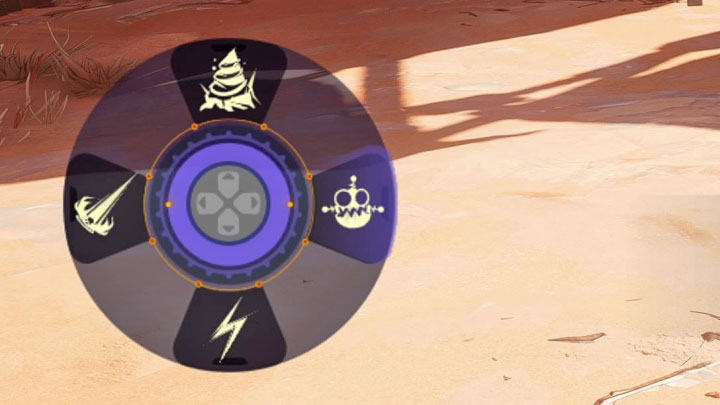
A much more interesting way is to use shortcuts to quickly select specific weapons. In the weapons drop-down menu, pay attention to the bottom left corner of the screen. There you can see the cross key buttons and you can assign your weapons to the 4 buttons of the cross key - after highlighting the weapon you are interested in, press the corresponding button of the cross key to assign it.
We think it's a good idea to have a variety of weapons at your disposal, such as a melee combat weapon, a ranged weapon, and a gadget for summoning allies.



- Ratchet & Clank Rift Apart Guide
- Ratchet & Clank Rift Apart: Game Guide
- Ratchet & Clank Rift Apart: FAQ
- Ratchet & Clank Rift Apart: Returning to earlier planets - is it possible?
- Ratchet & Clank Rift Apart: Healing - how to restore health?
- Ratchet & Clank Rift Apart: Barriers, forcefields - what to do?
- Ratchet & Clank Rift Apart: Stat boosts - how to get them?
- Ratchet & Clank Rift Apart: Walls - how to wall-run?
- Ratchet & Clank Rift Apart: Character appearance - can it be changed?
- Ratchet & Clank Rift Apart: Interdimensional travel - how does it work?
- Ratchet & Clank Rift Apart: Fast Travel - is it available?
- Ratchet & Clank Rift Apart: Swimming - is it in the game?
- Ratchet & Clank Rift Apart: Magneboots - how to use?
- Ratchet & Clank Rift Apart: Map-O-Matic - how to get?
- Ratchet & Clank Rift Apart: Problems with a puzzle - what to do?
- Ratchet & Clank Rift Apart: XP - how to earn it?
- Ratchet & Clank Rift Apart: Trudi - how to spit fire?
- Ratchet & Clank Rift Apart: Point of no return - is there one?
- Ratchet & Clank Rift Apart: Rifts - How do I open them?
- Ratchet & Clank Rift Apart: Weapons - how to choose it?
- Ratchet & Clank Rift Apart: Escaping UFO - how to stop it?
- Ratchet & Clank Rift Apart: Shields - can they be used?
- Ratchet & Clank Rift Apart: FAQ
- Ratchet & Clank Rift Apart: Game Guide
You are not permitted to copy any image, text or info from this page. This site is not associated with and/or endorsed by the developers and the publishers. All logos and images are copyrighted by their respective owners.
Copyright © 2000 - 2026 Webedia Polska SA for gamepressure.com, unofficial game guides, walkthroughs, secrets, game tips, maps & strategies for top games.