New World: Speech synthesis - how to disable?
This page of the New World tutorial shows you how to disable speech synthesizer.
Last update:
Creators of New World implemented the ability to read the messages of players in the chat using a text-to-speech synthesizer. This option should be disabled by default, but may become active without user input. On this page of the guide, we tell you how to turn the speech synthesizer off.
How to turn off the speech synthesizer?
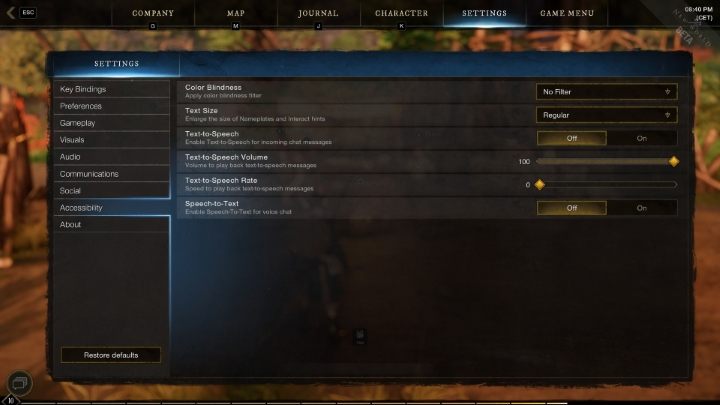
In order to disable speech synthesis, navigate to Settings in the main menu of the game. The next step is to open the Accessibility tab. This is where the buttons for turning the speech synthesizer off and on are located. The option can be changed at any time of the game and without the need to restart New World.



- New World Guide
- New World: Game Guide
- New World: Appendix
- New World: System requirements PC
- New World: Controls/Keybinds
- New World: Language - how to change?
- New World: Speech synthesis - how to disable?
- New World: Queue - how to skip?
- New World: Server - how to change?
- New World: Friends - how to add them?
- New World: Accessibility options
- work in progress
- New World: Appendix
- New World: Game Guide
You are not permitted to copy any image, text or info from this page. This site is not associated with and/or endorsed by the developers and the publishers. All logos and images are copyrighted by their respective owners.
Copyright © 2000 - 2026 Webedia Polska SA for gamepressure.com, unofficial game guides, walkthroughs, secrets, game tips, maps & strategies for top games.