Ixion - Transfer Resources Between Sectors and More
In this article, we will tell you how to transport resources between sectors in Ixion. We will also reveal to you some other tips.
3

Ixion is a city builder type game set on a space-travelling station. It can be called the spiritual heir of Startopia. The production does a very good job of introducing the player to the game world, however, there are still some mechanics that can be unclear. In this article, we will talk about the transport of resources between sectors and reveal some additional hints.
Ixion: Transport resources between sectors
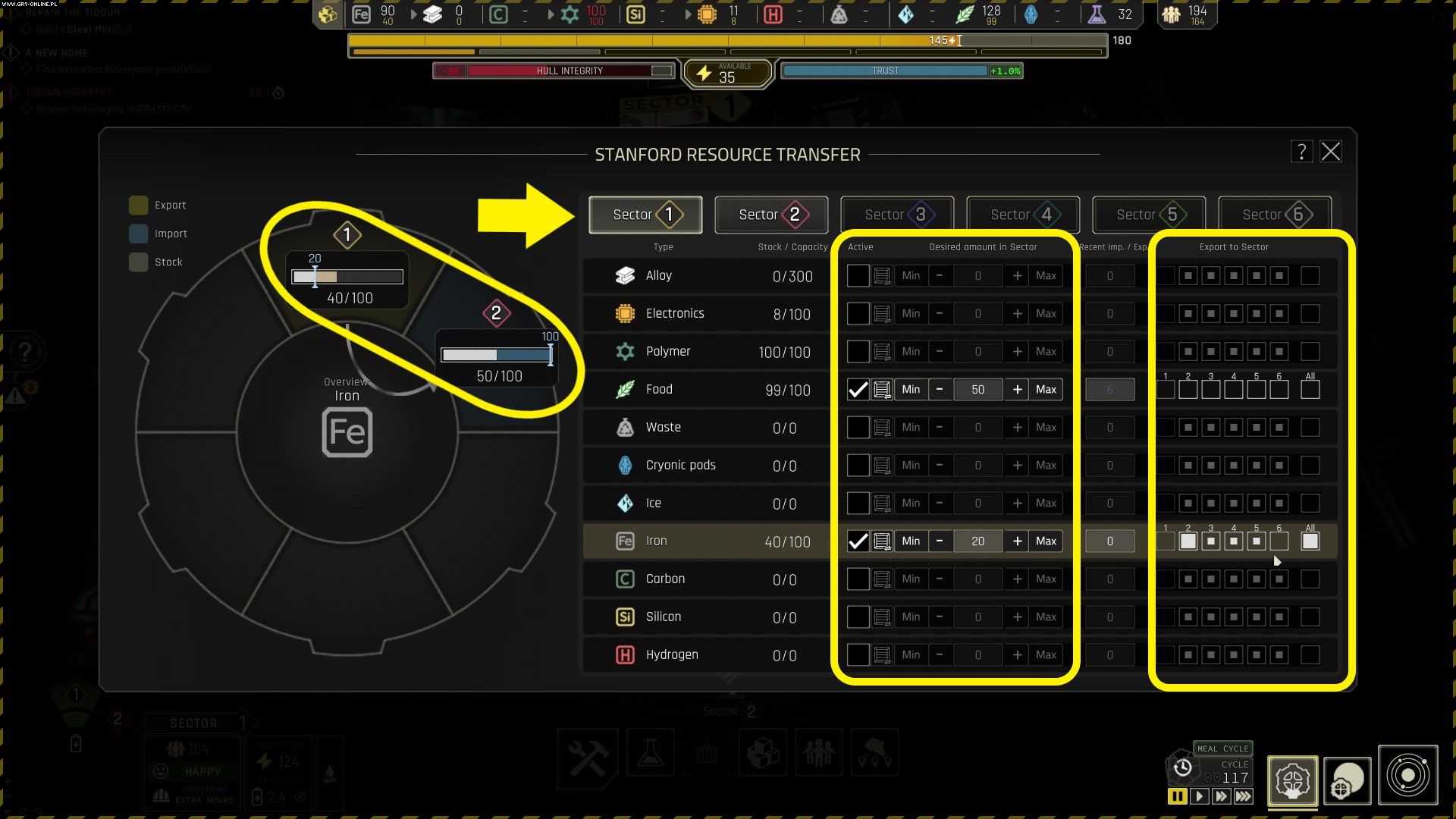
Resource ManagementScreen Gamepressure, Ixion
To transport raw materials between sectors, you first need to select the crate icon from the bottom menu - this is Resource Management. A window like the one shown above will then appear in front of you.
At the very top of it, you can select the sectors which raw materials you want to handle. Once you have selected the appropriate sector, you should then decide on the resources you wish to export.
In the center of the screen and on the sliders on the left, you set how much of a given raw material is to be left at a minimum in the depot in a given sector. If the values do not correspond to the actual situation, i.e. there is too little or too much of a given raw material, the game will try to even out the proportions. Remember that you have to check “Active” box.
On the right-hand side of the screen you select the sectors with which to trade. Filling in the white square indicates the priority of sending raw materials if a given resource is to be sent to several sectors.
Ixion: Tips for managing resources
- Resources need stockpiles - each raw material needs its own separate stockpile. This also applies to the transfer of supplies to other sectors: 1 raw material - 1 stockpile. If you do not have space, resources will not be generated/shipped.
- Remember about roads - resource stockpiles and other buildings must be connected by roads.
- It is not enough to have resources in your station - this may be quite obvious (given the topic of the article), but remember that in order to have access to raw materials, you must have them in stock in the sector that needs them. Raw materials are not transferred automatically, you have to issue the appropriate command in the Resource Management tab.
- You need probes - later in the game, you need probes to discover the resources in the star system. You must then give the appropriate order to your mining ship to collect them. You will be able to process such raw materials into the materials you need in the factories.
- Unlocking new sectors - in order to open new sectors, you need to bring resources to the Gateway. To do this, you need to lead the road to the right places of it. It is therefore advisable not to build anything in the immediate vicinity of the Gateway, in order to leave space for the road to be built.



3

Author: Damian Gacek
Graduate of English Philology and English in Public Communication. His portfolio includes a scientific article on video game translation. Working with Gamepressure.com since 2019, writing for various departments. Currently, deals with guides and occasionally supports the newsroom. Interested in electronic entertainment since childhood. Loves RPGs and strategies, often also immersing himself in the depths of indie games. In his free time, works on a book and learns film editing.


Latest News
- KaM Remake, the fan-made version of the classic strategy game, is practically finished
- A fan has enhanced and fixed the classic Ultimate Spider-Man for PC
- Because of the final boss, I never gave up on entire genre, but the wonderful Rayman 2: The Great Escape hasn't aged a bit
- The free version of the cult classic shmup Tyrian has been updated after 4 years
- A new Nod campaign has been added to The Dawn of the Tiberium Age, a freeware Command & Conquer RTS