Mass Effect Andromeda: How to collect resources with the NOMAD?
Mineral resources are a crucial part of the gameplay in Mass Effect Andromeda, as those are used in the process of creating new weapons, elements of armor, as well as Augmentations. The amount of minerals required to craft specific items differ and depend on the quality of the item - the better it is (rarer), the more expensive and rare materials are required to craft it. One of the methods of acquiring minerals is to use the NOMAD vehicle.
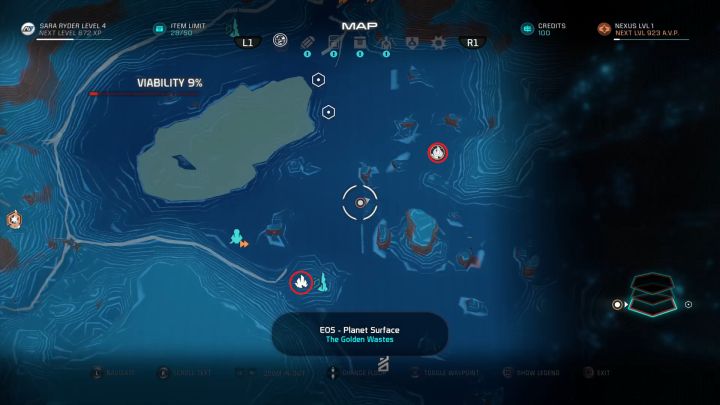
This can be done on the surface of some of the planets - not every single one of them, but there are more mineral deposits available than you will even need. To start collecting minerals, you have to look for an appropriate place - those are marked on the map with special icons, such as the ones shown on the above screenshot. Those mineral deposits are characterized by the amount of minerals they store - beginning with Rich, minerals change their description as you deplete them, until finally you won't be able to get anything from them.
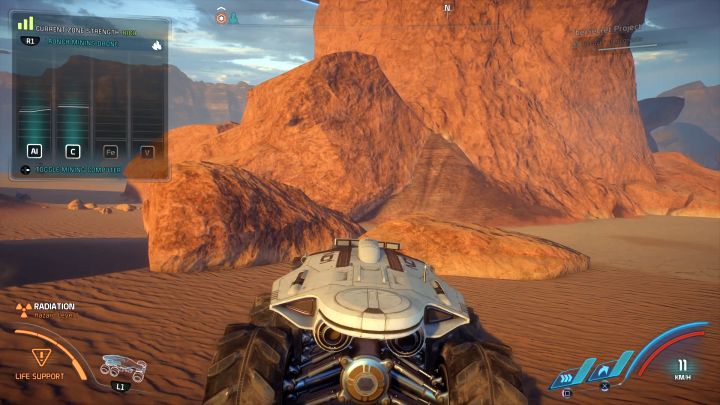
When you find a deposit, you have to travel near it. Minerals are located in a small radius around the mineral deposit icon shown on the map. To check if there's something to collect, open the mining window by pressing the button shown in the upper left corner of the screen (while, quite obviously, driving the NOMAD). The following information will be presented in the newly displayed window:
- The amount of resources that the mineral deposit holds. It begins with Rich and changes to Good, Fair and so on as you deplete the mineral deposit, finally reaching a point when you won't be able to collect anything more.
- Mineral graphs showing the types of minerals that can be mined on the planet. Those are four and normally the graphs will show zero values. When you approach one of the available minerals, the appropriate graph will start rising - the higher the value shown on the graph, the more resources you will mine upon drone deployment.
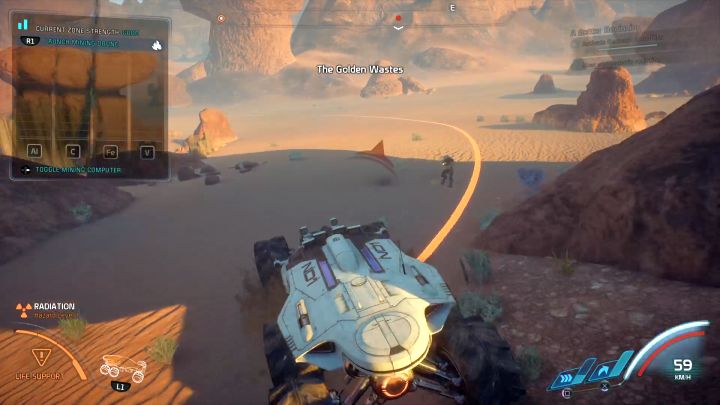
When you get to the appropriate place and one of the graphs will show that there are some minerals in the area, you just need to deploy a mining probe. This can be done by pressing the button shown in the upper left corner of the mining window. Once the drone is deployed, all of the resources shown on the graphs will be mined from the nearby area. To collect more, you have to travel outside of the zone of the previously installed mining drone - the orange line shows the range of it.
There are some things worth remembering when it comes to mining with the NOMAD, such as:
- Try to explore the area before launching a mining drone. A drone will allow you to collect all of the resources shown on the graphs, but launching them too soon might deprive you of some more valuable minerals. Even though the drone won't collect a rare mineral, it (the mineral) can still be in the range of the drone, preventing you from launching another one and depriving you of a rare mineral.
- There's no limit to the amount of drones the NOMAD is carrying, as well as to the number you can launch - the only limitation is the number of areas where you can launch mineral drones.
- Once a drone is launched, it will forever remain in the specific spot - you can't destroy it and the enemies won't be able to as well.



- Mass Effect: Andromeda Game Guide
- Mass Effect Andromeda: Strategy Guide
- Mass Effect Andromeda: FAQ - Frequently asked questions
- Mass Effect Andromeda: List of scale models for the captain's cabin
- Mass Effect Andromeda: NOMAD - which upgrades should you start with?
- Mass Effect Andromeda: What does item weight influence?
- Mass Effect Andromeda: How to increase character weight limit?
- Mass Effect Andromeda: What is Research Data and how to obtain it?
- Mass Effect Andromeda: Why can't I access the Strike Team screen?
- Mass Effect Andromeda: How to modify weapons and armors?
- Mass Effect Andromeda: How to change the look of your character?
- Mass Effect Andromeda: How to change active party members?
- Mass Effect Andromeda: When do you unlock all party members?
- Mass Effect Andromeda: How to collect resources with the NOMAD?
- Mass Effect Andromeda: How to get Research Data?
- Mass Effect Andromeda: How to get crafting materials?
- Mass Effect Andromeda: How to earn Credits?
- Mass Effect Andromeda: How to get more Cryo Pods?
- Mass Effect Andromeda: Which cryo pod capsules should you open first and which should you avoid?
- Mass Effect Andromeda: How do Fusion Mods work and where to get them?
- Mass Effect Andromeda: How to reset skill points of your character?
- Mass Effect Andromeda: How to reveal hidden treasures on the map?
- Mass Effect Andromeda: How to increase the item limit of the character?
- Mass Effect Andromeda: How to increase the amount of carried weapons?
- Mass Effect Andromeda: How to increase the amount of carried Consumables?
- Mass Effect Andromeda: How to unlock the N7 Armor?
- Mass Effect Andromeda: FAQ - Frequently asked questions
- Mass Effect Andromeda: Strategy Guide
You are not permitted to copy any image, text or info from this page. This site is not associated with and/or endorsed by the developers and the publishers. All logos and images are copyrighted by their respective owners.
Copyright © 2000 - 2026 Webedia Polska SA for gamepressure.com, unofficial game guides, walkthroughs, secrets, game tips, maps & strategies for top games.