Mass Effect Andromeda: What is Research Data and how to obtain it?
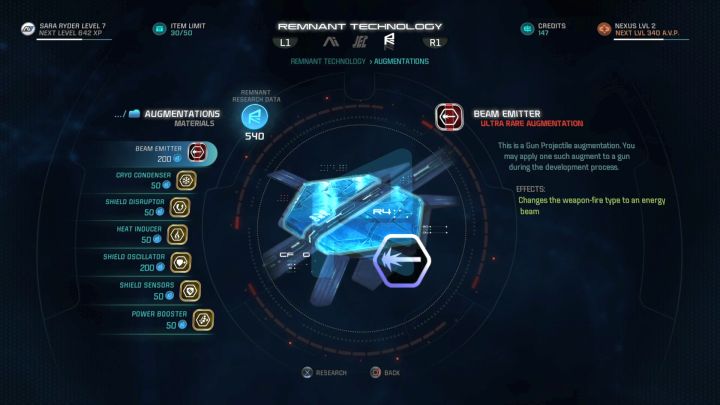
Research Data is a kind of an additional type of currency in the game, although it cannot be spent on buying items or enhancements. Instead, it is used to design new technologies - unlocking blueprints for increasingly powerful weapons, armor, and other very valuable items. How to obtain them, though?
Acquiring it is very simple - you just have to scan various objects. To do so, you need to use the scanner built into the omni-tool that the protagonist has. You can get acquainted with the scanning process at the very beginning of the game when you use it to localize a technical malfunction's source. However, it's not enough to simply run around the map, look at and click on random items to get some Research Data points - you have to find specific things that can be scanned.
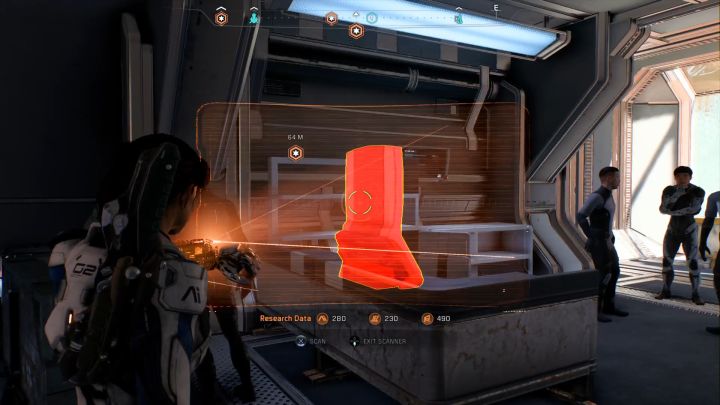
Those can be all kinds of things - new plants you haven't seen before, characteristic objects (such as portals, generators, or shields), enemies defeated for the first time, or corpses of colonists that you will come across constantly. Every such item can be scanned just once - if you do it again, you simply gain nothing. Objects available for scanning are colored red, while those already scanned have a yellow outline.
Scanning items gives you one of three kinds of Research Data:
- Milky Way - you gain it by scanning objects connected to colonists (or their corpses) and their equipment.
- Heleus- this kind of data is obtained by scanning objects connected to the races that inhabit only Andromeda Galaxy.
- Remnant - data connected to the abandoned "alien" technology. You can obtain it by scanning Remnant enemies (robots you bump into when solving Remnant puzzles) as well as objects you come across while exploring locations linked to the main storyline.
The amount of available Research Data points can be checked in two ways: by opening the Research screen (the value is visible at the top of the screen) or by activating the omni-tool scanner (the number is visible at the lower edge of the screen).



- Mass Effect: Andromeda Game Guide
- Mass Effect Andromeda: Strategy Guide
- Mass Effect Andromeda: FAQ - Frequently asked questions
- Mass Effect Andromeda: List of scale models for the captain's cabin
- Mass Effect Andromeda: NOMAD - which upgrades should you start with?
- Mass Effect Andromeda: What does item weight influence?
- Mass Effect Andromeda: How to increase character weight limit?
- Mass Effect Andromeda: What is Research Data and how to obtain it?
- Mass Effect Andromeda: Why can't I access the Strike Team screen?
- Mass Effect Andromeda: How to modify weapons and armors?
- Mass Effect Andromeda: How to change the look of your character?
- Mass Effect Andromeda: How to change active party members?
- Mass Effect Andromeda: When do you unlock all party members?
- Mass Effect Andromeda: How to collect resources with the NOMAD?
- Mass Effect Andromeda: How to get Research Data?
- Mass Effect Andromeda: How to get crafting materials?
- Mass Effect Andromeda: How to earn Credits?
- Mass Effect Andromeda: How to get more Cryo Pods?
- Mass Effect Andromeda: Which cryo pod capsules should you open first and which should you avoid?
- Mass Effect Andromeda: How do Fusion Mods work and where to get them?
- Mass Effect Andromeda: How to reset skill points of your character?
- Mass Effect Andromeda: How to reveal hidden treasures on the map?
- Mass Effect Andromeda: How to increase the item limit of the character?
- Mass Effect Andromeda: How to increase the amount of carried weapons?
- Mass Effect Andromeda: How to increase the amount of carried Consumables?
- Mass Effect Andromeda: How to unlock the N7 Armor?
- Mass Effect Andromeda: FAQ - Frequently asked questions
- Mass Effect Andromeda: Strategy Guide
You are not permitted to copy any image, text or info from this page. This site is not associated with and/or endorsed by the developers and the publishers. All logos and images are copyrighted by their respective owners.
Copyright © 2000 - 2026 Webedia Polska SA for gamepressure.com, unofficial game guides, walkthroughs, secrets, game tips, maps & strategies for top games.