Encountering Unity 6000.0.50f1 error in Hollow Knight: Silksong? There are a few things to try
If you're encountering this error that prevents you from launching Hollow Knight: Silksong on Steam, you are not alone. There are a few tricks to try.

Today, nearly every digital video game storefront has crashed thanks to the incredible launch of Hollow Knight: Silksong. In just under four hours, the game managed to attract half a million players on Steam, and that’s not even considering the thousands of others across various consoles. However, with so many people jumping in, there are bound to be issues, even for a small minority of players. On Steam, a handful of players have encountered a launch error.
Players are unable to launch Silksong thanks to Error Unity 6000.0.50f1. There might be a fix
A Steam discussion post provides the error code: Error Unity 6000.0.50f1, and explains that the game won’t launch. At the time of writing, at least ten other users have commented, stating they are experiencing the same issue. Currently, there is no word from the developers, but keep in mind that Team Cherry is a very small, independent team that may not be able to get to everything immediately. While there’s no guaranteed fix at the moment, there are at least a few things you can try.
Whenever you encounter a problem with a game on Steam, it’s always good practice to verify the game files' integrity. Thankfully, this is fairly simple to do. Navigate to your Steam library, find the game, or in this specific case, Hollow Knight: Silksong, right-click it, and select “Properties.” This will open up a secondary window. Go to “Installed Files” and click “Verify integrity of game files.” This will run a quick check and will repair any corrupted or missing game files.
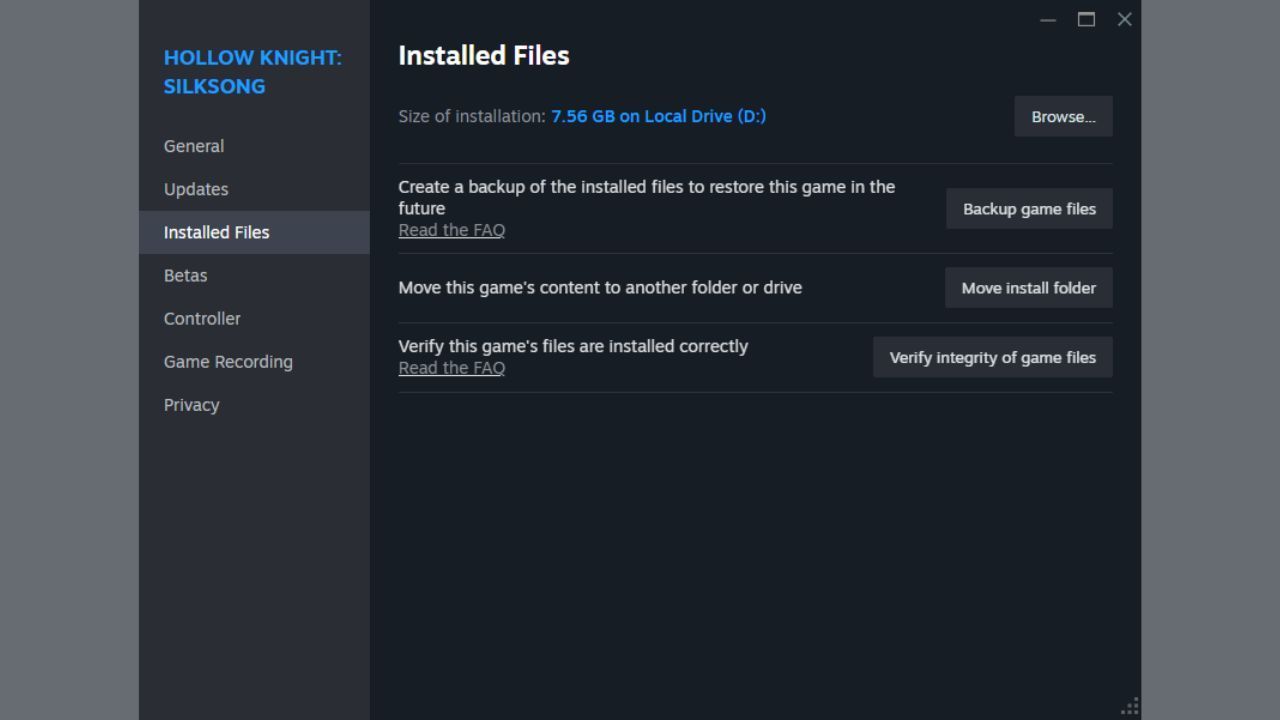
Make sure to click "Verify integrity of game files."Steam, Screenshot by me.
If this still doesn’t solve the problem, it can’t hurt to uninstall and reinstall Hollow Knight: Silksong. Hopefully, since it’s only about 8 GB, it shouldn’t take too long. You can also try restarting Steam or even restarting your computer completely.
This problem appears to be a common issue with games built in the Unity engine. For example, it may be helpful to look up other games that have had a similar issue in the past. Though I cannot recommend anything specifically, as there’s no guarantee that it would work in the same way for Silksong.
For now, if none of the above options work for you, it might be best to wait to see if someone from the original Steam discussion post solves the problem or if Team Cherry introduces a fix. It should also go without saying that if an update for Silksong comes out, you should download that update immediately.
- „End of Xbox Game Pass.” Players are reportedly canceling their subscriptions in such large numbers that they have overloaded Microsoft's website
- „Short of an unexpected tragedy.” Silksong took seven years off their lives, so the devs are approaching their next big plans with a cool head
- Hollow Knight: Silksong devs may skip the Game Awards, say they are „safe” becasue of Expedition 33



0

Author: Matt Buckley
Matt has been writing for Gamepressure since 2020, and currently lives in San Diego, CA. Like any good gamer, he has a Steam wishlist of over three hundred games and a growing backlog that he swears he’ll get through someday. Aside from daily news stories, Matt also interviews developers and writes game reviews. Some of Matt’s recent favorites include Arco, Neva, Cocoon, Animal Well, Baldur’s Gate 3, and Tears of the Kingdom. Generally, Matt likes games that let you explore a world, tell a compelling story, and challenge you to think in different ways.


Latest News
- The free version of the cult classic shmup Tyrian has been updated after 4 years
- A new Nod campaign has been added to The Dawn of the Tiberium Age, a freeware Command & Conquer RTS
- Fans have removed the time limit from The Blood of Dawnwalker
- Empire II: Total War now with two extra historical campaigns
- Someone has remastered Medieval 2: Total War and Rome: Total War so well that the AI's moves are now calculated in a matter of seconds [Updated]