How to Check in Guard Phone in One Armed Robber
If you have problems with guard phone in One Armed robber, you are in a good place. Read our guide to learn how to check in.
3

One-Armed Robber is a new free to play game which allows players to take part in heists. It is definitely less realistic than recently released Payday 3 but regardless of that, it attracted thousands of fans with its multiplayer and silliness. Hower, many people have problems with guard phones. If you don’t check them in quickly enough, the alarm will start. In this guide we will tell you how to do it.
How to Check in Guard Phone in One Armed Robber
Once you dispose quietly of a guard, his phone will start counting. It is nothing good, as it triggers alarm if it reaches 0. However, you can disable it, if you are quick enough.
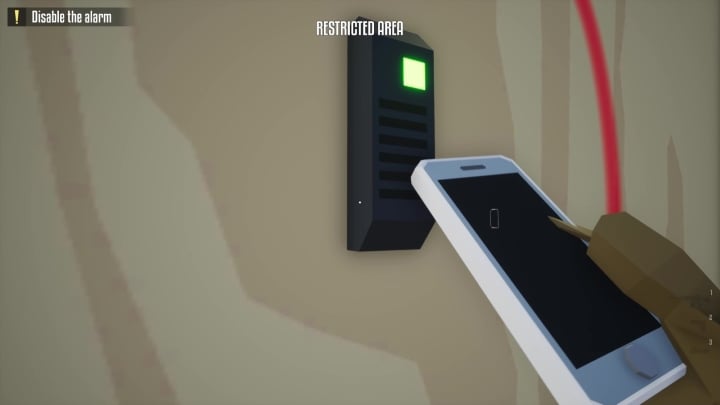
- Use your empty hand and pick up a guard phone.
- Go to the check in point on the wall (the screen above). The closest one should be highlighted once you pick up a guard phone.
- Keep the phone close to the device until it turns black.
- You are free to continue heist.
Remember that you will have to do it quickly, as you have only few seconds to complete checking in. You should make sure that all close cameras are turned off. If you will not, you may trigger alarm anyway while doing above steps.
It is a good idea to complete a stealth tutorial to learn more about mechanics. It is hidden quite well, though. In the right corner of the screen click More and later Tutorials button. Now, you will be able to pick the stealth one.
3

Author: Damian Gacek
Graduate of English Philology and English in Public Communication. His portfolio includes a scientific article on video game translation. Working with Gamepressure.com since 2019, writing for various departments. Currently, deals with guides and occasionally supports the newsroom. Interested in electronic entertainment since childhood. Loves RPGs and strategies, often also immersing himself in the depths of indie games. In his free time, works on a book and learns film editing.


Latest News
- A fan has enhanced and fixed the classic Ultimate Spider-Man for PC
- Because of the final boss, I never gave up on entire genre, but the wonderful Rayman 2: The Great Escape hasn't aged a bit
- The free version of the cult classic shmup Tyrian has been updated after 4 years
- A new Nod campaign has been added to The Dawn of the Tiberium Age, a freeware Command & Conquer RTS
- Fans have removed the time limit from The Blood of Dawnwalker