How to Switch Teams in Minecraft Legends
In this guide we will tell you how to switch teams in Minecraft Legends. Read our article if you want to learn more about it.

Minecraft Legends debuted yesterday. The game is a new adventure in the world of popular game Minecraft. Many players were interested in this title and gave it a chance. There are few modes, which you can try out. Of course, there is also an option to play against other people. The problem starts, when you want to team up with your friends. In this guide we will tell you how to switch teams in Minecraft Legends.
Public
Right now, it is impossible to switch teams in the Public mode. The community is not sure if this is a bug or an intentional act by the developers. However, there is no official announcement on this matter.
There is a workaround, though. If you want to play with other friends, just follow the steps presented below:
- One of you should create the lobby.
- Wait for someone to join (this person will appear in the opposite team).
- Your friend should join (they should be in your team).
- Repeat steps 2 and 3 untill all your friends will be in your team.
Private
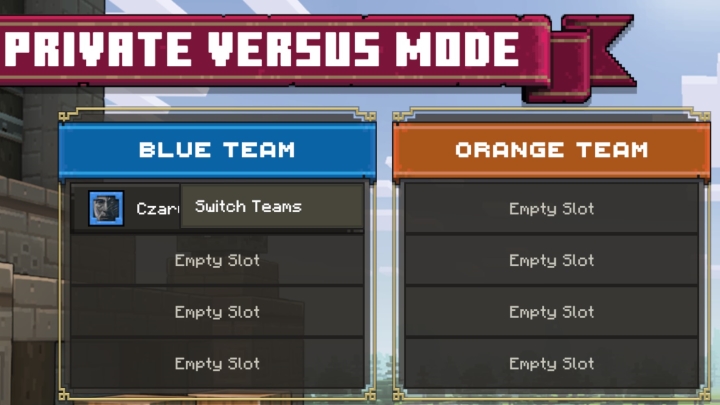
If you play Private mode with your friends, you can switch teams easily.
- PC (keyboard and mouse) – if you play using keyboard and mouse, click on your name, the switch team option will appear. Confirm it with enter – nothing easier.
- Xbox – in the case you are using Xbox controllers, press Y and confirm it with B.
- PlayStation – in the case you are using PlayStation controllers press Triangle and confirm it with Circle.
Read also:
- Minecraft Legends Launches; New Game From Homeworld: Deserts of Kharak Devs
- Minecraft Legends in First Reviews



0

Author: Damian Gacek
Graduate of English Philology and English in Public Communication. His portfolio includes a scientific article on video game translation. Working with Gamepressure.com since 2019, writing for various departments. Currently, deals with guides and occasionally supports the newsroom. Interested in electronic entertainment since childhood. Loves RPGs and strategies, often also immersing himself in the depths of indie games. In his free time, works on a book and learns film editing.


Latest News
- Because of the final boss, I never gave up on entire genre, but the wonderful Rayman 2: The Great Escape hasn't aged a bit
- The free version of the cult classic shmup Tyrian has been updated after 4 years
- A new Nod campaign has been added to The Dawn of the Tiberium Age, a freeware Command & Conquer RTS
- Fans have removed the time limit from The Blood of Dawnwalker
- Empire II: Total War now with two extra historical campaigns