How to Turn Off Narrator in Minecraft Legends
Are you tired by the voice which reads UI? In this guide we will tell you how to turn off the narrator in Minecraft Legends. Read our article to learn more about this issue.

Minecraft Legends has just been released, offering a new adventure in the beloved Minecraft universe. The game has generated a lot of interest among players, who are keen to try out its various modes. There is only one problem – a voice which reads the UI text. While it is a great idea, and for sure it can be useful for many people, it is quite incomprehensible. What is more, the sound of it can irritate some players. In this guide we will tell you how to turn off the narrator in Minecraft Legends.
How to turn off the narrator
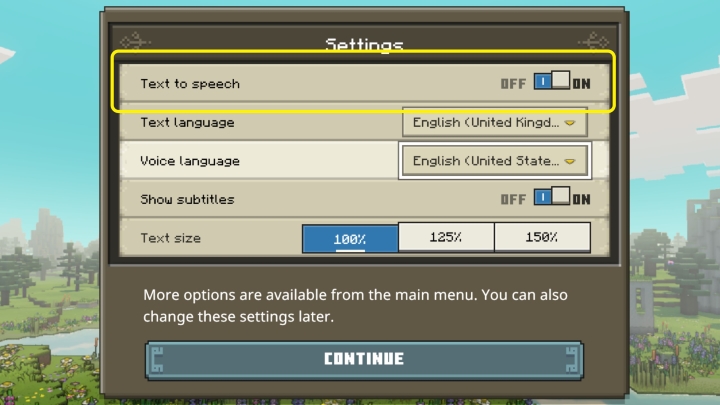
You can turn off the UI reader when you start the game for the first time. Just disable text to speech option at the top of the window presented above.
However, if you did not use this occasion to do that, there is always another method. You have to go to the game’s menu:
- Enter Settings,
- Pick Accessibility,
- In the Text section, turn off text to speech.
Remember that the UI reader will turn off after the last spoken sentence. So do not expect it to be silent immediately. Just wait patiently for the narrator to stop. The voice should not start again after this. Of course, you can turn it on in the same way if needed.
If you want to learn more about the game, read also our other articles and guides.
Articles about Minecraft Legends:
- Minecraft Legends Launches; New Game From Homeworld: Deserts of Kharak Devs
- Minecraft Legends in First Reviews
Guides to Minecraft Legends:



0

Author: Damian Gacek
Graduate of English Philology and English in Public Communication. His portfolio includes a scientific article on video game translation. Working with Gamepressure.com since 2019, writing for various departments. Currently, deals with guides and occasionally supports the newsroom. Interested in electronic entertainment since childhood. Loves RPGs and strategies, often also immersing himself in the depths of indie games. In his free time, works on a book and learns film editing.

Latest News
- KaM Remake, the fan-made version of the classic strategy game, is practically finished
- A fan has enhanced and fixed the classic Ultimate Spider-Man for PC
- Because of the final boss, I never gave up on entire genre, but the wonderful Rayman 2: The Great Escape hasn't aged a bit
- The free version of the cult classic shmup Tyrian has been updated after 4 years
- A new Nod campaign has been added to The Dawn of the Tiberium Age, a freeware Command & Conquer RTS