How to use FM26 in game editor to edit players
Many players have problems with using the in-game editor in Football Manager 26. We are here to help! With our guide you will edit players without issues.

Many people were waiting for the newest part of the Football Manager series. FM26 was released a couple of hours ago and managed to attract tens of thousands of players. For those of us who would like to tailor their experience a little bit more, developers have prepared an in game editor to edit various characteristics of our footballers. However, it seems that some players are puzzled by this feature, as it is not very intuitive. If you are one of them, read our guide!
How to use Football Manager 26 in-game editor to edit players
- Sadly, the first step to use in-game editor is to buy it. It is a DLC that can be purchased in the same store you have bought the base game. It costs 8,99 USD.
- Now, you should create your manager. It is free for all players. However, you can use the in-game editor only if you load the save!
- So, after creating the new game and taking a team under your wing, go to the Squad tab.

Right-click to see some general options.Source: Football Manager 26, developer: Sports Interactive
- Now, you can right-click any player you want to edit and see a new option at the bottom of the menu “In-Game Editor” (if you can’t see it, save FM26, close the game and load it). Here you can choose some basic commands – Freeze Attributes, Terminate Contract, Move to other club, Remove all Unhappiness / Suspensions / Injuries. However it is far from over.
- You can click the player to see their detailed description with various stats.
If you find our guides and news helpful and interesting, we recommend to follow us on Google News. It is free and supports us.
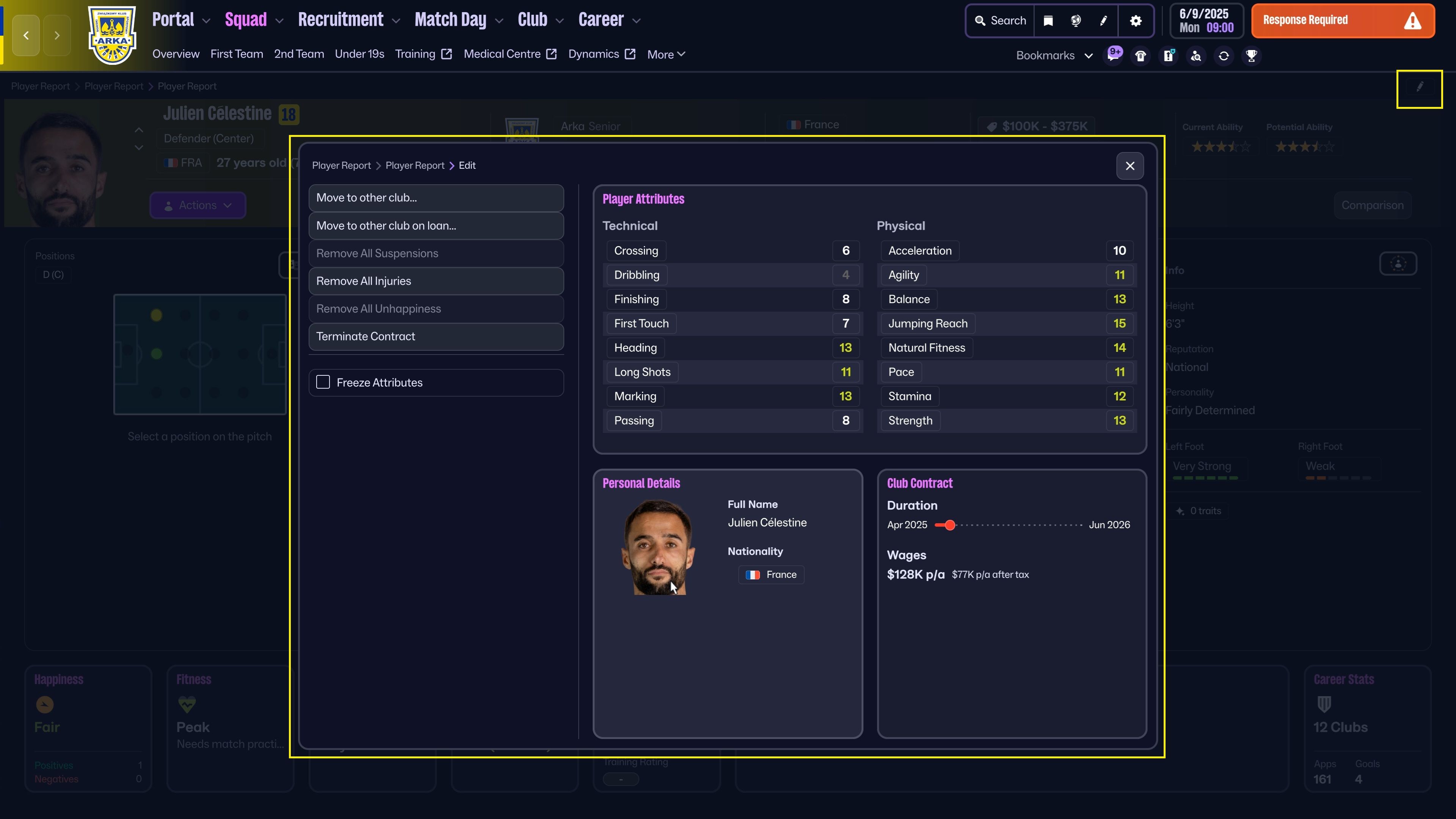
Edit player.Source: Football Manager 26, developer: Sports Interactive
- There is a button in the upper right corner of the screen – edit player. When you press it, it will open the editor in the middle of the screen.
- The editor has 4 sections – the general one (the same you see when you right-click the player on the Sqad screen), Player Attributes (remember that there are various categories of attributes that you can change), Personal Details and Club Contract. After clicking each of them, you will be taken to separate menus that will allow you to further change the footballer.


0

Author: Damian Gacek
Graduate of English Philology and English in Public Communication. His portfolio includes a scientific article on video game translation. Working with Gamepressure.com since 2019, writing for various departments. Currently, deals with guides and occasionally supports the newsroom. Interested in electronic entertainment since childhood. Loves RPGs and strategies, often also immersing himself in the depths of indie games. In his free time, works on a book and learns film editing.

Latest News
- The free version of the cult classic shmup Tyrian has been updated after 4 years
- A new Nod campaign has been added to The Dawn of the Tiberium Age, a freeware Command & Conquer RTS
- Fans have removed the time limit from The Blood of Dawnwalker
- Empire II: Total War now with two extra historical campaigns
- Someone has remastered Medieval 2: Total War and Rome: Total War so well that the AI's moves are now calculated in a matter of seconds [Updated]