EU5 crashing at startup? There might be a solution
Having trouble launching Europa Universalis 5 without it crashing? Many users are experiencing the same issue. Thankfully, there is one solution worth trying.

Today, the fifth entry in the grand strategy series, Europa Universalis 5, launches on PC. It’s one of the most anticipated launches of the month of November. This will be the first entry in the series in 12 years, and it was only revealed less than 5 months ago. With so much time between entries, it’s not surprising that EU5 will take the series in a slightly new direction. Plus, as with all major video game launches, players are experiencing issues. The developers are likely tracking everything and doing what they can to push out updates and patches. However, in the meantime, if you are experiencing the common issue of the game crashing on startup, there is a simple solution to try.
Europa Universalis 5 crashing on startup? There could be a solution
The issue is apparent on Steam’s EU5 community discussion page, where a few dozen players are experiencing the same issue. The problem appears to occur right when players try to play the game. Most can’t even get the game to start. But a couple of users have provided a potential solution that has worked for some players.
If you’re having issues with EU5 at launch, try this solution from Juuken and TheKingMaker on Steam. Open your Steam library and right-click on Europa Universalis 5. Open Properties, select the General tab, find Launch Options, and enter “-dx12.” Then try launching your game again. This will essentially force the game to launch in a different DirectX version, which is helpful for computers with older graphics hardware.
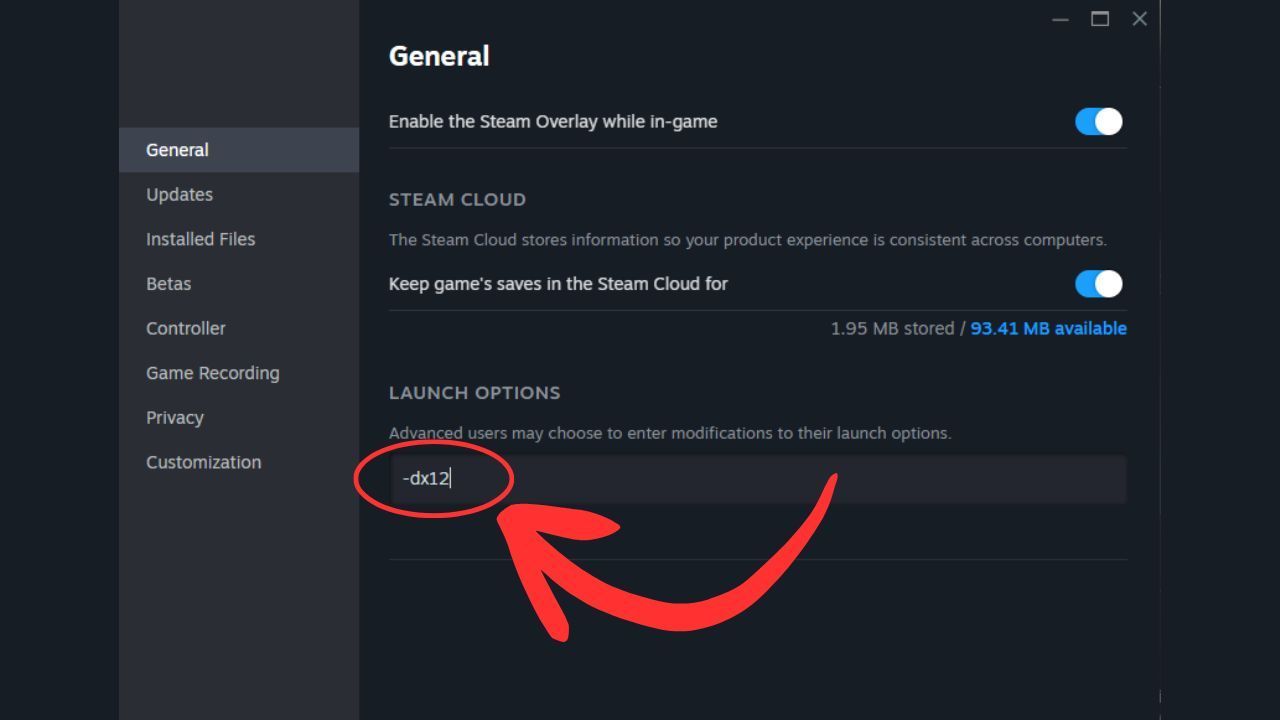
Where to enter "-dx12" in the launch options.Steam
As this article was being written, the developers also shared this same solution on Steam, lending it some extra credibility. Though it doesn’t appear to be working for everyone, so patience is key.
For more updates about the newest game releases, join our community on Google News. There, you can find a direct feed of the latest news and insights into the gaming industry.
On the Steam discussion page about this issue, a handful of users have replied to these comments to say it worked for them, with one user even thankful enough to say “what a hero” about the user who shared this solution. If the issue persists, there are other simple things to try, such as restarting Steam, restarting your computer, and trying again. But if still nothing is working, keep in mind that launch day is often the day with the most issues. Keep an eye out for any updates or posts from the Europa Universalis 5 team, and make sure to keep your version of the game as up to date as you can.


0

Author: Matt Buckley
Matt has been writing for Gamepressure since 2020, and currently lives in San Diego, CA. Like any good gamer, he has a Steam wishlist of over three hundred games and a growing backlog that he swears he’ll get through someday. Aside from daily news stories, Matt also interviews developers and writes game reviews. Some of Matt’s recent favorites include Arco, Neva, Cocoon, Animal Well, Baldur’s Gate 3, and Tears of the Kingdom. Generally, Matt likes games that let you explore a world, tell a compelling story, and challenge you to think in different ways.

Latest News
- The free version of the cult classic shmup Tyrian has been updated after 4 years
- A new Nod campaign has been added to The Dawn of the Tiberium Age, a freeware Command & Conquer RTS
- Fans have removed the time limit from The Blood of Dawnwalker
- Empire II: Total War now with two extra historical campaigns
- Someone has remastered Medieval 2: Total War and Rome: Total War so well that the AI's moves are now calculated in a matter of seconds [Updated]