Car Mechanic Simulator 2014: Testing parts | Basics of gameplay
Process of testing parts comes with two ways. First of them is option of checking condition of chosen car's element individually - to do that show the menu with right mouse button and then choose Examine Conditions option. By clicking with magnifying glass cursor on chosen part you will see (if it is possible) it's proportional condition and the part will get colour appropriate to it's actual condition.
ADVICE: Each item with less than 15% of condition has to be changed - otherwise game will not complete targets of your mission with success!
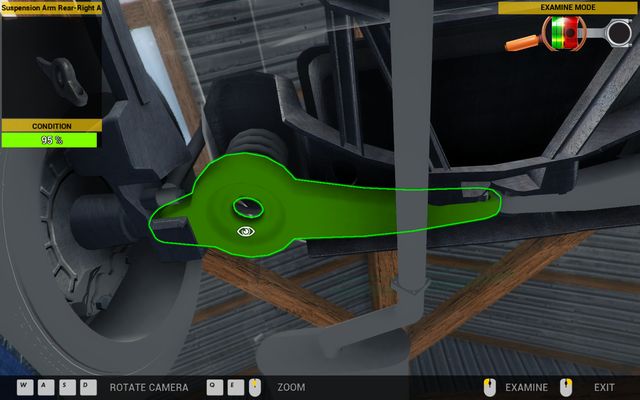
Other way to check condition of particular components is going for test drive or performing diagnostics test - they show mainly problems with drivetrain, suspension and gearbox.


- Car Mechanic Simulator 2014 Game Guide
- Car Mechanic Simulator 2014: Game Guide
- Car Mechanic Simulator 2014: Basics
- Car Mechanic Simulator 2014: Controls | Basics of gameplay
- Car Mechanic Simulator 2014: Navigation in the garage | Basics of gameplay
- Car Mechanic Simulator 2014: Testing parts | Basics of gameplay
- Car Mechanic Simulator 2014: Shop service | Basics of gameplay
- Car Mechanic Simulator 2014: Repair of worn-out parts | Basics of gameplay
- Car Mechanic Simulator 2014: Service books | Basics of gameplay
- Car Mechanic Simulator 2014: Lending money | Basics of gameplay
- Car Mechanic Simulator 2014: Test drive | Basics of gameplay
- Car Mechanic Simulator 2014: Diagnostics | Basics of gameplay
- Car Mechanic Simulator 2014: Chip tuning | Basics of gameplay
- Car Mechanic Simulator 2014: Basics
- Car Mechanic Simulator 2014: Game Guide
You are not permitted to copy any image, text or info from this page. This site is not associated with and/or endorsed by the developers and the publishers. All logos and images are copyrighted by their respective owners.
Copyright © 2000 - 2026 Webedia Polska SA for gamepressure.com, unofficial game guides, walkthroughs, secrets, game tips, maps & strategies for top games.