How to change language in Borderlands 4. There are a few more steps than you might think
Changing the language in Borderlands 4 might have a few more steps than you think. The audio and the subtitles both have different methods.

Today, Borderlands 4 was released, and while some PC players are experiencing issues such as a black screen or crash, the game appears to be off to a good start overall. It already has an 84 on Metacritic, and it was able to attract over 200 thousand players on Steam, which put it the number four most played game today, according to SteamDB. But there is one thing that could be a little confusing if you want to change the game’s language.
How to change the language in Borderlands 4 on PC and consoles
There are two important things to change if you are looking to completely change the language in Borderlands 4. First, the audio language is the simplest one. Open the in-game settings, go to the audio tab, and adjust your preferred language in the “Audio Language” option, second from the bottom of the screen. This should work with both PC and consoles. However, if you want to change the subtitles too, it will require a few additional steps outside of the game itself.
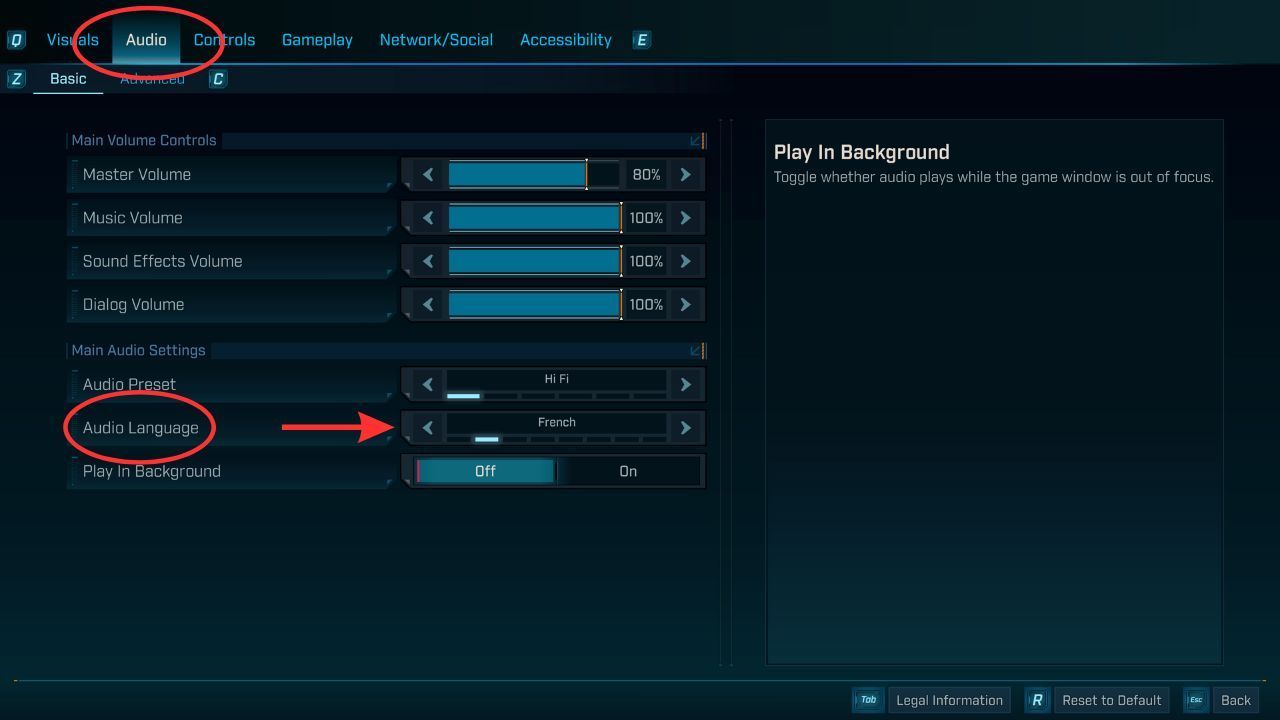
Go to the audio tab, down to Audio Language, and choose your language.Source: Borderlands 4, Developer: Gearbox Software
For subtitles, it’s a little more complicated, but still not difficult. You’ll need to open your Steam library, right-click on Borderlands 4, go to Properties, and then in the General tab, adjust the language to your preferred subtitle language. On consoles, subtitles will typically adjust based on the set system language. This will vary depending on console, but if you go to Settings, find the System Settings, and then find the Language setting within that, and change it to your preferred language, that should work.

In the Properties menu, go to General, then change the language.Source: Steam
Hopefully this was helpful! Enjoy playing Borderlands 4 in your preferred language. If you have any other concerns, such as the controversy around the Take-Two Terms of Service, or whether you can play with friends across platforms, Gamepressure has the answers for you.



0

Author: Matt Buckley
Matt has been writing for Gamepressure since 2020, and currently lives in San Diego, CA. Like any good gamer, he has a Steam wishlist of over three hundred games and a growing backlog that he swears he’ll get through someday. Aside from daily news stories, Matt also interviews developers and writes game reviews. Some of Matt’s recent favorites include Arco, Neva, Cocoon, Animal Well, Baldur’s Gate 3, and Tears of the Kingdom. Generally, Matt likes games that let you explore a world, tell a compelling story, and challenge you to think in different ways.


Latest News
- Because of the final boss, I never gave up on entire genre, but the wonderful Rayman 2: The Great Escape hasn't aged a bit
- The free version of the cult classic shmup Tyrian has been updated after 4 years
- A new Nod campaign has been added to The Dawn of the Tiberium Age, a freeware Command & Conquer RTS
- Fans have removed the time limit from The Blood of Dawnwalker
- Empire II: Total War now with two extra historical campaigns