God of War Ragnarok: Controls
God of War Ragnarok is another TPP action adventure game in the God of War series. On this page you will find a list of GoW Rangarok controls for PS4 and PS5 consoles.
This page contains controls for GoW Ragnarok on PS4/PS5 consoles and PC. We've compiled all the keys/buttons and their in-game functions in the simple tables below. You will also find solutions to common control problems on PC.
- PC
- Problems with DualSense and Xbox controllers on PC
- Problems with mouse performance on PC
- PS4 and PS5
PC
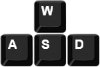 | Move |
 | Look around |
 | Interaction |
 | Dodge |
 | Signature Weapon Ability |
 | Atreus action |
 | Block (hold) / Parry (single press) |
 | Aim |
 | Light Attack |
 | Heavy Attack |
 | Primary Weapon |
 | Secondary Weapon |
 | Bare hands - you can fight without using melee weapons |
 | Arrow Type |
 | Lock-On Camera / Grab a stunned enemy |
 | Sprint |
 | Weapons |
| Spartan Rage |
| Quick turn (hold down the keys) |
 | Pause menu |


Problems with DualSense and Xbox controllers on PC
- The premiere version of God of War Ragnarok on PC contains problems with proper controller support - when you launch the game, the DualSense (PS5 controller) or Xbox controller may not work properly.
- A solution may be to change the operation of Steam Input - you need to go to the Controller tab in the settings of the Steam client. Try to change the current state - deactivate and then activate back the controller support. The problem can also be caused by playing in wireless mode - try connecting the controller to the computer via a cable.
Problems with mouse performance on PC
- One of the potential bugs of the PC version of God of War Ragnarok is the lack of responsiveness to mouse movements. The game can thus force you to perform all actions on the keyboard - the mouse can be replaced by the arrow keys.
- Unfortunately, there is no single proven solution to the problem. You can try restarting the game, temporarily exiting the game with the ALT+TAB key combination, or changing the mouse sensitivity in the game settings. This problem should be fixed with one of the future updates.
PS4 and PS5
 | Movement |
 | Sprint |
 | Rotate Camera |
 | Lock On / grab stunned enemy |
| Spartan Rage |
 | Block / Parry |
 | Aim |
 | Light Attack |
 | Strong attack |
 | Signature ability |
 | Interaction |
 | Dodge |
 | Command Ally |
 | Arrow Type |
 | Main weapon |
 | Side Weapon |
 | Unarmed |
 | Character Window / Map |
 | Options |


- God of War Ragnarok Guide
- God of War Ragnarok: Game Guide
- God of War Ragnarok: Appendix
- God of War Ragnarok: Language versions
- God of War Ragnarok: Game editions
- God of War Ragnarok: Accessibility settings
- God of War Ragnarok: Game Length - duration of the story and obtaining 100% of secrets
- God of War Ragnarok: Controls
- God of War Ragnarok: PC system requirements
- God of War Ragnarok: Performance and Quality Modes, graphics options
- God of War Ragnarok: Do you need to know first part?
- God of War Ragnarok: Disk space
- God of War Ragnarok: Open world
- God of War Ragnarok: Multiplayer / Co-op
- God of War Ragnarok: Trophies / Achievements - list, trophy guide
- God of War Ragnarok: New Game Plus / NG+
- God of War Ragnarok: Appendix
- God of War Ragnarok: Game Guide
You are not permitted to copy any image, text or info from this page. This site is not associated with and/or endorsed by the developers and the publishers. All logos and images are copyrighted by their respective owners.
Copyright © 2000 - 2026 Webedia Polska SA for gamepressure.com, unofficial game guides, walkthroughs, secrets, game tips, maps & strategies for top games.