Starfield: How to decorate houses?
The houses available for purchase in Starfield are mostly empty. However, you can decorate them to your liking and set up useful items such as workshops in them. From this tutorial page, you'll learn all about furnishing homes.
Last update:
You can decorate your home in Starfield if you own one. On this page you'll learn how to furnish and decorate your home.
How to decorate your home?
There are two ways to decorate a house.
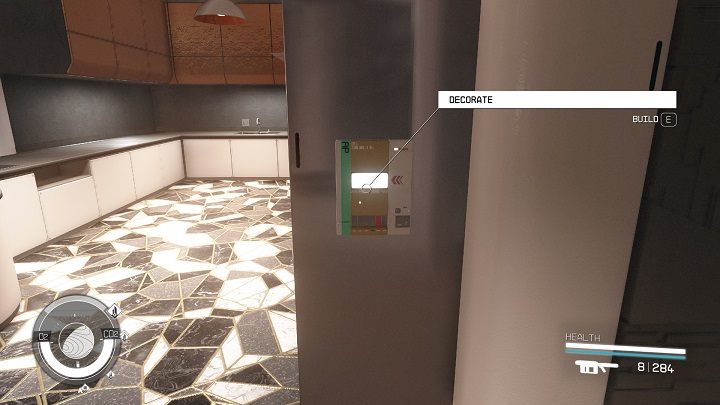
- Find the furnishing panel in a home you own. It can usually be found on the wall by the main entrance. After approaching it, select "build".
- While in the apartment, turn on your scanner ("F" on the keyboard, "LB" on the controller) and choose the "decor" option, pressing "R" on the keyboard or "X" on the controller.
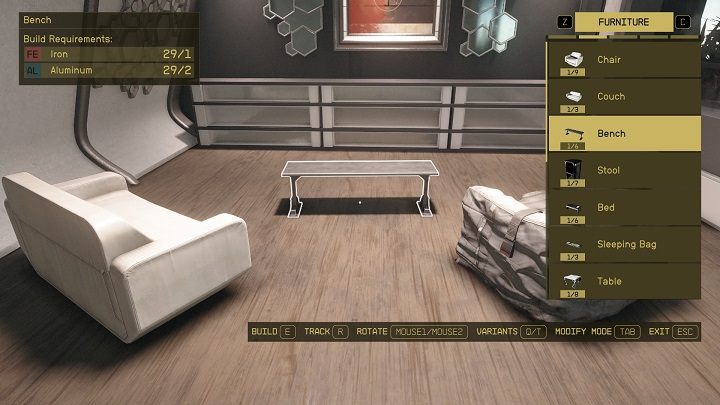
There are two modes available while decorating, which you can switch between by pressing "TAB" on the keyboard or "B" on the controller.
- Build mode lets you craft items from a list, rotate then (mouse keys/LT or RT) and place them in the house.
- Modify mode lets you move furniture and objects already placed in the house.
Remember you must own the place to decorate it. You'll learn how to get houses and all the acquirable homes on the All houses page.
Furnishing categories
There are five categories to choose from in build mode.
- Crafting - objects used to craft other things, such as research labs and workbenches.
- Furniture - objects used to relax, such as armchairs, beds and cabinets.
- Decorations - objects used purely for aesthetics, such as flowers and posters.
- Displays - objects where you can store your things, such as weapon cases and pack stands.
- Miscellaneous - other objects, such as the mission board and the self-service bounty clearance.
How to craft furniture?
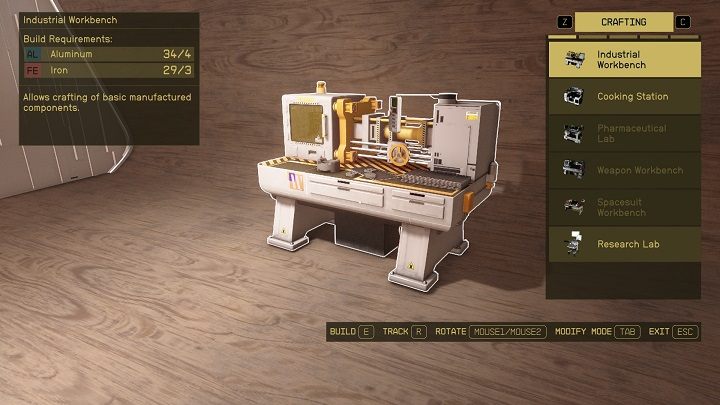
- You need resources to craft furniture, acquired by exploring space and planets. They can also be purchased from merchants in larger areas, such as the Neon Mining League (in the city of Neon).
- When decorating a home, you'll see information about the needed resources and currently owned resources in the upper-right corner of the screen. Usually you'll need such resources as iron, clay or pigments.
- The resources will be taken from your inventory or your ship's cargo hold.
- You can acquire new furniture blueprints by completing certain quests.
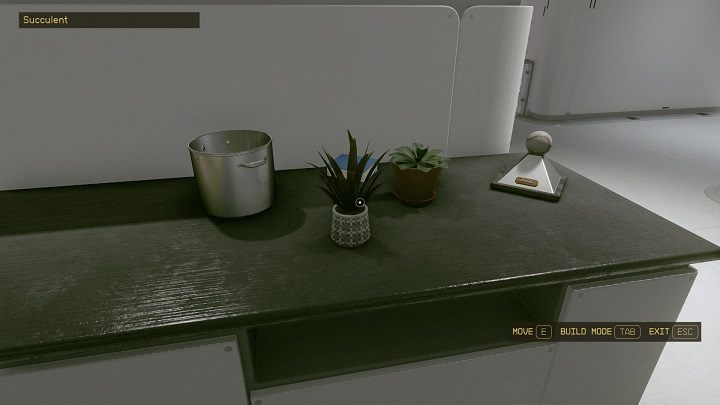
You can also decorate your house with items collected while exploring cities or outposts, such as potted flowers or figurines.
- You must select an item from your inventory and drop it.
- You can then pick it up and set it elsewhere after enabling modify mode using the panel or the scanner.



- Starfield Guide
- Starfield: Game Guide
- Starfield: FAQ
- Starfield: Equipment
- Starfield: How to quickly change weapons?
- Starfield: How to increase maximum carrying capacity?
- Starfield: How to unlock boost pack and how to fly?
- How to transfer items to companions in Starfield?
- How to turn off helmet visibility in Starfield?
- Starfield: How to earn credits quickly?
- Starfield: Where to sell stolen items?
- Starfield: Where to sell contraband?
- Starfield: How to unlock camouflage?
- Starfield: How to attach a suppressor?
- Starfield: How to get digipicks?
- Starfield: How to decorate houses?
- Starfield: How to find structural components?
- Starfield: How to use outpost storage?
- Starfield: When do the merchants get their credits reset?
- Starfield: Equipment
- Starfield: FAQ
- Starfield: Game Guide
You are not permitted to copy any image, text or info from this page. This site is not associated with and/or endorsed by the developers and the publishers. All logos and images are copyrighted by their respective owners.
Copyright © 2000 - 2026 Webedia Polska SA for gamepressure.com, unofficial game guides, walkthroughs, secrets, game tips, maps & strategies for top games.