Starfield: How to quickly change weapons?
In Starfield, you may have problems with quickly switching weapons without opening the inventory. On this page, we explain how to assign weapons to favorites and how to use hotkeys.
Last update:
During the battles in Starfield, you can look for a way to quickly switch between weapons. In our guide, you will find tips on assigning weapons by adding them to favorites, so you can quickly select them later without opening the inventory menu.
How to add a weapon to the favorites list?
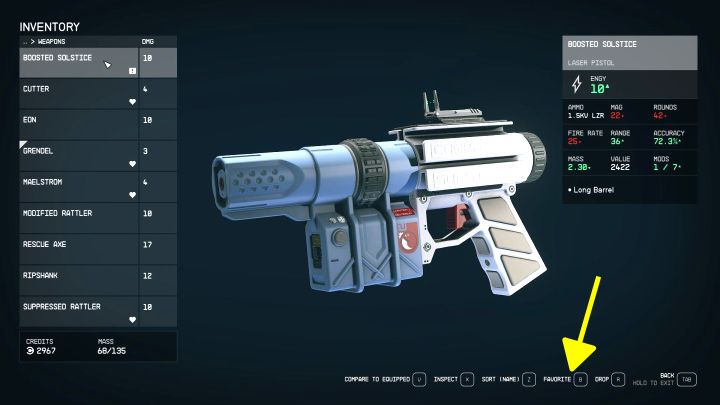
- In Starfield, the main character can carry many different weapons with varying ammunition requirements. So quickly selecting another weapon without interrupting the fight or calling up full-screen menus becomes desirable.
- You can add each of the weapons you own to your favorite list. To do it, open the inventory, go to the weapons tab, highlight the weapon, and press the favorites key (B on the keyboard - the above picture).
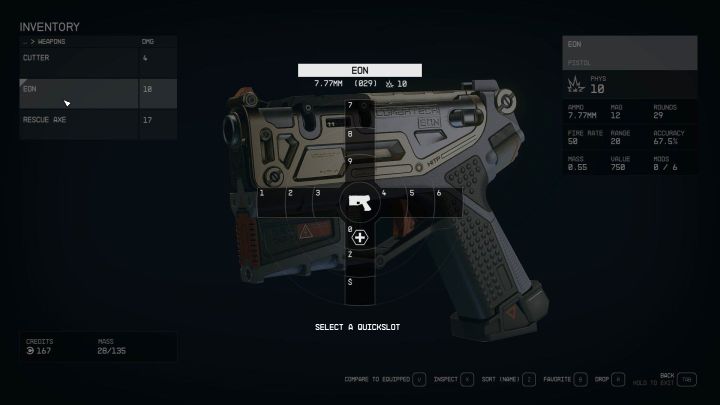
- A cross-shaped menu will appear on the screen (example in the picture). Thanks to it, you can assign a weapon to any slot - put it in an empty place or replace the current weapon in one of the occupied slots.
- A correctly assigned weapon has a heart icon next to its name - this confirms it is among the favorites.
How to use the shortcut key?
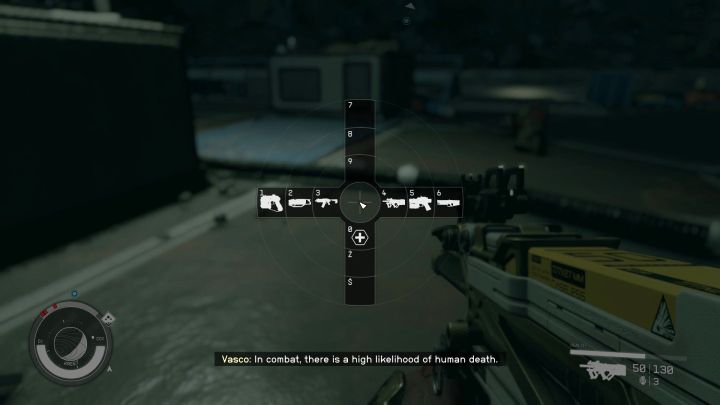
You can quickly select your favorite weapons using shortcut keys. By default, this is possible by:
- Pressing the weapon menu key (see above image) - Q on the keyboard.
- Pressing the key of a specific weapon (without opening the drop-down menu) - you can press 0-9 on the keyboard.
Shortcut keys work for various items, not just for weapons. Right from the start, the first aid kit is assigned to one of the keys letting you use it quickly. You can assign other useful objects, for example, consumable items, in a similar way.



- Starfield Guide
- Starfield: Game Guide
- Starfield: FAQ
- Starfield: Equipment
- Starfield: How to quickly change weapons?
- Starfield: How to increase maximum carrying capacity?
- Starfield: How to unlock boost pack and how to fly?
- How to transfer items to companions in Starfield?
- How to turn off helmet visibility in Starfield?
- Starfield: How to earn credits quickly?
- Starfield: Where to sell stolen items?
- Starfield: Where to sell contraband?
- Starfield: How to unlock camouflage?
- Starfield: How to attach a suppressor?
- Starfield: How to get digipicks?
- Starfield: How to decorate houses?
- Starfield: How to find structural components?
- Starfield: How to use outpost storage?
- Starfield: When do the merchants get their credits reset?
- Starfield: Equipment
- Starfield: FAQ
- Starfield: Game Guide
You are not permitted to copy any image, text or info from this page. This site is not associated with and/or endorsed by the developers and the publishers. All logos and images are copyrighted by their respective owners.
Copyright © 2000 - 2026 Webedia Polska SA for gamepressure.com, unofficial game guides, walkthroughs, secrets, game tips, maps & strategies for top games.