How to change language in Battlefield 6 on both PC and consoles
Changing languages in Battlefield 6 is not difficult, but it's not particularly intuitive either. Whether you're playing on PC or console, here's the solution.
1

Today, Battlefield 6 has launched, and perhaps predictably, it has been chaotic and confusing. At the time of writing, there are over 700,000 players on Steam, according to SteamDB, but that’s despite long queues, undefined errors, and some unfortunate players who couldn’t even get the game to start. But if you are one of the lucky players able to jump into Battlefield 6 with no issues, you might be wondering how to change languages.
How to change languages in Battlefield 6. Thankfully, it is not difficult
Changing the language on Steam is very simple. The only non-intuitive part is that you won’t be able to do it from within the game’s settings. You’ll have to close the game and go to your Steam Library. From there, right-click on Battlefield 6. Open Properties. Under the General tab, the language should be at the top. Use the drop-down menu to select your language, and you are good to go. It really is that simple, at least for Steam users.
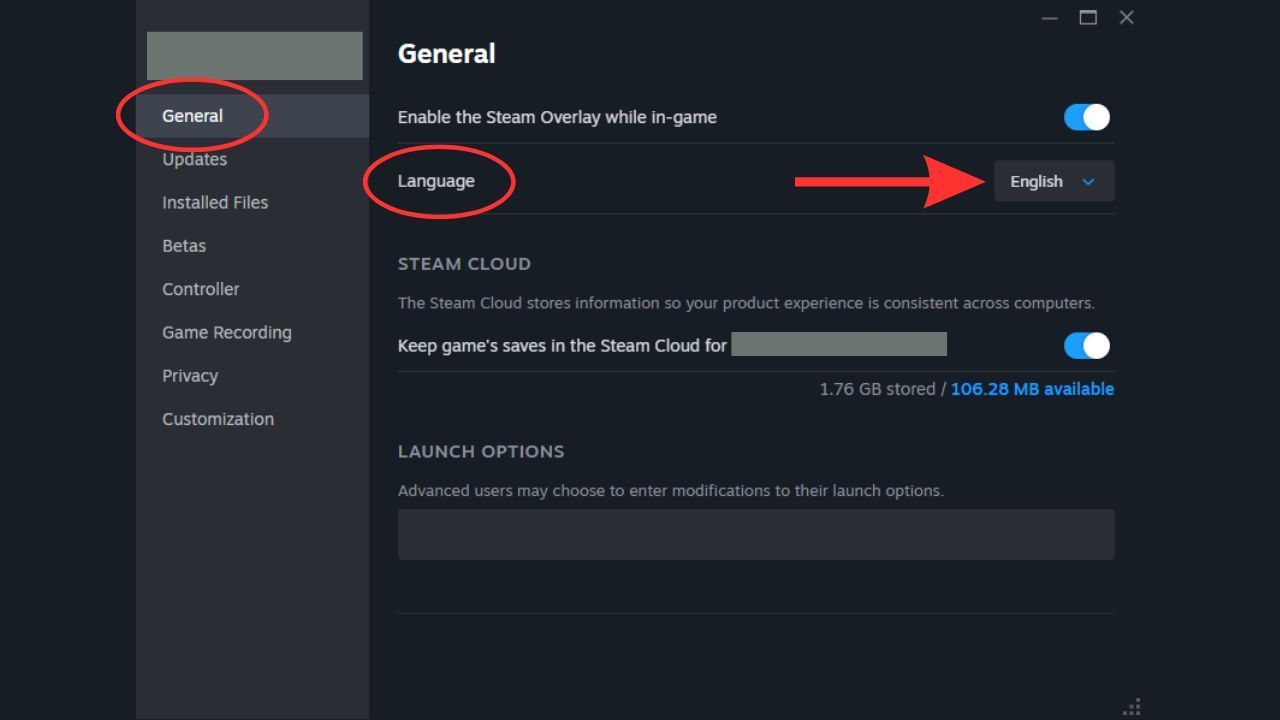
Changing language in Steam properties.Source: Steam
Changing languages on consoles is a little more complicated and varies by console, but it should be relatively similar. Like past Battlefield titles, Battlefield 6 doesn’t have an in-game language setting. Instead, you’ll need to navigate the settings of your specific console to change the system language, and Battlefield 6 will adapt accordingly. Keep in mind that you may need to restart your game for this change to take effect. To do this, go to your console’s settings, find the System Settings, and then find the system language and choose your preferred option.
As this is a large, global release from Electronic Arts, Battlefield 6 is available in many languages. If you are curious about a specific language, a Battlefield news account posted a helpful list on social media a few months ago that you can check. Hopefully, this guide helped you have the best experience with this new Battlefield. If you are having any other problems, like crashing on startup, we might be able to help with that too.


1

Author: Matt Buckley
Matt has been writing for Gamepressure since 2020, and currently lives in San Diego, CA. Like any good gamer, he has a Steam wishlist of over three hundred games and a growing backlog that he swears he’ll get through someday. Aside from daily news stories, Matt also interviews developers and writes game reviews. Some of Matt’s recent favorites include Arco, Neva, Cocoon, Animal Well, Baldur’s Gate 3, and Tears of the Kingdom. Generally, Matt likes games that let you explore a world, tell a compelling story, and challenge you to think in different ways.

Latest News
- The free version of the cult classic shmup Tyrian has been updated after 4 years
- A new Nod campaign has been added to The Dawn of the Tiberium Age, a freeware Command & Conquer RTS
- Fans have removed the time limit from The Blood of Dawnwalker
- Empire II: Total War now with two extra historical campaigns
- Someone has remastered Medieval 2: Total War and Rome: Total War so well that the AI's moves are now calculated in a matter of seconds [Updated]