No Man's Sky 2022: How to name newly-discovered planet, system or species?
The objects you discover in No Mans Sky can be named as you wish. From this guide page you will learn how to name the systems, planets and species you discover.
In No Man's Sky, you are able to name your discoveries. On this page you will learn how to rename planets, systems, animals, plants and minerals.
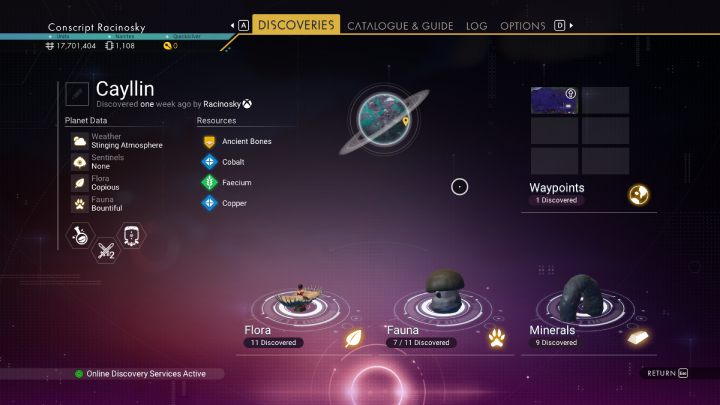
When you discover new systems, planets, landmarks, animal and plant species, you can name them. The new name you approve will be sent to the databases in No Man's Sky - this way new players will know that you were the ones who discovered a particular thing.

All the objects you have discovered can be found in the DISCOVERIES tab. After selecting an object, you will be able to rename it. You will also receive a small fee for submitting your discoveries.
Remember that you can only change the name of objects that have been discovered by you. Planets discovered by other players cannot be renamed. Such planets will have a character icon next to their name.



- No Man's Sky Game Guide
- No Man's Sky: Game Guide
- No Man's Sky: FAQ
- No Man's Sky: What to do first?
- No Man's Sky 2022: How to discover animal species?
- No Man's Sky 2022: How to acquire units?
- No Man's Sky 2022: How to leave first planet?
- No Man's Sky 2022: How to leave first system?
- No Man's Sky 2022: How to name newly-discovered planet, system or species?
- No Man's Sky 2022: How to save the game?
- No Man's Sky 2022: How to learn languages?
- No Man's Sky: FAQ
- No Man's Sky: Game Guide
You are not permitted to copy any image, text or info from this page. This site is not associated with and/or endorsed by the developers and the publishers. All logos and images are copyrighted by their respective owners.
Copyright © 2000 - 2026 Webedia Polska SA for gamepressure.com, unofficial game guides, walkthroughs, secrets, game tips, maps & strategies for top games.