GTA Online: Game menu and interaction menu
Table of Contents
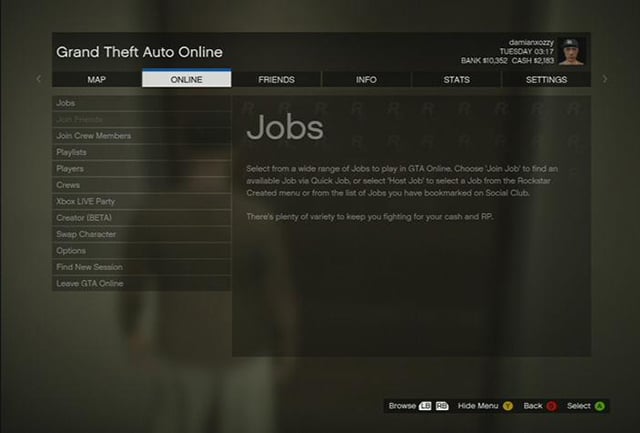
Game menu is very clear
Game menu in GTA Online is very clear and simple. Press START button to open it.
- Map
- Online - this tab contains such features as: Jobs, Friends, Crews, list of available players, Creator, Swap Character, Find New Session, and Leave GTA Online
- Friends - this is the list of your friends who are currently in game
- Info - information on your current job, Help, recent Dialogues, latest Notifications and messages from Rockstar Studios
- Stats
- Settings - Controls, Video, Sound
- Photo Gallery - photos that you took with your camera
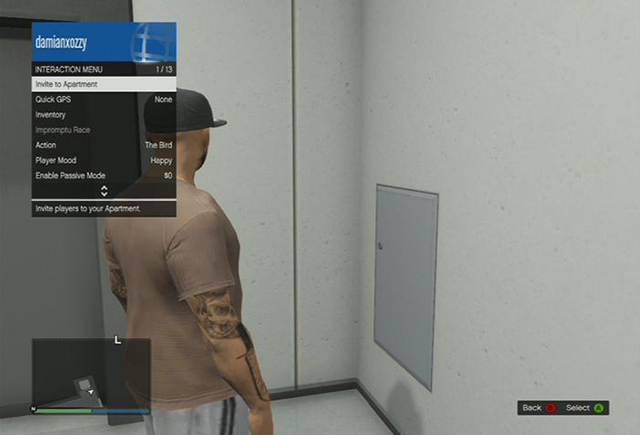
Interaction menu
To open interaction menu hold Back/Select.
- Quick GPS - you can set a route to your home, clothes shop, Ammu-nation stores, ATM or one of NPCs
- Inventory - through this tab you can give money to another player, put on/off your glasses or masks, choose a body armor and eat a snack
- Impromptu Race - you can invite nearby players to an impromptu race with the finish line set at any location
- Action - an animation for your character, e.g. saluting, smoking, or showing an international "peace symbol" a.k.a. the middle finger
- Player mood - your character's facial expression, e.g. happy, sad, or angry
- Enable Passive Mode - in this mode you cannot be killed or attack anyone
- Highlight player - this option enables you to mark a player to see their location on the map
- Request Personal Vehicle - you can have one of your vehicles delivered to your current location
- Empty Personal Vehicle - if there are passengers in your car, you can remove them with this option
- Vehicle Access - you can set which players can use your personal vehicle or keep it exclusively to yourself
- Chat - you can set who will be able to sent you messages
- Kill Yourself - this option allows you to commit suicide, at a cost though



- GTA 5 Guide
- GTA 5: Grand Theft Auto Online
- GTA 5 Online: Basics
- GTA Online: Character creation
- GTA Online: First steps
- GTA Online: Game menu and interaction menu
- GTA Online: The police
- GTA Online: Mounting a tracker
- GTA Online: Skills development
- GTA Online: Jobs
- GTA Online: Types of jobs
- GTA Online: Joining jobs
- GTA Online: Creating your own jobs
- GTA Online: Creator
- GTA Online: Deathmatch Creator
- GTA Online: Race Creator
- GTA Online: Capture Creator
- GTA Online: The Last Team Standing Creator
- GTA Online: Money
- GTA Online: Protecting your money against other players
- GTA Online: Shopping
- GTA Online: Stores
- GTA Online: Service points
- GTA Online: Online shops
- GTA Online: Real estate agencies
- GTA Online: Joining an existing crew
- GTA Online: Creating your own crew
- GTA Online: Crews
- GTA Online: Cars and tuning
- GTA Online: Weapons
- GTA Online: Past time activities
- GTA Online: Awards
- GTA 5 Online: Basics
- GTA 5: Grand Theft Auto Online
You are not permitted to copy any image, text or info from this page. This site is not associated with and/or endorsed by the developers and the publishers. All logos and images are copyrighted by their respective owners.
Copyright © 2000 - 2026 Webedia Polska SA for gamepressure.com, unofficial game guides, walkthroughs, secrets, game tips, maps & strategies for top games.